This is best Fabric, Power BI, SQL and AI community event. How do we know? The last event sold out! Save €200 with code FABCMTY200.
Register nowA new Data Days event is coming soon! This time we’re going bigger than ever. Fabric, Power BI, SQL, AI and more. Don't miss out.
Hello,
I have two tables. Table one contains sales orders and table two items on stock.
In table one the same item can be on more then one sales order. If this is the case then the oldest sales order (lowest sales order no.) gets the item.
Example:
Table one contains sales orders:
| Sales order no | Item no | QTY on sales order |
| 1 | A1 | 3 |
| 2 | S1 | 4 |
| 3 | S1 | 2 |
| 4 | A2 | 5 |
Table two contains the stock:
| Item No | QTY |
| A1 | 5 |
| A2 | 10 |
| S1 | 5 |
| S2 | 3 |
What I need is a way to join the two tables so I can get this:
| Sales order no | Item no | QTY on sales order | QTY On Stock |
| 1 | A1 | 3 | 3 |
| 2 | S1 | 4 | 4 |
| 3 | S1 | 2 | 1 |
| 4 | A2 | 5 | 5 |
If the QTY on Stock is higher then the QTY on the sales order then it shall only show the QTY corresponding to the QTY on the sales order.
Hope it is not too confusing 🙂
Is there any way this can be done?
Best regards
Kim Ladelund
Solved! Go to Solution.
This would be easier in DAX, but it is possible in M too.
A key piece is to create a new column that records the cumulative sum of sales of each item. To do this, refer to this prior thread:
https://community.powerbi.com/t5/Desktop/How-to-do-a-running-Sum-by-group-in-Power-Query/m-p/290123
Supposing you have that, then you can merge with the Stock table to get the QTY and then write some logic to put it all together. Here's an expanded example similar to yours:
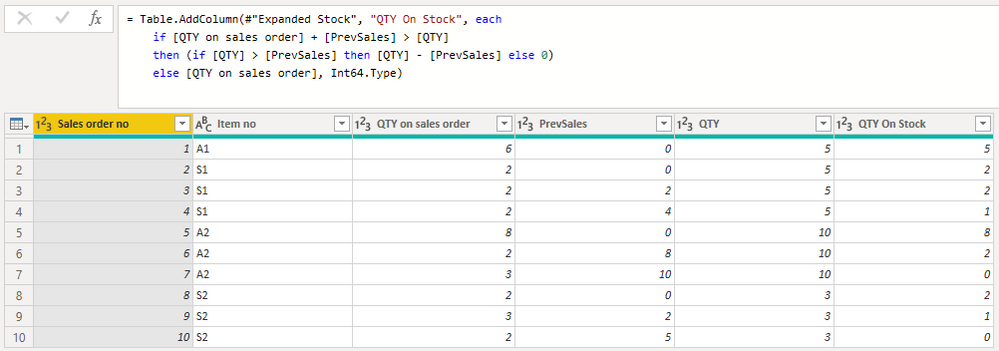
Here's the M query you can use to reproduce the above (assuming you have the Stock table you defined as a separate query):
let
Source = Table.FromRows(Json.Document(Binary.Decompress(Binary.FromText("i45WMlTSUXIEEWZAbKAUqxOtZARkBYOEjOBCxshCRmAhE2QhE7CQKcgsENcCrtEMJgQRBgmZw4RAhhpClIE0BBuhWGkJEzKGWwlUjKTMVCk2FgA=", BinaryEncoding.Base64), Compression.Deflate)), let _t = ((type nullable text) meta [Serialized.Text = true]) in type table [#"Sales order no" = _t, #"Item no" = _t, #"QTY on sales order" = _t, PrevSales = _t]),
#"Changed Type" = Table.TransformColumnTypes(Source,{{"Sales order no", Int64.Type}, {"QTY on sales order", Int64.Type}, {"PrevSales", Int64.Type}}),
#"Merged Queries" = Table.NestedJoin(#"Changed Type", {"Item no"}, Stock, {"Item No"}, "Stock", JoinKind.LeftOuter),
#"Expanded Stock" = Table.ExpandTableColumn(#"Merged Queries", "Stock", {"QTY"}, {"QTY"}),
#"Added Custom1" = Table.AddColumn(#"Expanded Stock", "QTY On Stock", each
if [QTY on sales order] + [PrevSales] > [QTY]
then (if [QTY] > [PrevSales] then [QTY] - [PrevSales] else 0)
else [QTY on sales order], Int64.Type)
in
#"Added Custom1"
Note that this does not include the running total logic.
This would be easier in DAX, but it is possible in M too.
A key piece is to create a new column that records the cumulative sum of sales of each item. To do this, refer to this prior thread:
https://community.powerbi.com/t5/Desktop/How-to-do-a-running-Sum-by-group-in-Power-Query/m-p/290123
Supposing you have that, then you can merge with the Stock table to get the QTY and then write some logic to put it all together. Here's an expanded example similar to yours:
Here's the M query you can use to reproduce the above (assuming you have the Stock table you defined as a separate query):
let
Source = Table.FromRows(Json.Document(Binary.Decompress(Binary.FromText("i45WMlTSUXIEEWZAbKAUqxOtZARkBYOEjOBCxshCRmAhE2QhE7CQKcgsENcCrtEMJgQRBgmZw4RAhhpClIE0BBuhWGkJEzKGWwlUjKTMVCk2FgA=", BinaryEncoding.Base64), Compression.Deflate)), let _t = ((type nullable text) meta [Serialized.Text = true]) in type table [#"Sales order no" = _t, #"Item no" = _t, #"QTY on sales order" = _t, PrevSales = _t]),
#"Changed Type" = Table.TransformColumnTypes(Source,{{"Sales order no", Int64.Type}, {"QTY on sales order", Int64.Type}, {"PrevSales", Int64.Type}}),
#"Merged Queries" = Table.NestedJoin(#"Changed Type", {"Item no"}, Stock, {"Item No"}, "Stock", JoinKind.LeftOuter),
#"Expanded Stock" = Table.ExpandTableColumn(#"Merged Queries", "Stock", {"QTY"}, {"QTY"}),
#"Added Custom1" = Table.AddColumn(#"Expanded Stock", "QTY On Stock", each
if [QTY on sales order] + [PrevSales] > [QTY]
then (if [QTY] > [PrevSales] then [QTY] - [PrevSales] else 0)
else [QTY on sales order], Int64.Type)
in
#"Added Custom1"
Note that this does not include the running total logic.
Thanks for the help 😊
It works!
Check out the May 2026 Power BI update to learn about new features.
Sign up to receive a private message when registration opens and key events begin.
If you have recently started exploring Fabric, we'd love to hear how it's going. Your feedback can help with product improvements.