Get certified for free when you join Fabric Data Days 2026 and dive into Fabric, Power BI, SQL, AI, and other essential data skills.
Join nowData Days is here! Join us now for 60+ days of learning, challenges, and connection. Learn more
Hey everyone!
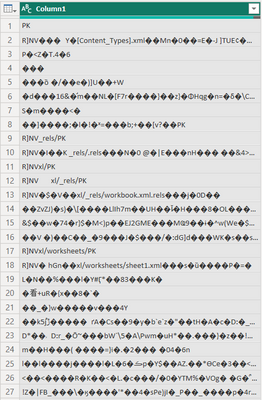
Trying to import CSV from Sharepoint Folder and I get the follwoing picture
The table itself contains columns, headers and etc. The most interesing thing is that the rest CSV files from the same folder work correctly
How to make Power Query Editor read the data properly?
Solved! Go to Solution.
It works only when I re-save the Excel file as CSV again and then import it to Power Query
Hi @Anonymous - I don't think the file that you are trying to import is CSV. It is possible that it is XLSX file or ODS version of an Excel file (Differences between the OpenDocument Spreadsheet (.ods) format and the Excel for Windows (.xlsx) for...).
Hey! It is 100% CSV file
Don't miss out on Data Days, June 15 through August 7. Learn Fabric, Power BI, SQL, AI and more.
Check out the May 2026 Power BI update to learn about new features.
| User | Count |
|---|---|
| 4 | |
| 4 | |
| 3 | |
| 2 | |
| 1 |
| User | Count |
|---|---|
| 11 | |
| 11 | |
| 5 | |
| 4 | |
| 3 |