Share feedback directly with Fabric product managers, Participate in targeted research studies and influence the Fabric roadmap.
Sign up nowVote for your favorite vizzies from the Power BI Dataviz World Championship submissions. Vote now!
Hello community:
Can you help me with the following?
I have a table with 2 columns (Order ID and Product), but as you can see 2 or more different products they can share the same Order ID:
Order ID | Product |
176560 | Google Phone |
176560 | Wired Headphones |
176574 | Google Phone |
176574 | USB-C Charging Cable |
176553 | Lightning Charging Cable |
176553 | Bose SoundSport Headphones |
176553 | Apple Airpods Headphones |
I need to concatenate the products in the same OrderID as the following table:
Order ID | Product |
176560 | Google Phone - Wired Headphones |
176574 | Google Phone - USB-C Charging Cable |
176553 | Lightning Charging Cable - Bose SoundSport Headphones -Apple Airpods Headphones |
How can I do that?
Thank you so much
Solved! Go to Solution.
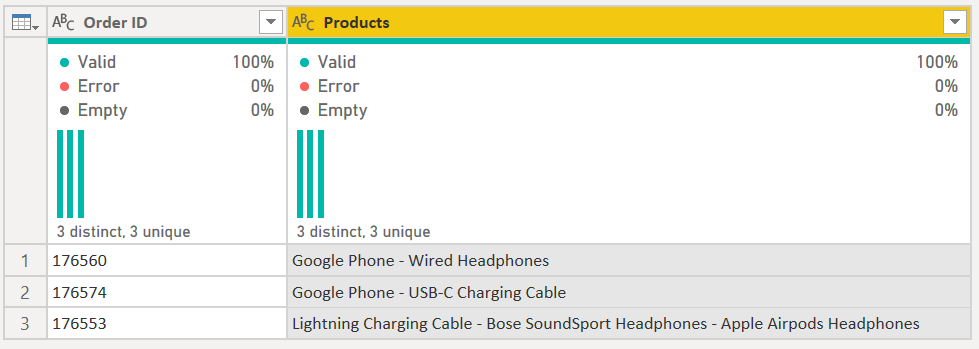
Hi @Anonymous - see the following M code. It turns this:
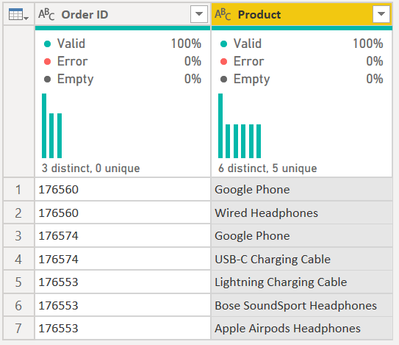
into this:
let
Source = Table.FromRows(Json.Document(Binary.Decompress(Binary.FromText("i45WMjQ3MzUzUNJRcs/PT89JVQjIyM9LVYrVQZIJzyxKTVHwSE1MKQBJFsNlzU1w6QPLhAY76TorOGckFqVn5qUrOCcm5SBUmBoDVfhkpmeU5IEl8ahyyi9OVQjOL81LCS7ILyrB5hKwOseCAqBDHDOLCvJTilFUxQIA", BinaryEncoding.Base64), Compression.Deflate)), let _t = ((type nullable text) meta [Serialized.Text = true]) in type table [#"Order ID" = _t, Product = _t]),
#"Grouped Rows" =
Table.Group(
Source,
{"Order ID"},
{
{"Products", each _[Product] }
}
),
#"Extracted Values" = Table.TransformColumns(#"Grouped Rows", {"Products", each Text.Combine(List.Transform(_, Text.From), " - "), type text})
in
#"Extracted Values"
The key is in the Group By statement, I am grouping by ID, then I create a list with the each _[Product] statement.
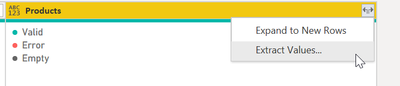
Then I simply expand that to values through the UI and type in the " - " delimiter.
1) In Power Query, select New Source, then Blank Query
2) On the Home ribbon, select "Advanced Editor" button
3) Remove everything you see, then paste the M code I've given you in that box.
4) Press Done
5) See this article if you need help using this M code in your model.
DAX is for Analysis. Power Query is for Data Modeling
Proud to be a Super User!
MCSA: BI ReportingHi @Anonymous - see the following M code. It turns this:
into this:
let
Source = Table.FromRows(Json.Document(Binary.Decompress(Binary.FromText("i45WMjQ3MzUzUNJRcs/PT89JVQjIyM9LVYrVQZIJzyxKTVHwSE1MKQBJFsNlzU1w6QPLhAY76TorOGckFqVn5qUrOCcm5SBUmBoDVfhkpmeU5IEl8ahyyi9OVQjOL81LCS7ILyrB5hKwOseCAqBDHDOLCvJTilFUxQIA", BinaryEncoding.Base64), Compression.Deflate)), let _t = ((type nullable text) meta [Serialized.Text = true]) in type table [#"Order ID" = _t, Product = _t]),
#"Grouped Rows" =
Table.Group(
Source,
{"Order ID"},
{
{"Products", each _[Product] }
}
),
#"Extracted Values" = Table.TransformColumns(#"Grouped Rows", {"Products", each Text.Combine(List.Transform(_, Text.From), " - "), type text})
in
#"Extracted Values"
The key is in the Group By statement, I am grouping by ID, then I create a list with the each _[Product] statement.
Then I simply expand that to values through the UI and type in the " - " delimiter.
1) In Power Query, select New Source, then Blank Query
2) On the Home ribbon, select "Advanced Editor" button
3) Remove everything you see, then paste the M code I've given you in that box.
4) Press Done
5) See this article if you need help using this M code in your model.
DAX is for Analysis. Power Query is for Data Modeling
Proud to be a Super User!
MCSA: BI ReportingYou rock!!!! thank you so much.
Glad I was able to assist @Anonymous
DAX is for Analysis. Power Query is for Data Modeling
Proud to be a Super User!
MCSA: BI ReportingIf you love stickers, then you will definitely want to check out our Community Sticker Challenge!
Check out the January 2026 Power BI update to learn about new features.
| User | Count |
|---|---|
| 7 | |
| 5 | |
| 4 | |
| 3 | |
| 3 |
| User | Count |
|---|---|
| 13 | |
| 11 | |
| 11 | |
| 8 | |
| 6 |