cancel
Showing results for 
Search instead for 
Did you mean: 

The Power BI Data Visualization World Championships is back! Get ahead of the game and start preparing now! Learn more

Reply
josephrandall
Regular Visitor

Index column based on value in another column

I know my title isn't explaining my problem well. Let me elaborate.


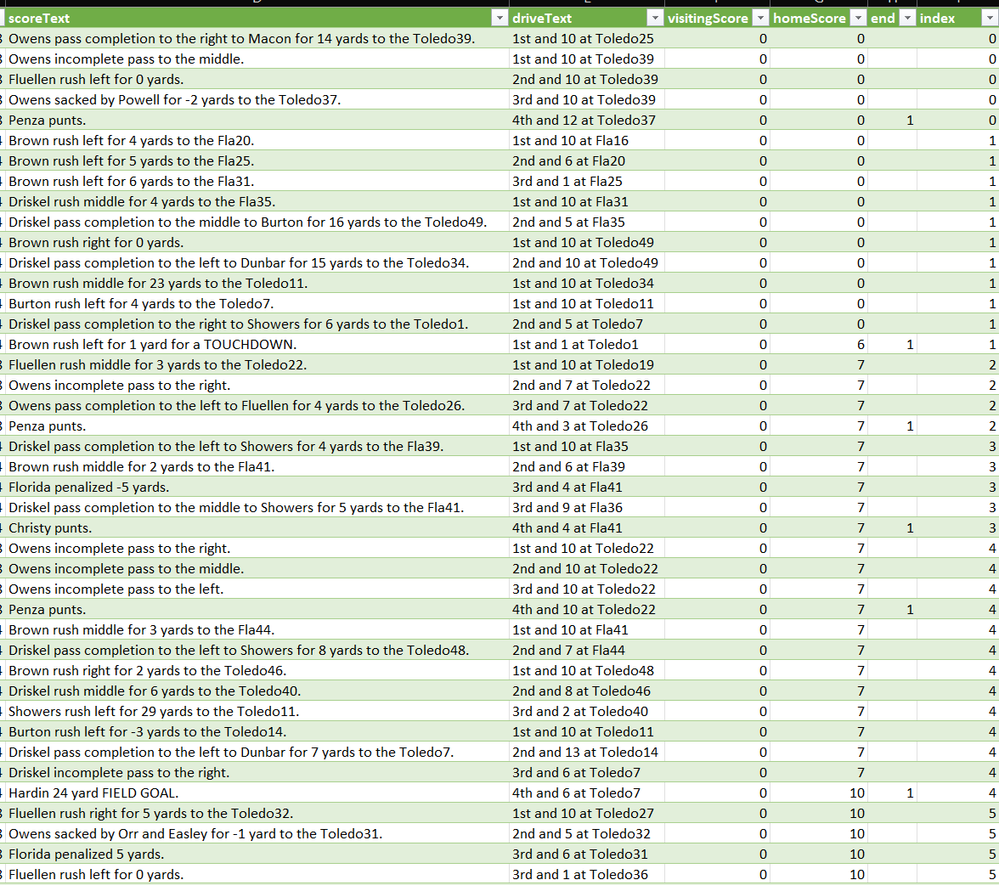
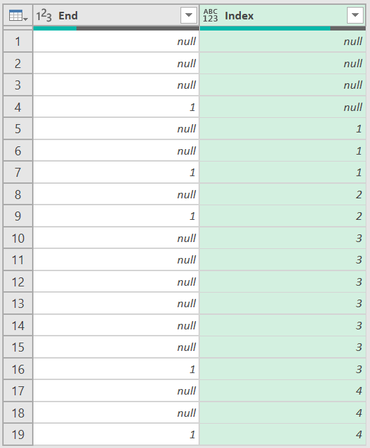
I have a column (end, far right, pic1) where I placed a 1 in the rows where I would like that index number to end. the other rows are null.

I would like the index column to update after each 1 (like the index column in pic2)


Is this possible ?


Please see my pictures for a better understanding. 

1.png2.png

1 ACCEPTED SOLUTION
6677028
Frequent Visitor

Sent you.

let

    Source = Excel.CurrentWorkbook(){[Name="Table1"]}[Content],

    #"Changed Type" = Table.TransformColumnTypes(Source,{{"ScoreText", type text}, {"DriveText", type text}, {"HomeScore", Int64.Type}, {"End", Int64.Type}}),

    #"Added Index" = Table.AddIndexColumn(#"Changed Type", "Index", 1, 1, Int64.Type),

    #"Added Custom" = Table.AddColumn(#"Added Index", "Custom", each if [End]=null then null else Number.ToText([End])&Number.ToText([Index])),

    #"Filled Down" = Table.FillDown(#"Added Custom",{"Custom"}),

    #"Grouped Rows" = Table.Group(#"Filled Down", {"Custom"}, {{"Count", each _, type table [ScoreText=nullable text, DriveText=nullable text, HomeScore=nullable number, End=nullable number, Index=number, Custom=nullable text]}}),

    #"Added Index1" = Table.AddIndexColumn(#"Grouped Rows", "Index", 0, 1, Int64.Type),

    #"Expanded Count" = Table.ExpandTableColumn(#"Added Index1", "Count", {"ScoreText", "DriveText", "HomeScore", "End", "Index", "Custom"}, {"Count.ScoreText", "Count.DriveText", "Count.HomeScore", "Count.End", "Count.Index", "Count.Custom"}),

    #"Removed Columns" = Table.RemoveColumns(#"Expanded Count",{"Custom", "Count.Index", "Count.Custom"})

in

    #"Removed Columns"

View solution in original post

3 REPLIES 3
dufoq3
Super User
Super User

Hi @josephrandall,


I've prepared 2 versions of code for you:

  • v1 is slower but easier to understand (using Index Helper column. If you doesn't have a lot of rows of your data - it is ok to use also this version)
  • v2 is the only propper way how to achive this - using List.Generate function (it is really fast solution)

dufoq3_0-1707733521857.png

let
    Source = Table.FromRows(Json.Document(Binary.Decompress(Binary.FromText("i45WUorVQSYMcfPRpbARWLTHAgA=", BinaryEncoding.Base64), Compression.Deflate)), let _t = ((type nullable text) meta [Serialized.Text = true]) in type table [End = _t]),
    ChangedType = Table.TransformColumnTypes(Source,{{"End", Int64.Type}}),
    v1_AddedIndexHelper = Table.AddIndexColumn(ChangedType, "Index Helper", 0, 1, Int64.Type),
    v1_AddedIndex = Table.AddColumn(v1_AddedIndexHelper, "Index", each List.Sum(List.FirstN(ChangedType[End], [Index Helper])), Int64.Type),
    v1_RemovedIndexHelper = Table.RemoveColumns(v1_AddedIndex,{"Index Helper"}),
    v2_AddedIndex_Faster = [ l = List.Buffer(ChangedType[End]),
    lg = List.Generate(
            ()=> [ x = 0, i = l{x} ],
            each [x] < List.Count(l),
            each [ x = [x]+1, i = List.Sum({[i], l{x}})],
            each [i]
    ),
   toTable = Table.RemoveLastN(Table.FromColumns(Table.ToColumns(ChangedType) & {{null} & lg}, Table.ColumnNames(ChangedType) & {"Index"}), 1)
  ][toTable]
in
    v2_AddedIndex_Faster


Note: Check this link to learn how to use my query.
Check this link if you don't know how to provide sample data.

6677028
Frequent Visitor

Sent you.

let

    Source = Excel.CurrentWorkbook(){[Name="Table1"]}[Content],

    #"Changed Type" = Table.TransformColumnTypes(Source,{{"ScoreText", type text}, {"DriveText", type text}, {"HomeScore", Int64.Type}, {"End", Int64.Type}}),

    #"Added Index" = Table.AddIndexColumn(#"Changed Type", "Index", 1, 1, Int64.Type),

    #"Added Custom" = Table.AddColumn(#"Added Index", "Custom", each if [End]=null then null else Number.ToText([End])&Number.ToText([Index])),

    #"Filled Down" = Table.FillDown(#"Added Custom",{"Custom"}),

    #"Grouped Rows" = Table.Group(#"Filled Down", {"Custom"}, {{"Count", each _, type table [ScoreText=nullable text, DriveText=nullable text, HomeScore=nullable number, End=nullable number, Index=number, Custom=nullable text]}}),

    #"Added Index1" = Table.AddIndexColumn(#"Grouped Rows", "Index", 0, 1, Int64.Type),

    #"Expanded Count" = Table.ExpandTableColumn(#"Added Index1", "Count", {"ScoreText", "DriveText", "HomeScore", "End", "Index", "Custom"}, {"Count.ScoreText", "Count.DriveText", "Count.HomeScore", "Count.End", "Count.Index", "Count.Custom"}),

    #"Removed Columns" = Table.RemoveColumns(#"Expanded Count",{"Custom", "Count.Index", "Count.Custom"})

in

    #"Removed Columns"
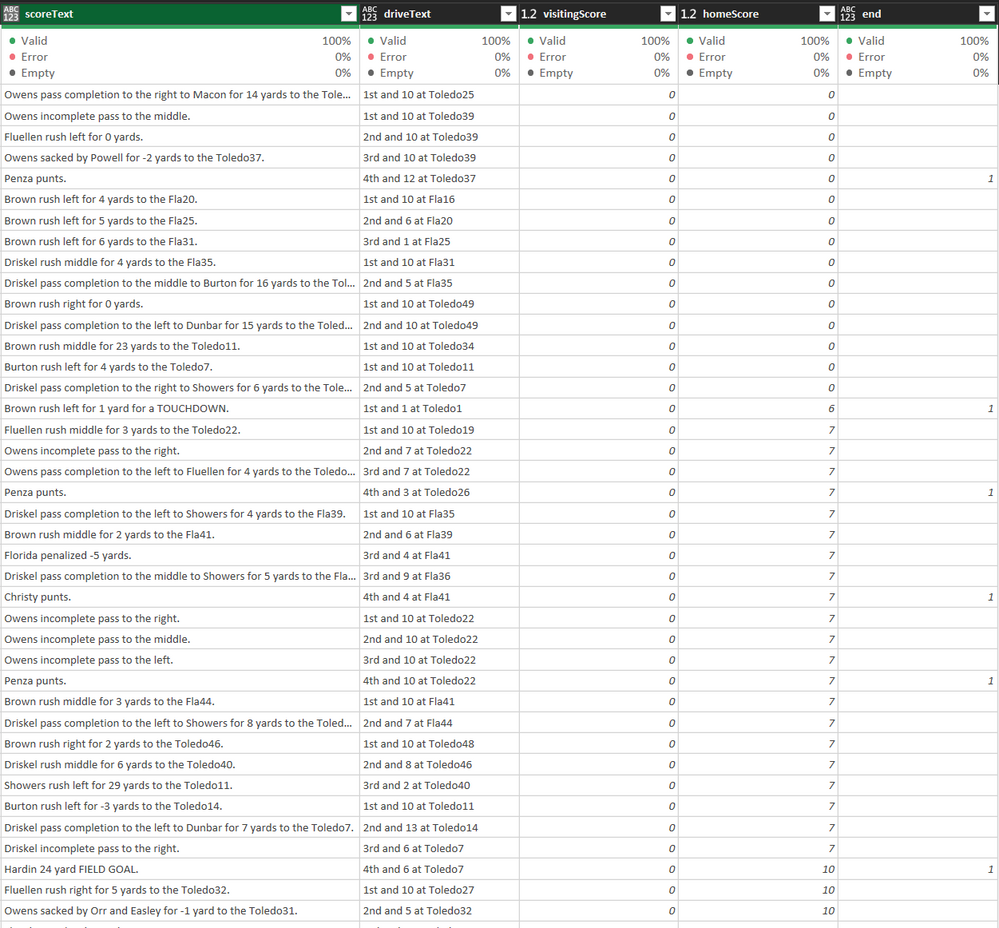
Thank you kindly.


Helpful resources

Announcements
Power BI DataViz World Championships

Power BI Dataviz World Championships

The Power BI Data Visualization World Championships is back! Get ahead of the game and start preparing now!

December 2025 Power BI Update Carousel

Power BI Monthly Update - December 2025

Check out the December 2025 Power BI Holiday Recap!

FabCon Atlanta 2026 carousel

FabCon Atlanta 2026

Join us at FabCon Atlanta, March 16-20, for the ultimate Fabric, Power BI, AI and SQL community-led event. Save $200 with code FABCOMM.