cancel
Showing results for 
Search instead for 
Did you mean: 

The Power BI Data Visualization World Championships is back! Get ahead of the game and start preparing now! Learn more

Reply
GuilleATT
Frequent Visitor

DataSource Error from SalesForce object

Hi all,


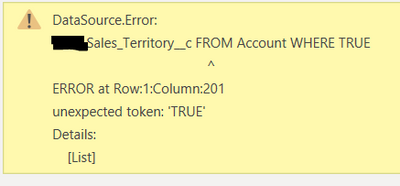
I'm getting an error which I don't even understand... it happens when filtering a column by a certain value, but it's not even the Sales_Territory column that the error mentions... 

GuilleATT_1-1600867982187.png

can anyhow throw some light on this error and if possible how to solve it?


Best,


Guillermo


1 ACCEPTED SOLUTION
lbendlin
Super User
Super User

Your WHERE statement is incomplete.  At the bare minimum it will need to say TRUE=TRUE  but more likely you are missing a filter column.

View solution in original post

4 REPLIES 4
lbendlin
Super User
Super User

Your WHERE statement is incomplete.  At the bare minimum it will need to say TRUE=TRUE  but more likely you are missing a filter column.

Anonymous
Not applicable

I'm receving a nearly identical error when trying to expand account object fields. I understand that in the error displayed, the statement is incomplete; however, I don't see a way to edit the soql query directly (if I could this would be super easy to resolve). I'm not sure what you mean by 'missing a filter column'. Can you please elaborate on what the issue might be and how to correct?

Show your Power Query code please.

Hello, I don't know if the issue has already been adressed and resolved.
Anyway I'm getting the same error than Guillermo.
Please find below steps that I have made:

  1. Load Account data from Salesforce source --> The stand alone table works fine
  2. Load Competitor data from Salesforce source --> The stand alone table works fine
  3. Join the above table to get the competitor accounts details -->
    1. The "join" step works properly
    2. The "expand table column" steps got this error: SELECT Id FROM Account WHERE TRUE

I got the issue even if i try to recreate the step from zero.
Please find below the power query code related to steps 3.1 and 3.2:
3.1 Code: = Table.NestedJoin(#"Removed Other Columns1", {"Competitor__c"}, #"Competitor Details 01 - Account", {"Id"}, "Competitor Details 01 - Account", JoinKind.Inner)
3.2 Code: = Table.ExpandTableColumn(#"Merged Queries", "Competitor Details 01 - Account", {"Id"}, {"Competitor Details 01 - Account.Id"})

Helpful resources

Announcements
Power BI DataViz World Championships

Power BI Dataviz World Championships

The Power BI Data Visualization World Championships is back! Get ahead of the game and start preparing now!

December 2025 Power BI Update Carousel

Power BI Monthly Update - December 2025

Check out the December 2025 Power BI Holiday Recap!

FabCon Atlanta 2026 carousel

FabCon Atlanta 2026

Join us at FabCon Atlanta, March 16-20, for the ultimate Fabric, Power BI, AI and SQL community-led event. Save $200 with code FABCOMM.