cancel
Showing results for 
Search instead for 
Did you mean: 

We've captured the moments from FabCon & SQLCon that everyone is talking about, and we are bringing them to the community, live and on-demand. Starts on April 14th. Register now

Reply
vicky_
Super User
Super User

Import dates using Locale in Excel

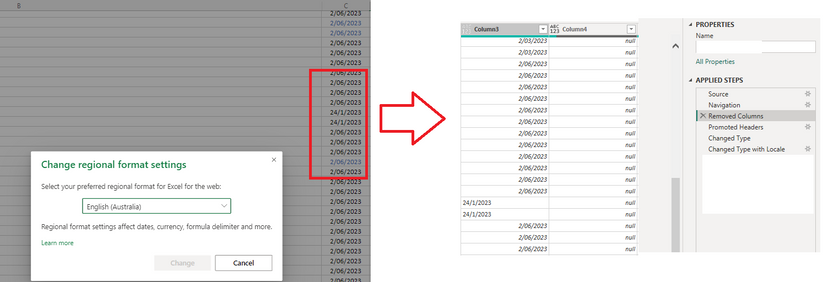
I'm hoping this is a quick fix. On my excel file, the region is set to Australia. When I import this file in Power Query, there are dates in american mm/dd/yy format (unless they cannot be converted). Is there any way to get the data show up the same way in power query, as I cannot use change type with locale if half of my dates are dd/mm/yy. The regional settings for "This File" are also set to English (Australia).

vicky__0-1677038613049.png


1 ACCEPTED SOLUTION
vicky_
Super User
Super User

What I ended up doing was manually going to the source excel, changing the locale of that file and fixing the dates. Then I went and refreshed the data, which seemed to work.

View solution in original post

3 REPLIES 3
vicky_
Super User
Super User

What I ended up doing was manually going to the source excel, changing the locale of that file and fixing the dates. Then I went and refreshed the data, which seemed to work.

wdx223_Daniel
Community Champion
Community Champion

NewStep=Table.TransformColumns(PreviousStepName,{"your date column name",each Date.From(_,"en-Au")})

Hey, thanks for the reply. 
Unfortunately, I can't use Transform as the dates are showing in mixed dd/mm/yy and mm/dd/yy, due to a locale difference. 

Helpful resources

Announcements
New to Fabric survey Carousel

New to Fabric Survey

If you have recently started exploring Fabric, we'd love to hear how it's going. Your feedback can help with product improvements.

Power BI DataViz World Championships carousel

Power BI DataViz World Championships - June 2026

A new Power BI DataViz World Championship is coming this June! Don't miss out on submitting your entry.

Join our Fabric User Panel

Join our Fabric User Panel

Share feedback directly with Fabric product managers, participate in targeted research studies and influence the Fabric roadmap.

March Power BI Update Carousel

Power BI Community Update - March 2026

Check out the March 2026 Power BI update to learn about new features.