This is best Fabric, Power BI, SQL and AI community event. How do we know? The last event sold out! Save €200 with code FABCMTY200.
Register nowA new Data Days event is coming soon! This time we’re going bigger than ever. Fabric, Power BI, SQL, AI and more. Don't miss out.
Hello,
I'm new to Power Query, and I am working on a formula where I will create a Custom Column, and what I need the new column to provide is the following:
subtract 2 date columns and return the number of days
IF the result is less than 0, return 0, otherwise return the vaule
So, based off what I've read, this is my current formula:
=IF ([Closed On.1]-[Due On.1] < 0, 0, [Closed On.1]-[Due On.1])
This gives me no syntax errors, but when I close the window, PQ immediately gives me a "The name 'IF' wasn't recognized.
What is happening that would cause the error even if my syntax is correct?
Solved! Go to Solution.
Hi @philthomasp ,
The Issue could be because subtracting two dates would return a date and not a number to use with a relational operator <. So alternatively create a measure having DATEDIFF function in it as shown below
Measure = IF(DATEDIFF(MAX(Table3[Drte2]),MAX(Table3[Dte1]),DAY) < 0, 0, DATEDIFF(MAX(Table3[Drte2]),MAX(Table3[Dte1]),DAY))
Rgds,
Hi @philthomasp ,
The Issue could be because subtracting two dates would return a date and not a number to use with a relational operator <. So alternatively create a measure having DATEDIFF function in it as shown below
Measure = IF(DATEDIFF(MAX(Table3[Drte2]),MAX(Table3[Dte1]),DAY) < 0, 0, DATEDIFF(MAX(Table3[Drte2]),MAX(Table3[Dte1]),DAY))
Rgds,
Hi @philthomasp ,
Try "if" in m language which is what Power Query uses. Or try using a conditional column rather than a custom column.
Let me know if you have any questions.
If this solves your issues, please mark it as the solution, so that others can find it easily. Kudos 👍are nice too.
Nathaniel
Proud to be a Super User!
Just for my own knowledge, but to clarify...m language is what we see when creating a custom column, and DAX is the advanced editor?
Hello @philthomasp ,
m language is what is used in Power Query and is shown in the Advanced Editor. DAX is used in Power BI, Excel and elsewhere.
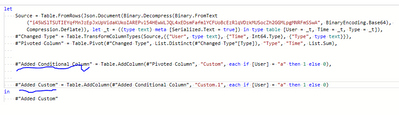
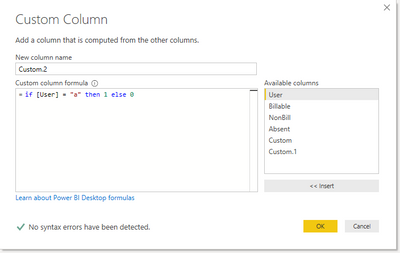
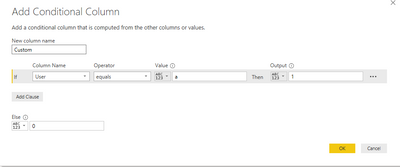
Table.AddColumn(#"Pivoted Column", "Custom", each if [User] = "a" then 1 else 0)So, I added the a custom column using the UI and above is what shown in the formula bar. The three pictures below, from the bottom, show the same conditional and custom column, and then it is shown in the Advanced Editor. From an efficiency standpoint, most of the time you can create measures (Using DAX) or calculated columns (Using DAX) however calculated columns, are better written in Power Query.
Check out M is for (DATA) Monkey by @KenPuls
Let me know if you have any questions.
If this solves your issues, please mark it as the solution, so that others can find it easily. Kudos 👍are nice too.
Nathaniel
Proud to be a Super User!
Check out the May 2026 Power BI update to learn about new features.
Sign up to receive a private message when registration opens and key events begin.
If you have recently started exploring Fabric, we'd love to hear how it's going. Your feedback can help with product improvements.
| User | Count |
|---|---|
| 4 | |
| 3 | |
| 2 | |
| 2 | |
| 1 |