cancel
Showing results for 
Search instead for 
Did you mean: 

Learn from the best! Meet the four finalists headed to the FINALS of the Power BI Dataviz World Championships! Register now

Reply
Anonymous
Not applicable

I need help with Power Query solution (code or transformation)

I need to create code or solution in Power Query becaus this will used in next ransformations. Any help is greately apreciated!
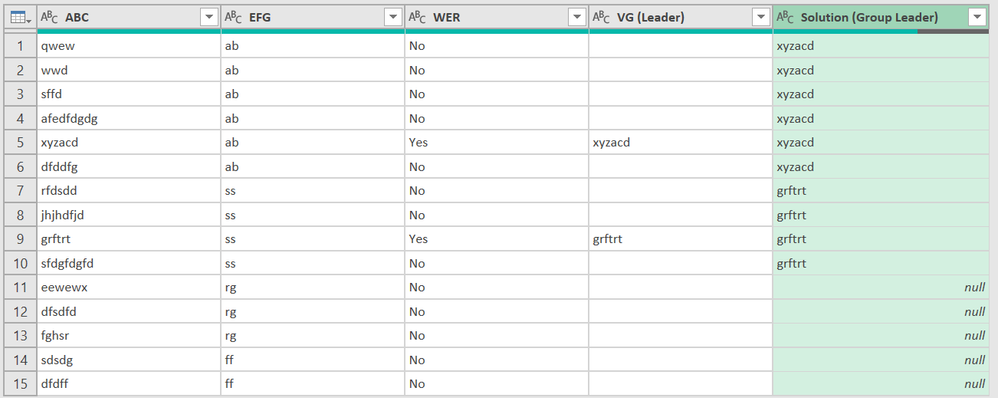
Where "WER" = Yes then Find value from ABC and Populate where EFG is the same.


ABCEFGWERVG (Leader)Solution (Group Leader)
qwewabNo xyzacd
wwdabNo xyzacd
sffdabNo xyzacd
afedfdgdgabNo xyzacd
xyzacdabYesxyzacdxyzacd
dfddfgabNo xyzacd
rfdsddssNo grftrt
jhjhdfjdssNo grftrt
grftrtssYesgrftrtgrftrt
sfdgfdgfdssNo grftrt
eewewxrgNo Null
dfsdfdrgNo null
fghsrrgNo Null
sdsdgffNo Null
dfdffffNo Null
1 ACCEPTED SOLUTION
jgeddes
Super User
Super User

Here is one possible solution to your question.

let
    Source = Table.FromRows(Json.Document(Binary.Decompress(Binary.FromText("fZDRDsIgDEV/xfC8b9m7IXtAL2Uhi0Y6w/Tr7RCVJa4JNKTncEOx1tyyz6Yz7iSlv0o5yF4eT3eGGTprcoaGmUjljjwIAUGT6rEaR88/vPEkCaQmJQJjvcXcGiHRnOZixDGOoKg69ViN93u+vcZjmawsLcx7+eFFeim0Rn+fpjoUoyRs+eXDKYyc9q+zDLwSop10FPIPDy8=", BinaryEncoding.Base64), Compression.Deflate)), let _t = ((type nullable text) meta [Serialized.Text = true]) in type table [ABC = _t, EFG = _t, WER = _t, #"VG (Leader)" = _t, #"Solution (Group Leader)" = _t]),
    #"Changed Type" = 
    Table.TransformColumnTypes(
        Source,
        {{"ABC", type text}, {"EFG", type text}, {"WER", type text}, {"VG (Leader)", type text}, {"Solution (Group Leader)", type text}}
    ),
    #"Grouped Rows" = 
    Table.Group(
        #"Changed Type", 
        {"EFG"}, 
        {{"_nestedTable", each _, type table [ABC=nullable text, EFG=nullable text, WER=nullable text, #"VG (Leader)"=nullable text, #"Solution (Group Leader)"=nullable text]}}
    ),
    fxLeaderValue = (inputTable as table) =>
    let 
        rows = Table.SelectColumns(Table.SelectRows(inputTable, each [WER]= "Yes"), {"ABC"}),
        value = Table.AddColumn(inputTable, "Solution", each Table.FirstValue(rows))
    in 
        value,
    Custom1 = 
    Table.TransformColumns(
        #"Grouped Rows", 
        {
            {"_nestedTable", each fxLeaderValue(_)}
        }
    ),
    #"Expanded _nestedTable" = 
    Table.ExpandTableColumn(
        Custom1, 
        "_nestedTable", 
        {"ABC", "WER", "VG (Leader)", "Solution"}, 
        {"ABC", "WER", "VG (Leader)", "Solution"}
    )
in
    #"Expanded _nestedTable"


Did I answer your question? Mark my post as a solution!

Proud to be a Super User!


View solution in original post

3 REPLIES 3
dufoq3
Super User
Super User

Hi @Anonymous, different approach.


Result

dufoq3_0-1713271400225.png


let
    Source = Table.FromRows(Json.Document(Binary.Decompress(Binary.FromText("bZDBCsMgEER/pXjOt/ReJIe04yheSt2Aab++q0kLhgUZ8D3GXfTevWqobnLLXeP61Li4efKuVhhUSAsvDCAiouG292d5/Eu3IJoHa1p7oNUrhKD1REaRU05gtlQsXMv6E/usg+3bI/ZjVEPQf9j0WuIoQEFvnAVjkmJw0b0bIs8PoaOBz18=", BinaryEncoding.Base64), Compression.Deflate)), let _t = ((type nullable text) meta [Serialized.Text = true]) in type table [ABC = _t, EFG = _t, WER = _t, #"VG (Leader)" = _t]),
    Ad_Solution = Table.AddColumn(Source, "Solution (Group Leader)", each if [WER] = "Yes" then [#"VG (Leader)"] else null, type text),
    GroupedRows = Table.Group(Ad_Solution, {"EFG"}, {{"All", each Table.FillUp(Table.FillDown(_, {"Solution (Group Leader)"}), {"Solution (Group Leader)"}), type table}}),
    CombinedAll = Table.Combine(GroupedRows[All])
in
    CombinedAll


Note: Check this link to learn how to use my query.
Check this link if you don't know how to provide sample data.

Anonymous
Not applicable

Thank you so much I will try that solution.

jgeddes
Super User
Super User

Here is one possible solution to your question.

let
    Source = Table.FromRows(Json.Document(Binary.Decompress(Binary.FromText("fZDRDsIgDEV/xfC8b9m7IXtAL2Uhi0Y6w/Tr7RCVJa4JNKTncEOx1tyyz6Yz7iSlv0o5yF4eT3eGGTprcoaGmUjljjwIAUGT6rEaR88/vPEkCaQmJQJjvcXcGiHRnOZixDGOoKg69ViN93u+vcZjmawsLcx7+eFFeim0Rn+fpjoUoyRs+eXDKYyc9q+zDLwSop10FPIPDy8=", BinaryEncoding.Base64), Compression.Deflate)), let _t = ((type nullable text) meta [Serialized.Text = true]) in type table [ABC = _t, EFG = _t, WER = _t, #"VG (Leader)" = _t, #"Solution (Group Leader)" = _t]),
    #"Changed Type" = 
    Table.TransformColumnTypes(
        Source,
        {{"ABC", type text}, {"EFG", type text}, {"WER", type text}, {"VG (Leader)", type text}, {"Solution (Group Leader)", type text}}
    ),
    #"Grouped Rows" = 
    Table.Group(
        #"Changed Type", 
        {"EFG"}, 
        {{"_nestedTable", each _, type table [ABC=nullable text, EFG=nullable text, WER=nullable text, #"VG (Leader)"=nullable text, #"Solution (Group Leader)"=nullable text]}}
    ),
    fxLeaderValue = (inputTable as table) =>
    let 
        rows = Table.SelectColumns(Table.SelectRows(inputTable, each [WER]= "Yes"), {"ABC"}),
        value = Table.AddColumn(inputTable, "Solution", each Table.FirstValue(rows))
    in 
        value,
    Custom1 = 
    Table.TransformColumns(
        #"Grouped Rows", 
        {
            {"_nestedTable", each fxLeaderValue(_)}
        }
    ),
    #"Expanded _nestedTable" = 
    Table.ExpandTableColumn(
        Custom1, 
        "_nestedTable", 
        {"ABC", "WER", "VG (Leader)", "Solution"}, 
        {"ABC", "WER", "VG (Leader)", "Solution"}
    )
in
    #"Expanded _nestedTable"


Did I answer your question? Mark my post as a solution!

Proud to be a Super User!


Helpful resources

Announcements
Join our Fabric User Panel

Join our Fabric User Panel

Share feedback directly with Fabric product managers, participate in targeted research studies and influence the Fabric roadmap.

February Power BI Update Carousel

Power BI Monthly Update - February 2026

Check out the February 2026 Power BI update to learn about new features.

FabCon Atlanta 2026 carousel

FabCon Atlanta 2026

Join us at FabCon Atlanta, March 16-20, for the ultimate Fabric, Power BI, AI and SQL community-led event. Save $200 with code FABCOMM.