Get certified for free when you join Fabric Data Days 2026 and dive into Fabric, Power BI, SQL, AI, and other essential data skills.
Join nowData Days is here! Join us now for 60+ days of learning, challenges, and connection. Learn more
I have a GET API call as source but table is limited to just 200 rows. I am at 216 rows of data and tested the GET response in postman - where I am showing 216.
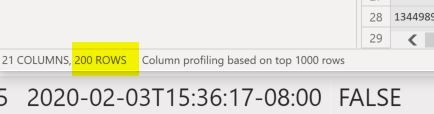
I show in step 216 being recognized as count but in table it is only showing 200 rows. Is there an adjustment I am misisng to get all 216 rows?
Istep showing 216
table row count - bottom left shows 200 rows
Tried different avenues, but this one worked for me.
Opening the Query Editor, then looking for the button "Advanced Editor" and then when opening the coding section, went form this:
let
Source = Json.Document(Web.Contents("https://publicapi.mycompany.com.au/rosters", [Headers=etc...
I added this:
let
Source = Json.Document(Web.Contents("https://publicapi.mycompany.com.au/rosters?limit=1000", [Headers=etc
And it worked!
Most public APIs limit the amount of data returned per request. I don't know what API you're making your requests to, but most likely you'll need to paginate through multiple pages to bring back all 216 rows. I'm fond of using the `List.Generate()` Power Query function for API pagination.
Can you provide the Power Query M script you're using to make this request to the API? Also, can you provide the URL to the API documentation?
It is, been struggling with scripts to try and get this to work. New to this, but this is script now
let
Source = Web.Contents("https://api.mavenlink.com/api/v1/time_entries?from_archived_workspaces=true&per_page=5000" & "from_archived_workspaces=true", [Headers=[Authorization="bearer keyishere12345"]]),
convertToJson = Json.Document(Source),
time_entries = convertToJson[time_entries],
#"Converted to Table" = Record.ToTable(time_entries),
#"Expanded Value" = Table.ExpandRecordColumn(#"Converted to Table", "Value", {"created_at", "updated_at", "date_performed", "time_in_minutes", "billable", "notes", "rate_in_cents", "cost_rate_in_cents", "currency", "currency_symbol", "currency_base_unit", "user_can_edit", "approved", "taxable", "is_invoiced", "story_id", "workspace_id", "user_id", "active_submission_id", "id"}, {"Value.created_at", "Value.updated_at", "Value.date_performed", "Value.time_in_minutes", "Value.billable", "Value.notes", "Value.rate_in_cents", "Value.cost_rate_in_cents", "Value.currency", "Value.currency_symbol", "Value.currency_base_unit", "Value.user_can_edit", "Value.approved", "Value.taxable", "Value.is_invoiced", "Value.story_id", "Value.workspace_id", "Value.user_id", "Value.active_submission_id", "Value.id"})
in
#"Expanded Value"
GET of all time entries
Don't miss out on Data Days, June 15 through August 7. Learn Fabric, Power BI, SQL, AI and more.
Check out the May 2026 Power BI update to learn about new features.
| User | Count |
|---|---|
| 4 | |
| 4 | |
| 3 | |
| 2 | |
| 1 |
| User | Count |
|---|---|
| 11 | |
| 11 | |
| 5 | |
| 4 | |
| 4 |