cancel
Showing results for 
Search instead for 
Did you mean: 

July 28 - August 9 | Final Round of the Power BI Dataviz World Championships. This is your chance. Learn more

Reply
SHOOKANSON
Advocate I
Advocate I

How do I customize this function??

Hi all!

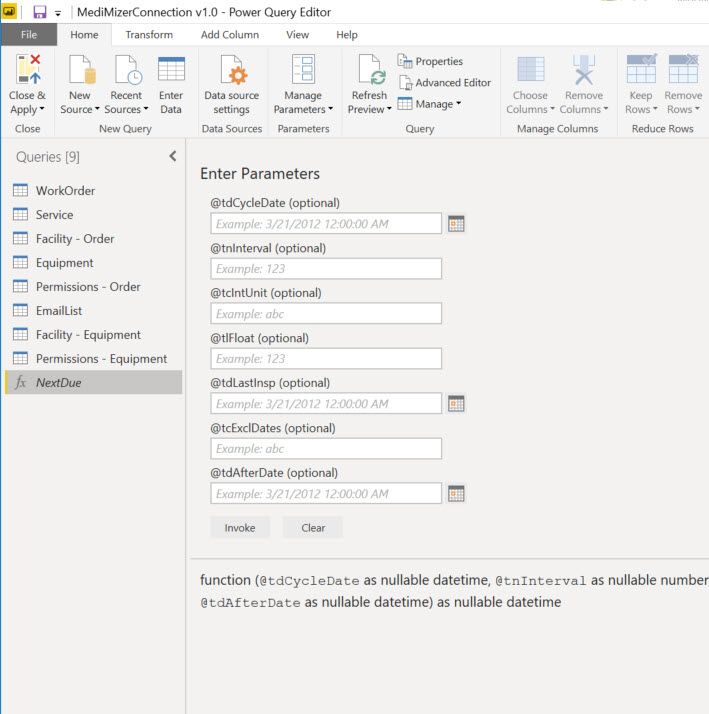
I am not a very advanced Power BI user and I am running into an issue. My report user wants a specific field from our application pulled into a Power BI report. "Great...I can do that easily," I thought. Turns out the field is a function which is not something I have ever dealt with before. This is what shows in Power Query Editor:

2019-08-01_13-54-21.jpg


How do I get this to show as a table? Basically this is a function for the next date of inspection for a piece of equipment. Obviously I want the next due date autmatically calculated for each piece of equipment, but how do I put in data fields and not static values? I am very confused. Please help!

1 ACCEPTED SOLUTION
Nolock
Resident Rockstar
Resident Rockstar

Hi @SHOOKANSON,

the simples method is the following:

  1. Fill out some static values.
  2. Click on Invoke. - pic1
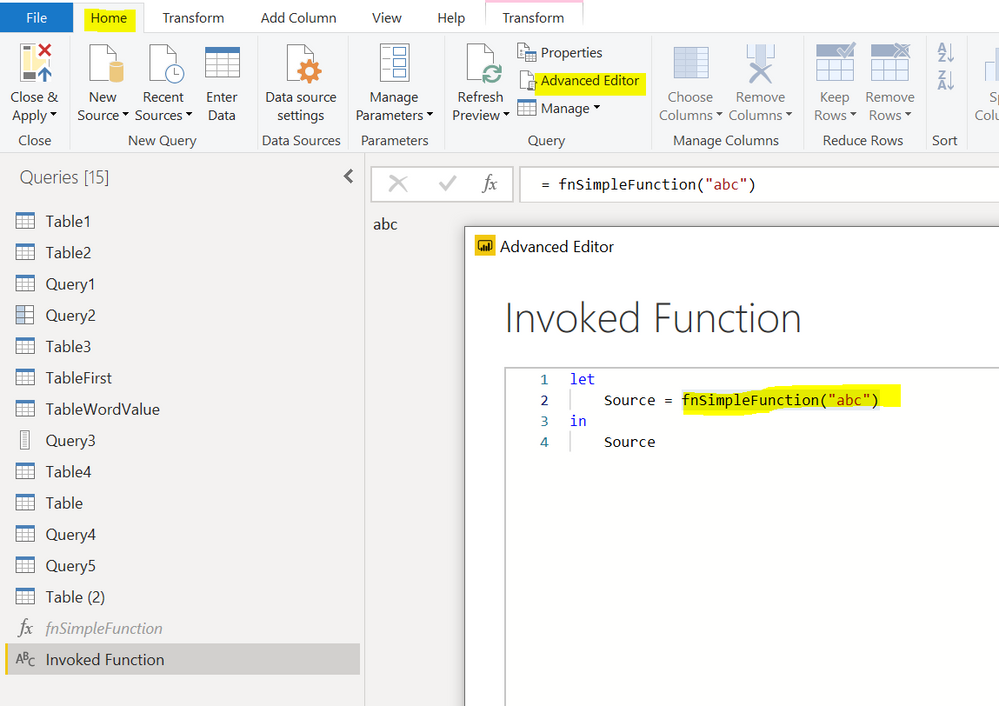
  3. Now you see a new query among Queries on the left hand site: Invoked Function
  4. Click on the new query, go to the tab Home and click on the Advanced Editor.
  5. You see the invocation with all parameters. -pic2
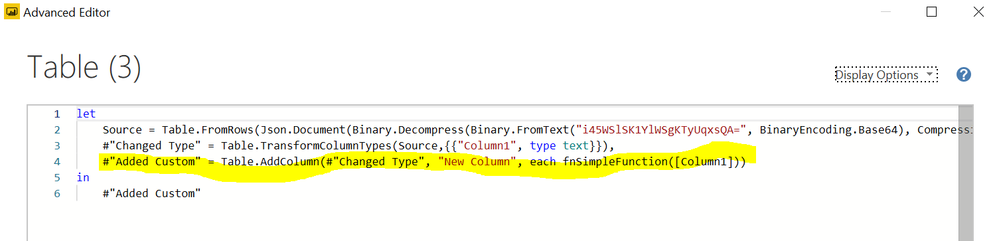
  6. Copy the invocation from the query and use it whereever you need with new parameters. -pic 3

pic1pic1pic2pic2

Capture3.PNG

View solution in original post

1 REPLY 1
Nolock
Resident Rockstar
Resident Rockstar

Hi @SHOOKANSON,

the simples method is the following:

  1. Fill out some static values.
  2. Click on Invoke. - pic1
  3. Now you see a new query among Queries on the left hand site: Invoked Function
  4. Click on the new query, go to the tab Home and click on the Advanced Editor.
  5. You see the invocation with all parameters. -pic2
  6. Copy the invocation from the query and use it whereever you need with new parameters. -pic 3

pic1pic1pic2pic2

Capture3.PNG

Helpful resources

Announcements
Fabric Community Sticker Design Challenge Barcelona Carousel

Fabric Community Sticker Challenge - Barcelona 2026

If you love stickers, then you will definitely want to check out our community sticker challenge, Barcelona edition!

July Power BI Update Carousel

Power BI Monthly Update - July 2026

Check out the July 2026 Power BI update to learn about new features.

Power BI DataViz World Championships carousel

Power BI DataViz World Championships - June 2026

A new Power BI DataViz World Championship is coming this June! Don't miss out on submitting your entry.