cancel
Showing results for 
Search instead for 
Did you mean: 

The Power BI Data Visualization World Championships is back! Get ahead of the game and start preparing now! Learn more

Reply
SHOOKANSON
Advocate I
Advocate I

How do I customize this function??

Hi all!

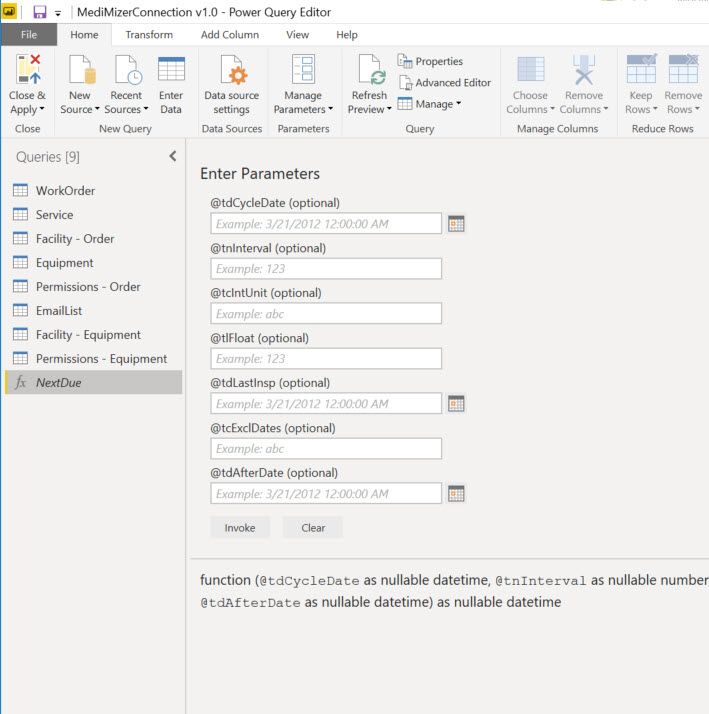
I am not a very advanced Power BI user and I am running into an issue. My report user wants a specific field from our application pulled into a Power BI report. "Great...I can do that easily," I thought. Turns out the field is a function which is not something I have ever dealt with before. This is what shows in Power Query Editor:

2019-08-01_13-54-21.jpg


How do I get this to show as a table? Basically this is a function for the next date of inspection for a piece of equipment. Obviously I want the next due date autmatically calculated for each piece of equipment, but how do I put in data fields and not static values? I am very confused. Please help!

1 ACCEPTED SOLUTION
Nolock
Resident Rockstar
Resident Rockstar

Hi @SHOOKANSON,

the simples method is the following:

  1. Fill out some static values.
  2. Click on Invoke. - pic1
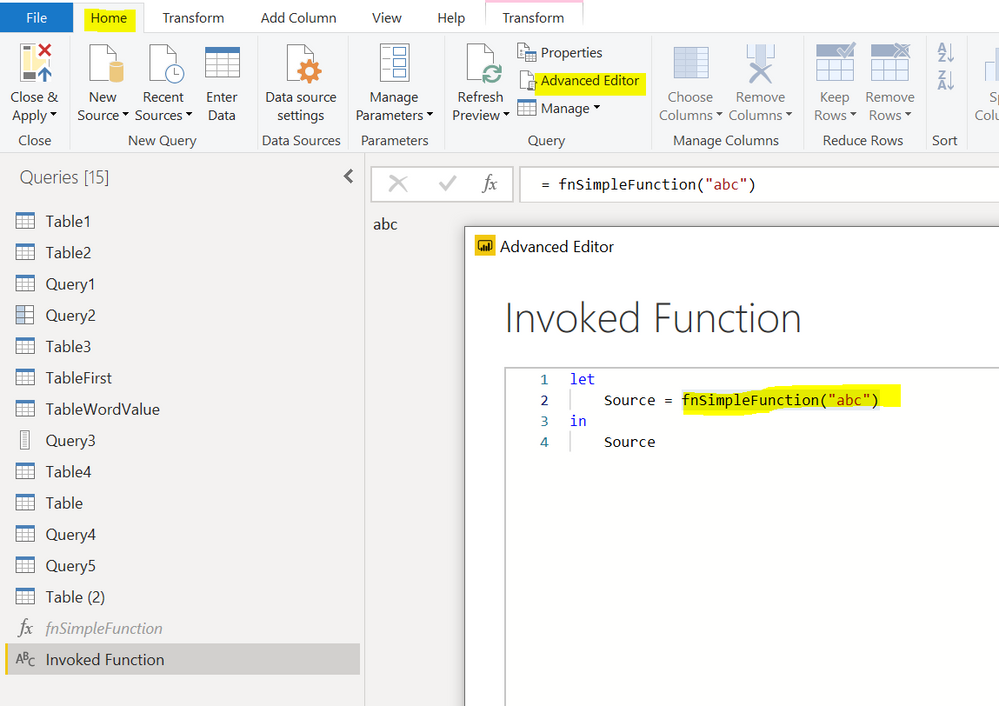
  3. Now you see a new query among Queries on the left hand site: Invoked Function
  4. Click on the new query, go to the tab Home and click on the Advanced Editor.
  5. You see the invocation with all parameters. -pic2
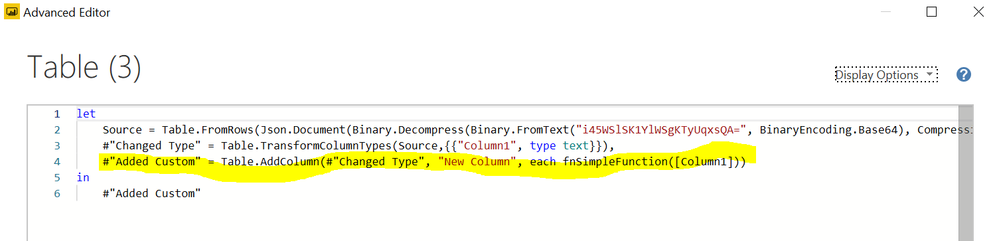
  6. Copy the invocation from the query and use it whereever you need with new parameters. -pic 3

pic1pic1pic2pic2

Capture3.PNG

View solution in original post

1 REPLY 1
Nolock
Resident Rockstar
Resident Rockstar

Hi @SHOOKANSON,

the simples method is the following:

  1. Fill out some static values.
  2. Click on Invoke. - pic1
  3. Now you see a new query among Queries on the left hand site: Invoked Function
  4. Click on the new query, go to the tab Home and click on the Advanced Editor.
  5. You see the invocation with all parameters. -pic2
  6. Copy the invocation from the query and use it whereever you need with new parameters. -pic 3

pic1pic1pic2pic2

Capture3.PNG

Helpful resources

Announcements
Power BI DataViz World Championships

Power BI Dataviz World Championships

The Power BI Data Visualization World Championships is back! Get ahead of the game and start preparing now!

December 2025 Power BI Update Carousel

Power BI Monthly Update - December 2025

Check out the December 2025 Power BI Holiday Recap!

FabCon Atlanta 2026 carousel

FabCon Atlanta 2026

Join us at FabCon Atlanta, March 16-20, for the ultimate Fabric, Power BI, AI and SQL community-led event. Save $200 with code FABCOMM.