This is best Fabric, Power BI, SQL and AI community event. How do we know? The last event sold out! Save €200 with code FABCMTY200.
Register nowThe Fabric community is upgrading! Read all of the details including the timeline and what you can expect. Learn more
Is there a shortcut for horizontal/sideways scroll in the Power Query editor? For example, in Power BI Data view, we can just hold shift when scrolling.
Solved! Go to Solution.
Edit: went and tested and learnt this one new for today. CTRL + ARROW will allow you to select columns and not lose the selection, whether than selection be adjacent or not. Also checked the docs again and apparently it is in there already which I missed first time around.
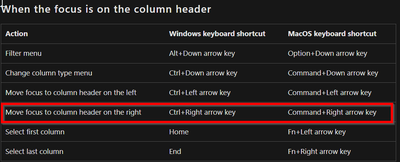
I don't think that behaviour is possible, see all the shortcuts here: Keyboard shortcuts in Power Query - Power Query | Microsoft Learn
Hi @Anonymous
I don't know if this is what you need but...
You first select some columns using Shift. Then, you scroll with nothing pressed.
When you want to continue selecting, press first Ctrl and click on the first column of the new range. Now press Shift and select until the end of your new range.
I mean, I think you can achieve it with a combination of Ctrl and Shift
I'm pretty sure the arrow keys do that.
--Nate
That isn't really scrolling though. You couldn't select a couple columns to keep, scroll for a bit then add more columns to the selection. Pressing an arrow key immediately clears the selection.
Edit: thanks for replying though. Appreciate arrow keys are good enough for most scenarios.
Edit: went and tested and learnt this one new for today. CTRL + ARROW will allow you to select columns and not lose the selection, whether than selection be adjacent or not. Also checked the docs again and apparently it is in there already which I missed first time around.
I don't think that behaviour is possible, see all the shortcuts here: Keyboard shortcuts in Power Query - Power Query | Microsoft Learn
This is great, thank you! Bonus to this is that one can then press CRTL + SPACE to select the highlighted column, makes moving around much faster.
Join us in Barcelona for FabCon and SQLCon, the Fabric, Power BI, SQL, and AI community event. Save €200 with code FABCMTY200.