Get certified for free when you join Fabric Data Days 2026 and dive into Fabric, Power BI, SQL, AI, and other essential data skills.
Join nowData Days is here! Join us now for 60+ days of learning, challenges, and connection. Learn more
Is there a shortcut for horizontal/sideways scroll in the Power Query editor? For example, in Power BI Data view, we can just hold shift when scrolling.
Solved! Go to Solution.
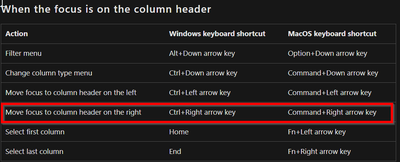
Edit: went and tested and learnt this one new for today. CTRL + ARROW will allow you to select columns and not lose the selection, whether than selection be adjacent or not. Also checked the docs again and apparently it is in there already which I missed first time around.
I don't think that behaviour is possible, see all the shortcuts here: Keyboard shortcuts in Power Query - Power Query | Microsoft Learn
Hi @Anonymous
I don't know if this is what you need but...
You first select some columns using Shift. Then, you scroll with nothing pressed.
When you want to continue selecting, press first Ctrl and click on the first column of the new range. Now press Shift and select until the end of your new range.
I mean, I think you can achieve it with a combination of Ctrl and Shift
I'm pretty sure the arrow keys do that.
--Nate
That isn't really scrolling though. You couldn't select a couple columns to keep, scroll for a bit then add more columns to the selection. Pressing an arrow key immediately clears the selection.
Edit: thanks for replying though. Appreciate arrow keys are good enough for most scenarios.
Edit: went and tested and learnt this one new for today. CTRL + ARROW will allow you to select columns and not lose the selection, whether than selection be adjacent or not. Also checked the docs again and apparently it is in there already which I missed first time around.
I don't think that behaviour is possible, see all the shortcuts here: Keyboard shortcuts in Power Query - Power Query | Microsoft Learn
This is great, thank you! Bonus to this is that one can then press CRTL + SPACE to select the highlighted column, makes moving around much faster.
Don't miss out on Data Days, June 15 through August 7. Learn Fabric, Power BI, SQL, AI and more.
Check out the May 2026 Power BI update to learn about new features.
| User | Count |
|---|---|
| 4 | |
| 4 | |
| 3 | |
| 2 | |
| 1 |
| User | Count |
|---|---|
| 11 | |
| 11 | |
| 5 | |
| 4 | |
| 4 |