
Join us at FabCon Atlanta from March 16 - 20, 2026, for the ultimate Fabric, Power BI, AI and SQL community-led event. Save $200 with code FABCOMM.
Register now!The Power BI Data Visualization World Championships is back! Get ahead of the game and start preparing now! Learn more
Hi all,
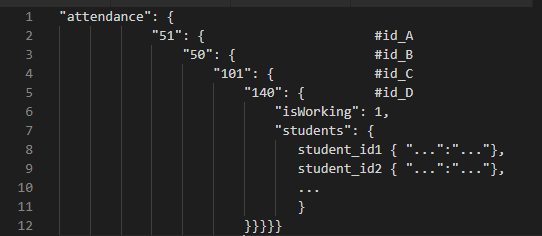
I'm hoping to expand some json into a table but because of the way the json is structured, the values I need end up as column headers instead of row values. Has anyone run into this before?
Example of json input:
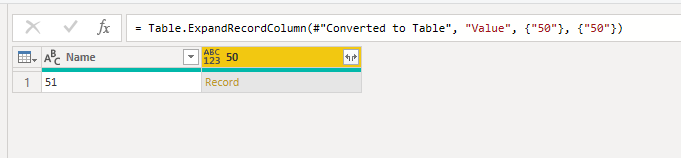
What happens in PowerBI:
Desired end state of query should result in a table like this:
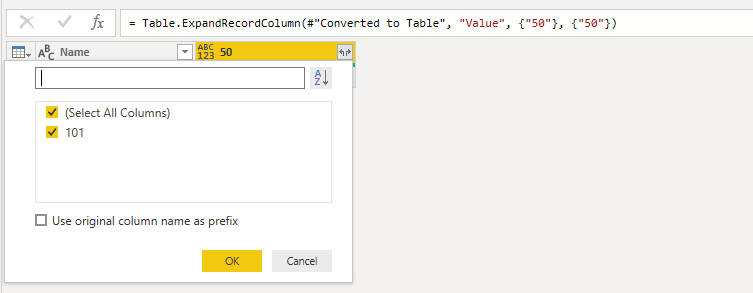
Additionally, if I expand the "50" column then the "50" is wiped out by the next record "101" which is in turn wiped out by "140" etc down the line. Renaming the expanded column doesn't help. Power Query:
let
Source = Json.Document(Web.Contents("APIurl")),
data = Source[data],
attendance = data[attendance],
#"Converted to Table" = Record.ToTable(attendance),
#"Expanded Value" = Table.ExpandRecordColumn(#"Converted to Table", "Value", {"50"}, {"50"}),
#"Expanded 50" = Table.ExpandRecordColumn(#"Expanded Value", "50", {"101"}, {"101"}),
#"Expanded 101" = Table.ExpandRecordColumn(#"Expanded 50", "101", {"140"}, {"140"})
in
#"Expanded 101"
Does anyone know a way to achieve this? Is this just bad json?
Thank you,
UIT
Hello @cboake
were you able to solve the problem with any reply given?
If so, please mark it as solution (to help other users find useful content and to acknowledge the work of users that helped you)
Kudoes are nice too
All the best
Jimmy
The Power BI Data Visualization World Championships is back! Get ahead of the game and start preparing now!
| User | Count |
|---|---|
| 19 | |
| 10 | |
| 9 | |
| 7 | |
| 6 |