This is best Fabric, Power BI, SQL and AI community event. How do we know? The last event sold out! Save €200 with code FABCMTY200.
Register nowA new Data Days event is coming soon! This time we’re going bigger than ever. Fabric, Power BI, SQL, AI and more. Don't miss out.
Hi all,
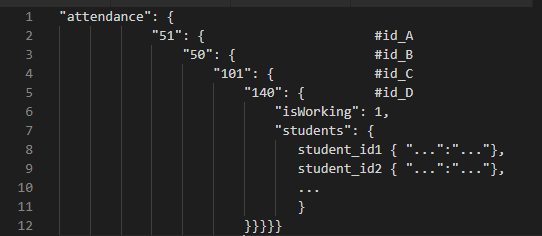
I'm hoping to expand some json into a table but because of the way the json is structured, the values I need end up as column headers instead of row values. Has anyone run into this before?
Example of json input:
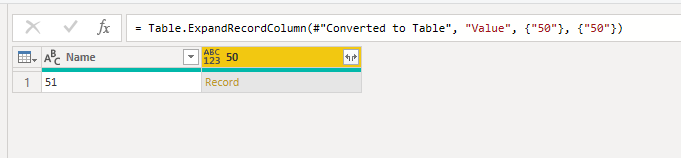
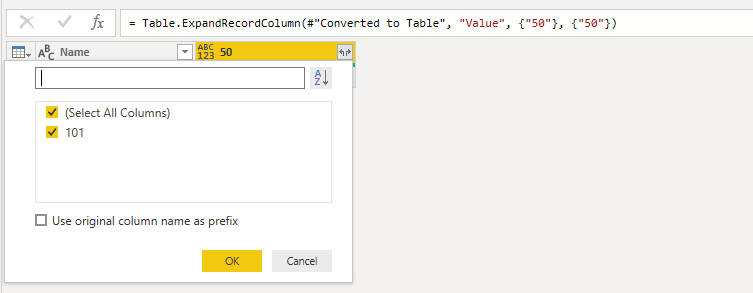
What happens in PowerBI:
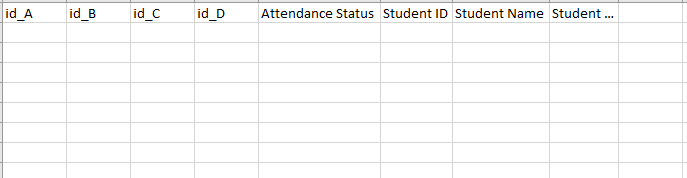
Desired end state of query should result in a table like this:
Additionally, if I expand the "50" column then the "50" is wiped out by the next record "101" which is in turn wiped out by "140" etc down the line. Renaming the expanded column doesn't help. Power Query:
let
Source = Json.Document(Web.Contents("APIurl")),
data = Source[data],
attendance = data[attendance],
#"Converted to Table" = Record.ToTable(attendance),
#"Expanded Value" = Table.ExpandRecordColumn(#"Converted to Table", "Value", {"50"}, {"50"}),
#"Expanded 50" = Table.ExpandRecordColumn(#"Expanded Value", "50", {"101"}, {"101"}),
#"Expanded 101" = Table.ExpandRecordColumn(#"Expanded 50", "101", {"140"}, {"140"})
in
#"Expanded 101"
Does anyone know a way to achieve this? Is this just bad json?
Thank you,
UIT
Hello @cboake
were you able to solve the problem with any reply given?
If so, please mark it as solution (to help other users find useful content and to acknowledge the work of users that helped you)
Kudoes are nice too
All the best
Jimmy
Check out the May 2026 Power BI update to learn about new features.
Sign up to receive a private message when registration opens and key events begin.
If you have recently started exploring Fabric, we'd love to hear how it's going. Your feedback can help with product improvements.