cancel
Showing results for 
Search instead for 
Did you mean: 

Get Fabric Certified for FREE during Fabric Data Days. Don't miss your chance! Request now

Reply
Liamnorris25
New Member

Trying to count up consecutive days a condition is met

Hi all, 


I am new to PowerBI and need some help with DAX I have already created a formula to do this in excel but am having issues in PowerBI. All suggestions are appreciated.  


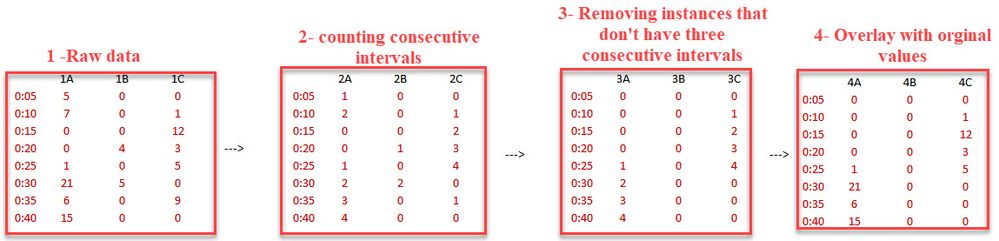
Here is an image of what I am trying to do: 


I need to count all intervals that meet a condition and if they do, I want to count how many timestamps in a row this occurs for. 


So I nPowerBI.jpgeed to access the cell in the same calculated column but on cell up. Here is the formula in excel (it is from a large spreadsheet


From 1->2 (image above)

=IF(PJ4>0,TJ3+1,0)       (PJ is from raw data, TJ is the data # 2 from the image above)


Again thank you for any help you may have!

3 REPLIES 3
Jimmy801
Community Champion
Community Champion

Hello @Liamnorris25 


is there still the need of help?


Jimmy

Jimmy801
Community Champion
Community Champion

Hello @Liamnorris25 


the approach you are using in Excel is not working in Power Query (not DAX) as it's not possible to reference a different row of the new created calculated column. This said, this task it's not that easy to solve in Power Query.

Therefore I want to make some fundamental questions to you:

- Why is this needed in Power Query? What would be the advantage? (to mess up the big Excel-sheet to have a clean process there?)

- your description deviates from the screenshot, as in the screenshot 3 transformation steps are needed but in the description your are talking only about the first.

- What would be the final goal of your process? Really the endpoint... to have the exctract shown in the last pic or do you have to evaluate it again?


BR


Jimmy

rajulshah
Resident Rockstar
Resident Rockstar

Hello @Liamnorris25,

Maybe this link could help. 

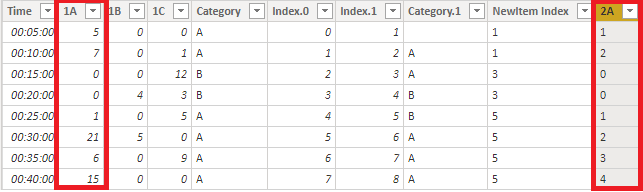
I tried with the 1A column and tried to create 2A column. See below:
cummulative.png


Hope this helps.

Helpful resources

Announcements
November Power BI Update Carousel

Power BI Monthly Update - November 2025

Check out the November 2025 Power BI update to learn about new features.

Fabric Data Days Carousel

Fabric Data Days

Advance your Data & AI career with 50 days of live learning, contests, hands-on challenges, study groups & certifications and more!

FabCon Atlanta 2026 carousel

FabCon Atlanta 2026

Join us at FabCon Atlanta, March 16-20, for the ultimate Fabric, Power BI, AI and SQL community-led event. Save $200 with code FABCOMM.