cancel
Showing results for 
Search instead for 
Did you mean: 

The Power BI Data Visualization World Championships is back! Get ahead of the game and start preparing now! Learn more

Reply
jjku
Frequent Visitor

Help on handling errors?

I cannot figure out how to insert the IF xxx[HasError]  else  xxx then  into this statement.


= Table.AddColumn(#"Added Custom9", "Entity", each ( let currentEntryNoKey = [Entry_No_Key] in Table.SelectRows(All_Vendor_Ledger, each [Entry_No_Key] = currentEntryNoKey)) 
{0}[Vendor_Name])


Basically, if there is an error, I just want it to return blank. If there is no error, then return the {0}[Vendor_Name]


1 ACCEPTED SOLUTION
Anonymous
Not applicable

OK, if you just want a value from that table, or null each time there is an error, I would do it like this, so there are no scope issues.  Add a new step, name it EntryKeyList, then in the formula bar, type:

= List.Buffer(#"Added Custom9"[Entry_No_Key])


Add a new step, name it NewThing (or whatever), then in the formula bar:

= Table.AddColumn(EntryKey, "Entity" each try Table.SelectRows(All_Vendor_Ledger, each List.Contains([Entry_No_Key], EntryKeyList)){0}[Vendor_Name] otherwise null)


--Nate


Entity = Table.AddColumn(

View solution in original post

7 REPLIES 7
Anonymous
Not applicable

OK, if you just want a value from that table, or null each time there is an error, I would do it like this, so there are no scope issues.  Add a new step, name it EntryKeyList, then in the formula bar, type:

= List.Buffer(#"Added Custom9"[Entry_No_Key])


Add a new step, name it NewThing (or whatever), then in the formula bar:

= Table.AddColumn(EntryKey, "Entity" each try Table.SelectRows(All_Vendor_Ledger, each List.Contains([Entry_No_Key], EntryKeyList)){0}[Vendor_Name] otherwise null)


--Nate


Entity = Table.AddColumn(

I will try this fix and report back. Thanks!

jjku
Frequent Visitor

Yes. I guess my problem is where do I put the Try and the Else.. I can't seem to figure that out.


I did try this:


= Table.AddColumn(#"Added Custom9", "Entity", each ( let currentEntryNoKey = [Entry_No_Key] in Table.SelectRows(All_Vendor_Ledger, each [Entry_No_Key] = currentEntryNoKey)), 
try {0}[Vendor_Name] otherwise "null")


but now I get a We cannot convert the value "null" to type Type.

jjku
Frequent Visitor

I changed it to this...


= Table.AddColumn(#"Added Custom9", "Entity", each ( let currentEntryNoKey = [Entry_No_Key] in Table.SelectRows(All_Vendor_Ledger, each [Entry_No_Key] = currentEntryNoKey)),
try {0}[Vendor_Name] otherwise Null.Type)


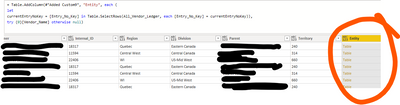
it seems to work, but my new problem is that the null results says TABLE, and not null.

Anonymous
Not applicable

Not Null.Type, just null. 

When i put null.. the result for all the null say  table. But nothing is in that table. 


I can't get my head around the TYPE. 


jjku_0-1625771068118.png


AlexisOlson
Super User
Super User

The standard method in M is with "try" ... "otherwise". In your case, "try xxx otherwise null" with return xxx if there isn't an error and a null otherwise.


https://docs.microsoft.com/en-us/power-query/handlingerrors

Helpful resources

Announcements
Power BI DataViz World Championships

Power BI Dataviz World Championships

The Power BI Data Visualization World Championships is back! Get ahead of the game and start preparing now!

November Power BI Update Carousel

Power BI Monthly Update - November 2025

Check out the November 2025 Power BI update to learn about new features.

FabCon Atlanta 2026 carousel

FabCon Atlanta 2026

Join us at FabCon Atlanta, March 16-20, for the ultimate Fabric, Power BI, AI and SQL community-led event. Save $200 with code FABCOMM.