Join us in Barcelona for FabCon and SQLCon, September 28 - October 1, 2026.
This is best Fabric, Power BI, SQL and AI community event. How do we know? The last event sold out! Save €200 with code FABCMTY200.
Register now- Power BI forums
- Get Help with Power BI
- Desktop
- Service
- Report Server
- Power Query
- Mobile Apps
- Developer
- DAX Commands and Tips
- Custom Visuals Development Discussion
- Health and Life Sciences
- Power BI Spanish forums
- Translated Spanish Desktop
- Training and Consulting
- Instructor Led Training
- Dashboard in a Day for Women, by Women
- Galleries
- Data Stories Gallery
- Themes Gallery
- Contests Gallery
- QuickViz Gallery
- Quick Measures Gallery
- Visual Calculations Gallery
- Fabric Apps Gallery
- Notebook Gallery
- Translytical Task Flow Gallery
- TMDL Gallery
- R Script Showcase
- Webinars and Video Gallery
- Ideas
- Custom Visuals Ideas (read-only)
- Issues
- Issues
- Events
- Upcoming Events
The Fabric community is now in read-only for platform upgrade. Learn more
- Power BI forums
- Forums
- Get Help with Power BI
- Power Query
- Re: Help on handling errors?
- Subscribe to RSS Feed
- Mark Topic as New
- Mark Topic as Read
- Float this Topic for Current User
- Bookmark
- Subscribe
- Printer Friendly Page

- Mark as New
- Bookmark
- Subscribe
- Mute
- Subscribe to RSS Feed
- Permalink
Help on handling errors?
I cannot figure out how to insert the IF xxx[HasError] else xxx then into this statement.
= Table.AddColumn(#"Added Custom9", "Entity", each ( let currentEntryNoKey = [Entry_No_Key] in Table.SelectRows(All_Vendor_Ledger, each [Entry_No_Key] = currentEntryNoKey))
{0}[Vendor_Name])
Basically, if there is an error, I just want it to return blank. If there is no error, then return the {0}[Vendor_Name]
Solved! Go to Solution.

- Mark as New
- Bookmark
- Subscribe
- Mute
- Subscribe to RSS Feed
- Permalink
OK, if you just want a value from that table, or null each time there is an error, I would do it like this, so there are no scope issues. Add a new step, name it EntryKeyList, then in the formula bar, type:
= List.Buffer(#"Added Custom9"[Entry_No_Key])
Add a new step, name it NewThing (or whatever), then in the formula bar:
= Table.AddColumn(EntryKey, "Entity" each try Table.SelectRows(All_Vendor_Ledger, each List.Contains([Entry_No_Key], EntryKeyList)){0}[Vendor_Name] otherwise null)
--Nate
Entity = Table.AddColumn(
- Mark as New
- Bookmark
- Subscribe
- Mute
- Subscribe to RSS Feed
- Permalink
OK, if you just want a value from that table, or null each time there is an error, I would do it like this, so there are no scope issues. Add a new step, name it EntryKeyList, then in the formula bar, type:
= List.Buffer(#"Added Custom9"[Entry_No_Key])
Add a new step, name it NewThing (or whatever), then in the formula bar:
= Table.AddColumn(EntryKey, "Entity" each try Table.SelectRows(All_Vendor_Ledger, each List.Contains([Entry_No_Key], EntryKeyList)){0}[Vendor_Name] otherwise null)
--Nate
Entity = Table.AddColumn(
- Mark as New
- Bookmark
- Subscribe
- Mute
- Subscribe to RSS Feed
- Permalink
I will try this fix and report back. Thanks!
- Mark as New
- Bookmark
- Subscribe
- Mute
- Subscribe to RSS Feed
- Permalink
Yes. I guess my problem is where do I put the Try and the Else.. I can't seem to figure that out.
I did try this:
= Table.AddColumn(#"Added Custom9", "Entity", each ( let currentEntryNoKey = [Entry_No_Key] in Table.SelectRows(All_Vendor_Ledger, each [Entry_No_Key] = currentEntryNoKey)),
try {0}[Vendor_Name] otherwise "null")
but now I get a We cannot convert the value "null" to type Type.
- Mark as New
- Bookmark
- Subscribe
- Mute
- Subscribe to RSS Feed
- Permalink
I changed it to this...
= Table.AddColumn(#"Added Custom9", "Entity", each ( let currentEntryNoKey = [Entry_No_Key] in Table.SelectRows(All_Vendor_Ledger, each [Entry_No_Key] = currentEntryNoKey)),
try {0}[Vendor_Name] otherwise Null.Type)
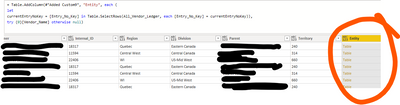
it seems to work, but my new problem is that the null results says TABLE, and not null.
- Mark as New
- Bookmark
- Subscribe
- Mute
- Subscribe to RSS Feed
- Permalink
Not Null.Type, just null.
- Mark as New
- Bookmark
- Subscribe
- Mute
- Subscribe to RSS Feed
- Permalink
When i put null.. the result for all the null say table. But nothing is in that table.
I can't get my head around the TYPE.


- Mark as New
- Bookmark
- Subscribe
- Mute
- Subscribe to RSS Feed
- Permalink
The standard method in M is with "try" ... "otherwise". In your case, "try xxx otherwise null" with return xxx if there isn't an error and a null otherwise.
Helpful resources

FabCon & SQLCon – Barcelona 2026
Join us in Barcelona for FabCon and SQLCon, the Fabric, Power BI, SQL, and AI community event. Save €200 with code FABCMTY200.

Power BI DataViz World Championships - June 2026
A new Power BI DataViz World Championship is coming this June! Don't miss out on submitting your entry.


