
cancel
Showing results for 
Search instead for 
Did you mean: 

The Power BI Data Visualization World Championships is back! Get ahead of the game and start preparing now! Learn more

Reply
Anonymous
Not applicable

Group by continuous sequence

Hello everybody.
I have problem with power query
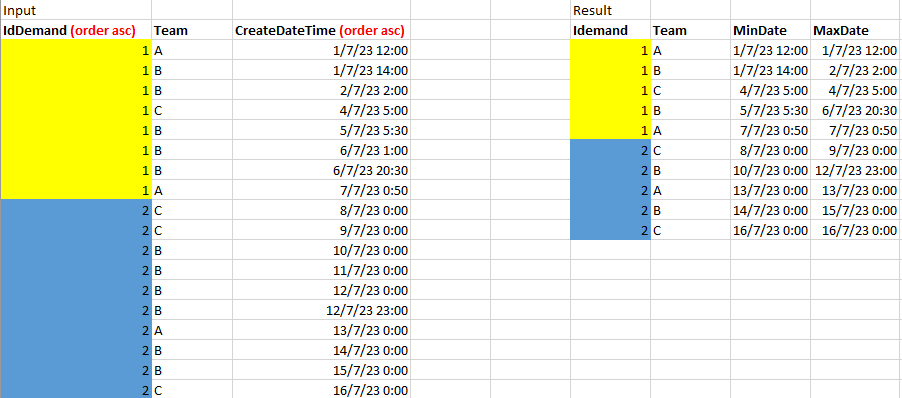
I would like to transform a table like the exemple by grouping with IdDemand + Team with. I want the Min DateTime and the Max DateTime for each continuous sequence of IdDemand + Team
The team can learn at different times later

Below the example:


Power1.PNG


Datas

IdDemand TeamCreateDateTime
1A1/7/23 12:00
1B1/7/23 14:00
1B2/7/23 2:00
1C4/7/23 5:00
1B5/7/23 5:30
1B6/7/23 1:00
1B6/7/23 20:30
1A7/7/23 0:50
2C8/7/23 0:00
2C9/7/23 0:00
2B10/7/23 0:00
2B11/7/23 0:00
2B12/7/23 0:00
2B12/7/23 23:00
2A13/7/23 0:00
2B14/7/23 0:00
2B15/7/23 0:00
2C16/7/23 0:00


Thank you all for your attention

1 ACCEPTED SOLUTION
BA_Pete
Super User
Super User

Hi @Anonymous ,


You can use the GroupKind argument to do this.

First, multi-select (Ctrl+Click) [IdDmand] and [Team].

Go to the Home tab > Group By.

In the dialog, create aggreagted columns for [MinDate] as MIN of [CreatedDateTime], and similar for MAX.

Once you've applied this, just add this little bit to the end of your Group By step:

BA_Pete_0-1694012974533.png

Full example query:

let
    Source = Table.FromRows(Json.Document(Binary.Decompress(Binary.FromText("hZBJCoAwDEWvIlkLZmisulOPId7/Gg5poS0GF9m8l0+G4wCCHta7aIgDS0e8IMLZm9gKEVrBJqrAflcwrm2/Zi41H9OAtj9xxjLwrBpN4KLGOQ2eMseazx/8vQw9QZ7gH8FSmvev4kWCJ9S5g8ZSnBc=", BinaryEncoding.Base64), Compression.Deflate)), let _t = ((type nullable text) meta [Serialized.Text = true]) in type table [#"IdDemand " = _t, Team = _t, CreateDateTime = _t]),
    chgTypes = Table.TransformColumnTypes(Source,{{"IdDemand ", Int64.Type}, {"Team", type text}, {"CreateDateTime", type datetime}}),

    groupIdTeamLocal = Table.Group(chgTypes, {"IdDemand ", "Team"}, {{"minDate", each List.Min([CreateDateTime]), type nullable datetime}, {"maxDate", each List.Max([CreateDateTime]), type nullable datetime}}, GroupKind.Local)
    
in
    groupIdTeamLocal


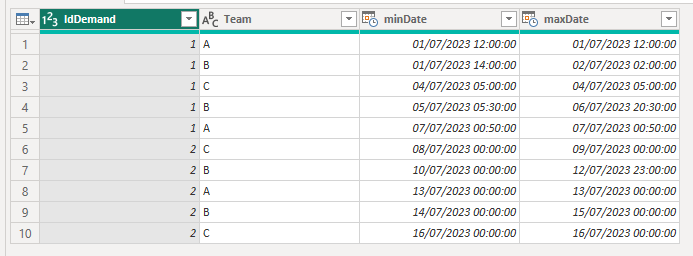
Example query output:

BA_Pete_1-1694013037421.png


Pete


Now accepting Kudos! If my post helped you, why not give it a thumbs-up?

Proud to be a Datanaut!


View solution in original post

3 REPLIES 3
Anonymous
Not applicable

I'm so happy, I spent a few hours on this problem only to discover that I was missing two words GroupKind.Local...
Thank you so much


No problem, happy to help.

Feel free to give a thumbs-up on any posts that help you 👍


Pete


Now accepting Kudos! If my post helped you, why not give it a thumbs-up?

Proud to be a Datanaut!


BA_Pete
Super User
Super User

Hi @Anonymous ,


You can use the GroupKind argument to do this.

First, multi-select (Ctrl+Click) [IdDmand] and [Team].

Go to the Home tab > Group By.

In the dialog, create aggreagted columns for [MinDate] as MIN of [CreatedDateTime], and similar for MAX.

Once you've applied this, just add this little bit to the end of your Group By step:

BA_Pete_0-1694012974533.png

Full example query:

let
    Source = Table.FromRows(Json.Document(Binary.Decompress(Binary.FromText("hZBJCoAwDEWvIlkLZmisulOPId7/Gg5poS0GF9m8l0+G4wCCHta7aIgDS0e8IMLZm9gKEVrBJqrAflcwrm2/Zi41H9OAtj9xxjLwrBpN4KLGOQ2eMseazx/8vQw9QZ7gH8FSmvev4kWCJ9S5g8ZSnBc=", BinaryEncoding.Base64), Compression.Deflate)), let _t = ((type nullable text) meta [Serialized.Text = true]) in type table [#"IdDemand " = _t, Team = _t, CreateDateTime = _t]),
    chgTypes = Table.TransformColumnTypes(Source,{{"IdDemand ", Int64.Type}, {"Team", type text}, {"CreateDateTime", type datetime}}),

    groupIdTeamLocal = Table.Group(chgTypes, {"IdDemand ", "Team"}, {{"minDate", each List.Min([CreateDateTime]), type nullable datetime}, {"maxDate", each List.Max([CreateDateTime]), type nullable datetime}}, GroupKind.Local)
    
in
    groupIdTeamLocal


Example query output:

BA_Pete_1-1694013037421.png


Pete


Now accepting Kudos! If my post helped you, why not give it a thumbs-up?

Proud to be a Datanaut!


Helpful resources

Announcements
Power BI DataViz World Championships

Power BI Dataviz World Championships

The Power BI Data Visualization World Championships is back! Get ahead of the game and start preparing now!

December 2025 Power BI Update Carousel

Power BI Monthly Update - December 2025

Check out the December 2025 Power BI Holiday Recap!

FabCon Atlanta 2026 carousel

FabCon Atlanta 2026

Join us at FabCon Atlanta, March 16-20, for the ultimate Fabric, Power BI, AI and SQL community-led event. Save $200 with code FABCOMM.