cancel
Showing results for 
Search instead for 
Did you mean: 

The Fabric community is upgrading! Read all of the details including the timeline and what you can expect. Learn more

Reply
SamWhite
Frequent Visitor

Generate Status based on multiple column values

I have data in the below format, the only values in the Approval column can be Completed, Not Completed, Not Approved.


SamWhite_0-1684498503936.png

Based on this I want to update a "End State" column as below:

If the FirstApproval or SecondApproval column have any value equal to Completed, Not Completed, or Not Approved.

The End State column should be updated accordingly. How can I achieve this using power query? Please suggest.

SamWhite_1-1684498639358.png


1 ACCEPTED SOLUTION
BA_Pete
Super User
Super User

Hi @SamWhite ,


You can add a new custom column in Power Query like this:

if [SecondApproval] = null and [FirstApproval] <> null then [FirstApproval]
else if [SecondApproval] <> null then [SecondApproval]
else "All your approval are belong to us"


Pete


Now accepting Kudos! If my post helped you, why not give it a thumbs-up?

Proud to be a Datanaut!


View solution in original post

2 REPLIES 2
latimeria
Solution Specialist
Solution Specialist

Hi @SamWhite ,


Try this:

let
    Source = Table.FromRows(Json.Document(Binary.Decompress(Binary.FromText("dY67DoMwDEV/xcrMkKpTR5S1ogzdUIYUjGIpxVYS+v1NB8RDdLuWz7Fv16l2jr13CeGq4e4ksyRVKcNvCZhxKLmZQ1C22qA3DQZDgNbzhD+84QxbZc0776KhpljIaaBMHE/M/XywNTzGkXoE4x3F5XEtEvnzv+rTvcq1tKwPkrVf", BinaryEncoding.Base64), Compression.Deflate)), let _t = ((type nullable text) meta [Serialized.Text = true]) in type table [ItemName = _t, FirstApproval = _t, SecondApproval = _t]),
    #"Added Custom" = Table.AddColumn(
        Source, 
        "EndSate", 
        each
            if List.Contains({[FirstApproval]} & {[SecondApproval]}, "Completed") then "Completed"
            else if List.Contains({[FirstApproval]} & {[SecondApproval]}, "Not Completed") then "Not Completed"
            else if List.Contains({[FirstApproval]} & {[SecondApproval]}, "Not Approved") then "Not Approved"
            else null,
        type text
    )
in
    #"Added Custom"
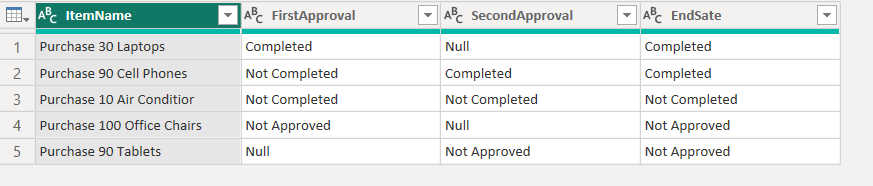
 

latimeria_0-1684508033199.png


BA_Pete
Super User
Super User

Hi @SamWhite ,


You can add a new custom column in Power Query like this:

if [SecondApproval] = null and [FirstApproval] <> null then [FirstApproval]
else if [SecondApproval] <> null then [SecondApproval]
else "All your approval are belong to us"


Pete


Now accepting Kudos! If my post helped you, why not give it a thumbs-up?

Proud to be a Datanaut!


Helpful resources

Announcements
FabCon and SQLCon Barcelona 2026

FabCon & SQLCon – Barcelona 2026

Join us in Barcelona for FabCon and SQLCon, the Fabric, Power BI, SQL, and AI community event. Save €200 with code FABCMTY200.

Power BI DataViz World Championships carousel

Power BI DataViz World Championships - June 2026

A new Power BI DataViz World Championship is coming this June! Don't miss out on submitting your entry.