cancel
Showing results for 
Search instead for 
Did you mean: 

Get Fabric Certified for FREE during AI Skills Fest. This week only. Secure your voucher now.

Reply
SamWhite
Frequent Visitor

Generate Status based on multiple column values

I have data in the below format, the only values in the Approval column can be Completed, Not Completed, Not Approved.


SamWhite_0-1684498503936.png

Based on this I want to update a "End State" column as below:

If the FirstApproval or SecondApproval column have any value equal to Completed, Not Completed, or Not Approved.

The End State column should be updated accordingly. How can I achieve this using power query? Please suggest.

SamWhite_1-1684498639358.png


1 ACCEPTED SOLUTION
BA_Pete
Super User
Super User

Hi @SamWhite ,


You can add a new custom column in Power Query like this:

if [SecondApproval] = null and [FirstApproval] <> null then [FirstApproval]
else if [SecondApproval] <> null then [SecondApproval]
else "All your approval are belong to us"


Pete


Now accepting Kudos! If my post helped you, why not give it a thumbs-up?

Proud to be a Datanaut!


View solution in original post

2 REPLIES 2
latimeria
Solution Specialist
Solution Specialist

Hi @SamWhite ,


Try this:

let
    Source = Table.FromRows(Json.Document(Binary.Decompress(Binary.FromText("dY67DoMwDEV/xcrMkKpTR5S1ogzdUIYUjGIpxVYS+v1NB8RDdLuWz7Fv16l2jr13CeGq4e4ksyRVKcNvCZhxKLmZQ1C22qA3DQZDgNbzhD+84QxbZc0776KhpljIaaBMHE/M/XywNTzGkXoE4x3F5XEtEvnzv+rTvcq1tKwPkrVf", BinaryEncoding.Base64), Compression.Deflate)), let _t = ((type nullable text) meta [Serialized.Text = true]) in type table [ItemName = _t, FirstApproval = _t, SecondApproval = _t]),
    #"Added Custom" = Table.AddColumn(
        Source, 
        "EndSate", 
        each
            if List.Contains({[FirstApproval]} & {[SecondApproval]}, "Completed") then "Completed"
            else if List.Contains({[FirstApproval]} & {[SecondApproval]}, "Not Completed") then "Not Completed"
            else if List.Contains({[FirstApproval]} & {[SecondApproval]}, "Not Approved") then "Not Approved"
            else null,
        type text
    )
in
    #"Added Custom"
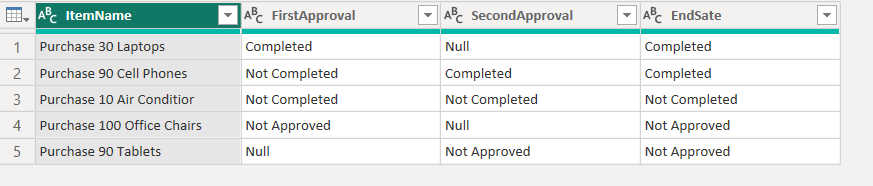
 

latimeria_0-1684508033199.png


BA_Pete
Super User
Super User

Hi @SamWhite ,


You can add a new custom column in Power Query like this:

if [SecondApproval] = null and [FirstApproval] <> null then [FirstApproval]
else if [SecondApproval] <> null then [SecondApproval]
else "All your approval are belong to us"


Pete


Now accepting Kudos! If my post helped you, why not give it a thumbs-up?

Proud to be a Datanaut!


Helpful resources

Announcements
Fabric Data Days is here Carousel

Fabric Data Days 2026

Don't miss out on Data Days, June 15 through August 7. Learn Fabric, Power BI, SQL, AI and more.

May Power BI Update Carousel

Power BI Monthly Update - May 2026

Check out the May 2026 Power BI update to learn about new features.

Power BI DataViz World Championships carousel

Power BI DataViz World Championships - June 2026

A new Power BI DataViz World Championship is coming this June! Don't miss out on submitting your entry.