Share feedback directly with Fabric product managers, participate in targeted research studies and influence the Fabric roadmap.
Sign up nowGet Fabric certified for FREE! Don't miss your chance! Learn more
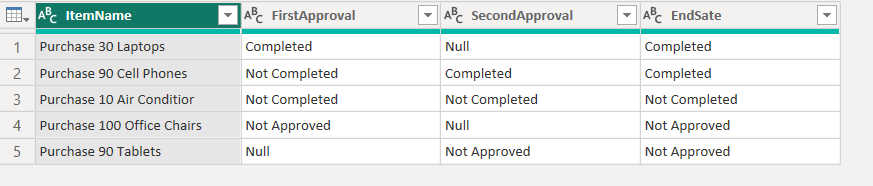
I have data in the below format, the only values in the Approval column can be Completed, Not Completed, Not Approved.
Based on this I want to update a "End State" column as below:
If the FirstApproval or SecondApproval column have any value equal to Completed, Not Completed, or Not Approved.
The End State column should be updated accordingly. How can I achieve this using power query? Please suggest.
Solved! Go to Solution.
Hi @SamWhite ,
You can add a new custom column in Power Query like this:
if [SecondApproval] = null and [FirstApproval] <> null then [FirstApproval]
else if [SecondApproval] <> null then [SecondApproval]
else "All your approval are belong to us"
Pete
Proud to be a Datanaut!
Hi @SamWhite ,
Try this:
let
Source = Table.FromRows(Json.Document(Binary.Decompress(Binary.FromText("dY67DoMwDEV/xcrMkKpTR5S1ogzdUIYUjGIpxVYS+v1NB8RDdLuWz7Fv16l2jr13CeGq4e4ksyRVKcNvCZhxKLmZQ1C22qA3DQZDgNbzhD+84QxbZc0776KhpljIaaBMHE/M/XywNTzGkXoE4x3F5XEtEvnzv+rTvcq1tKwPkrVf", BinaryEncoding.Base64), Compression.Deflate)), let _t = ((type nullable text) meta [Serialized.Text = true]) in type table [ItemName = _t, FirstApproval = _t, SecondApproval = _t]),
#"Added Custom" = Table.AddColumn(
Source,
"EndSate",
each
if List.Contains({[FirstApproval]} & {[SecondApproval]}, "Completed") then "Completed"
else if List.Contains({[FirstApproval]} & {[SecondApproval]}, "Not Completed") then "Not Completed"
else if List.Contains({[FirstApproval]} & {[SecondApproval]}, "Not Approved") then "Not Approved"
else null,
type text
)
in
#"Added Custom"
Hi @SamWhite ,
You can add a new custom column in Power Query like this:
if [SecondApproval] = null and [FirstApproval] <> null then [FirstApproval]
else if [SecondApproval] <> null then [SecondApproval]
else "All your approval are belong to us"
Pete
Proud to be a Datanaut!
If you love stickers, then you will definitely want to check out our Community Sticker Challenge!
Check out the January 2026 Power BI update to learn about new features.
| User | Count |
|---|---|
| 13 | |
| 11 | |
| 11 | |
| 7 | |
| 6 |