Don't miss your chance to take the Fabric Data Engineer (DP-600) exam for FREE! Find out how by attending the DP-600 session on April 23rd (pacific time), live or on-demand.
Learn moreNext up in the FabCon + SQLCon recap series: The roadmap for Microsoft SQL and Maximizing Developer experiences in Fabric. All sessions are available on-demand after the live show. Register now
Hi all!
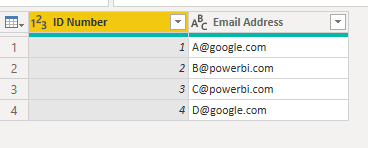
I am sure there is a simple solution for this, so please feel free to point me in the right direction. I uploaded a dataset and have errors in an ID field for three separate people. I'm working in Power Query to try to fix these errors. I'd like to individually edit these errors with the correct information for each and have other unique columns that I can reference. I think my solution is probably similar to the DAX formula referenced in the below ticket. Does anyone have information/DAX formula to edit a number field based on the another text or number field? I.e. could I write a formula that says "if this person's email address is X, change this person's ID number to Y?"
Ticket that sounds like a similar issue but with text: https://community.powerbi.com/t5/Power-Query/Override-Edit-a-Single-Cell/m-p/2337928
Thanks!
Solved! Go to Solution.
Hi @mforest ,
Based on this:
Does anyone have information/DAX formula to edit a number field based on the another text or number field? I.e. could I write a formula that says "if this person's email address is X, change this person's ID number to Y?"
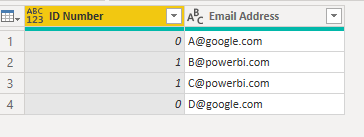
Let's assume, when his Email Address contains "powerbi" then replace ID Number with 1 else 0. Please try:
#"Replace"=Table.ReplaceValue(#"Changed Type", each [ID Number], each if Text.Contains([Email Address],"powerbi") then 1 else 0, Replacer.ReplaceValue,{"ID Number"})
In addition, please notice that, such syntax is M used in Power Query , not DAX.
Differences between the M Language and DAX in Power BI
https://powerpartners.pro/en/power-query-vs-dax/
Best Regards,
Eyelyn Qin
If this post helps, then please consider Accept it as the solution to help the other members find it more quickly.
Thanks Evelyn! My apologies - yes M!
Appreciate the reply. I've accepted it as the solution.
Hi @mforest ,
Based on this:
Does anyone have information/DAX formula to edit a number field based on the another text or number field? I.e. could I write a formula that says "if this person's email address is X, change this person's ID number to Y?"
Let's assume, when his Email Address contains "powerbi" then replace ID Number with 1 else 0. Please try:
#"Replace"=Table.ReplaceValue(#"Changed Type", each [ID Number], each if Text.Contains([Email Address],"powerbi") then 1 else 0, Replacer.ReplaceValue,{"ID Number"})
In addition, please notice that, such syntax is M used in Power Query , not DAX.
Differences between the M Language and DAX in Power BI
https://powerpartners.pro/en/power-query-vs-dax/
Best Regards,
Eyelyn Qin
If this post helps, then please consider Accept it as the solution to help the other members find it more quickly.
If you have recently started exploring Fabric, we'd love to hear how it's going. Your feedback can help with product improvements.
A new Power BI DataViz World Championship is coming this June! Don't miss out on submitting your entry.
Experience the highlights from FabCon & SQLCon, available live and on-demand starting April 14th.
| User | Count |
|---|---|
| 5 | |
| 3 | |
| 3 | |
| 3 | |
| 2 |
| User | Count |
|---|---|
| 7 | |
| 5 | |
| 5 | |
| 5 | |
| 4 |