cancel
Showing results for 
Search instead for 
Did you mean: 

Get Fabric certified for FREE! Don't miss your chance! Learn more

Reply
mforest
Frequent Visitor

Fix individual errors in Power Query

Hi all! 


I am sure there is a simple solution for this, so please feel free to point me in the right direction. I uploaded a dataset and have errors in an ID field for three separate people. I'm working in Power Query to try to fix these errors. I'd like to individually edit these errors with the correct information for each and have other unique columns that I can reference. I think my solution is probably similar to the DAX formula referenced in the below ticket. Does anyone have information/DAX formula to edit a number field based on the another text or number field? I.e. could I write a formula that says "if this person's email address is X, change this person's ID number to Y?"


Ticket that sounds like a similar issue but with text: https://community.powerbi.com/t5/Power-Query/Override-Edit-a-Single-Cell/m-p/2337928


Thanks!

1 ACCEPTED SOLUTION
Anonymous
Not applicable

Hi @mforest ,


Based on this:

Does anyone have information/DAX formula to edit a number field based on the another text or number field? I.e. could I write a formula that says "if this person's email address is X, change this person's ID number to Y?"


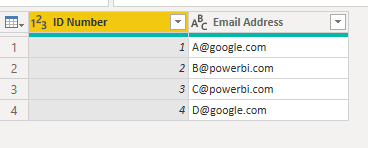
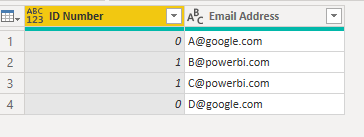
Let's assume, when his Email Address contains "powerbi" then replace ID Number with 1 else 0. Please try:

#"Replace"=Table.ReplaceValue(#"Changed Type", each [ID Number], each if Text.Contains([Email Address],"powerbi")  then 1 else 0, Replacer.ReplaceValue,{"ID Number"})

Eyelyn9_0-1656309329283.png

Eyelyn9_1-1656309336792.png


In addition, please notice that, such syntax is M used in Power Query , not DAX.

Differences between the M Language and DAX in Power BI

https://powerpartners.pro/en/power-query-vs-dax/


Best Regards,
Eyelyn Qin
If this post helps, then please consider Accept it as the solution to help the other members find it more quickly.

View solution in original post

2 REPLIES 2
mforest
Frequent Visitor

Thanks Evelyn! My apologies - yes M! 


Appreciate the reply. I've accepted it as the solution.

Anonymous
Not applicable

Hi @mforest ,


Based on this:

Does anyone have information/DAX formula to edit a number field based on the another text or number field? I.e. could I write a formula that says "if this person's email address is X, change this person's ID number to Y?"


Let's assume, when his Email Address contains "powerbi" then replace ID Number with 1 else 0. Please try:

#"Replace"=Table.ReplaceValue(#"Changed Type", each [ID Number], each if Text.Contains([Email Address],"powerbi")  then 1 else 0, Replacer.ReplaceValue,{"ID Number"})

Eyelyn9_0-1656309329283.png

Eyelyn9_1-1656309336792.png


In addition, please notice that, such syntax is M used in Power Query , not DAX.

Differences between the M Language and DAX in Power BI

https://powerpartners.pro/en/power-query-vs-dax/


Best Regards,
Eyelyn Qin
If this post helps, then please consider Accept it as the solution to help the other members find it more quickly.

Helpful resources

Announcements
Join our Fabric User Panel

Join our Fabric User Panel

Share feedback directly with Fabric product managers, participate in targeted research studies and influence the Fabric roadmap.

FabCon Atlanta 2026 carousel

FabCon Atlanta 2026

Join us at FabCon Atlanta, March 16-20, for the ultimate Fabric, Power BI, AI and SQL community-led event. Save $200 with code FABCOMM.