This time we’re going bigger than ever. Fabric, Power BI, SQL, AI and more. We're covering it all. You won't want to miss it.
Learn moreDid you hear? There's a new SQL AI Developer certification (DP-800). Start preparing now and be one of the first to get certified. Register now
Hi all!
I am sure there is a simple solution for this, so please feel free to point me in the right direction. I uploaded a dataset and have errors in an ID field for three separate people. I'm working in Power Query to try to fix these errors. I'd like to individually edit these errors with the correct information for each and have other unique columns that I can reference. I think my solution is probably similar to the DAX formula referenced in the below ticket. Does anyone have information/DAX formula to edit a number field based on the another text or number field? I.e. could I write a formula that says "if this person's email address is X, change this person's ID number to Y?"
Ticket that sounds like a similar issue but with text: https://community.powerbi.com/t5/Power-Query/Override-Edit-a-Single-Cell/m-p/2337928
Thanks!
Solved! Go to Solution.
Hi @mforest ,
Based on this:
Does anyone have information/DAX formula to edit a number field based on the another text or number field? I.e. could I write a formula that says "if this person's email address is X, change this person's ID number to Y?"
Let's assume, when his Email Address contains "powerbi" then replace ID Number with 1 else 0. Please try:
#"Replace"=Table.ReplaceValue(#"Changed Type", each [ID Number], each if Text.Contains([Email Address],"powerbi") then 1 else 0, Replacer.ReplaceValue,{"ID Number"})
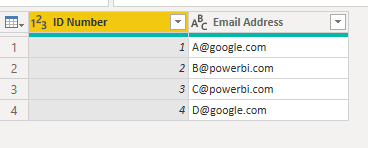
In addition, please notice that, such syntax is M used in Power Query , not DAX.
Differences between the M Language and DAX in Power BI
https://powerpartners.pro/en/power-query-vs-dax/
Best Regards,
Eyelyn Qin
If this post helps, then please consider Accept it as the solution to help the other members find it more quickly.
Thanks Evelyn! My apologies - yes M!
Appreciate the reply. I've accepted it as the solution.
Hi @mforest ,
Based on this:
Does anyone have information/DAX formula to edit a number field based on the another text or number field? I.e. could I write a formula that says "if this person's email address is X, change this person's ID number to Y?"
Let's assume, when his Email Address contains "powerbi" then replace ID Number with 1 else 0. Please try:
#"Replace"=Table.ReplaceValue(#"Changed Type", each [ID Number], each if Text.Contains([Email Address],"powerbi") then 1 else 0, Replacer.ReplaceValue,{"ID Number"})
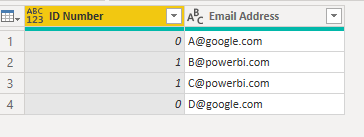
In addition, please notice that, such syntax is M used in Power Query , not DAX.
Differences between the M Language and DAX in Power BI
https://powerpartners.pro/en/power-query-vs-dax/
Best Regards,
Eyelyn Qin
If this post helps, then please consider Accept it as the solution to help the other members find it more quickly.
Check out the April 2026 Power BI update to learn about new features.
Sign up to receive a private message when registration opens and key events begin.
If you have recently started exploring Fabric, we'd love to hear how it's going. Your feedback can help with product improvements.
| User | Count |
|---|---|
| 7 | |
| 5 | |
| 4 | |
| 3 | |
| 3 |