cancel
Showing results for 
Search instead for 
Did you mean: 

July 28 - August 9 | Final Round of the Power BI Dataviz World Championships. This is your chance. Learn more

Reply
mforest
Frequent Visitor

Fix individual errors in Power Query

Hi all! 


I am sure there is a simple solution for this, so please feel free to point me in the right direction. I uploaded a dataset and have errors in an ID field for three separate people. I'm working in Power Query to try to fix these errors. I'd like to individually edit these errors with the correct information for each and have other unique columns that I can reference. I think my solution is probably similar to the DAX formula referenced in the below ticket. Does anyone have information/DAX formula to edit a number field based on the another text or number field? I.e. could I write a formula that says "if this person's email address is X, change this person's ID number to Y?"


Ticket that sounds like a similar issue but with text: https://community.powerbi.com/t5/Power-Query/Override-Edit-a-Single-Cell/m-p/2337928


Thanks!

1 ACCEPTED SOLUTION
Anonymous
Not applicable

Hi @mforest ,


Based on this:

Does anyone have information/DAX formula to edit a number field based on the another text or number field? I.e. could I write a formula that says "if this person's email address is X, change this person's ID number to Y?"


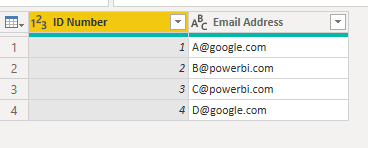
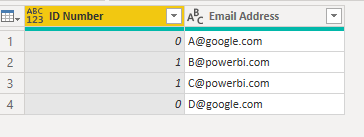
Let's assume, when his Email Address contains "powerbi" then replace ID Number with 1 else 0. Please try:

#"Replace"=Table.ReplaceValue(#"Changed Type", each [ID Number], each if Text.Contains([Email Address],"powerbi")  then 1 else 0, Replacer.ReplaceValue,{"ID Number"})

Eyelyn9_0-1656309329283.png

Eyelyn9_1-1656309336792.png


In addition, please notice that, such syntax is M used in Power Query , not DAX.

Differences between the M Language and DAX in Power BI

https://powerpartners.pro/en/power-query-vs-dax/


Best Regards,
Eyelyn Qin
If this post helps, then please consider Accept it as the solution to help the other members find it more quickly.

View solution in original post

2 REPLIES 2
mforest
Frequent Visitor

Thanks Evelyn! My apologies - yes M! 


Appreciate the reply. I've accepted it as the solution.

Anonymous
Not applicable

Hi @mforest ,


Based on this:

Does anyone have information/DAX formula to edit a number field based on the another text or number field? I.e. could I write a formula that says "if this person's email address is X, change this person's ID number to Y?"


Let's assume, when his Email Address contains "powerbi" then replace ID Number with 1 else 0. Please try:

#"Replace"=Table.ReplaceValue(#"Changed Type", each [ID Number], each if Text.Contains([Email Address],"powerbi")  then 1 else 0, Replacer.ReplaceValue,{"ID Number"})

Eyelyn9_0-1656309329283.png

Eyelyn9_1-1656309336792.png


In addition, please notice that, such syntax is M used in Power Query , not DAX.

Differences between the M Language and DAX in Power BI

https://powerpartners.pro/en/power-query-vs-dax/


Best Regards,
Eyelyn Qin
If this post helps, then please consider Accept it as the solution to help the other members find it more quickly.

Helpful resources

Announcements
Fabric Community Sticker Design Challenge Barcelona Carousel

Fabric Community Sticker Challenge - Barcelona 2026

If you love stickers, then you will definitely want to check out our community sticker challenge, Barcelona edition!

July Power BI Update Carousel

Power BI Monthly Update - July 2026

Check out the July 2026 Power BI update to learn about new features.

Power BI DataViz World Championships carousel

Power BI DataViz World Championships - June 2026

A new Power BI DataViz World Championship is coming this June! Don't miss out on submitting your entry.