
cancel
Showing results for 
Search instead for 
Did you mean: 

The Power BI Data Visualization World Championships is back! Get ahead of the game and start preparing now! Learn more

Reply
adelmonte
Resolver I
Resolver I

Find using "Contains" Wildcard and replace whole text with new value.

Hi all,

I am trying to replace whole text with "Yes" in case it contains "Product" 
Currently, I create a new conditional column, than I remove column, but I would like to do it in one step and simply replace the text.

Current code:
#"Added Conditional Column" = Table.AddColumn(#"Filtered Rows1", "Project", each if Text.Contains([#"Product Based Project"], "Product") then "Yes" else "No")

Thanks in advance.
Alex

(Mr. Amit please don't spam this post.)

1 ACCEPTED SOLUTION
MFelix
Super User
Super User

Hi @adelmonte ,


In this case you need to use the approach on the video below:


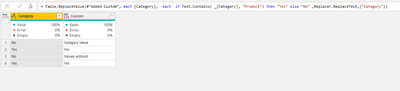
I have made a sample file with the formula that should be something similar to the one below:

MFelix_1-1643626143320.png


= Table.ReplaceValue(#"Added Custom", each [Category],  each  if Text.Contains( _[Category], "Product") then "Yes" else [Category] ,Replacer.ReplaceText,{"Category"})


MFelix_0-1643626124002.png


Has you can see the custom column (used for comparision only) give the same result has the one with the ReplaceValue. I also did not replace the full text by "No" to give the comparision between the values but if you change the values by:

= Table.ReplaceValue(#"Added Custom", each [Category],  each  if Text.Contains( _[Category], "Product") then "Yes" else "No" ,Replacer.ReplaceText,{"Category"})

Then result is has below:

MFelix_2-1643626301649.png


Regards

Miguel Félix


Did I answer your question? Mark my post as a solution!

Proud to be a Super User!

Check out my blog: Power BI em Português


View solution in original post

2 REPLIES 2
MFelix
Super User
Super User

Hi @adelmonte ,


In this case you need to use the approach on the video below:


I have made a sample file with the formula that should be something similar to the one below:

MFelix_1-1643626143320.png


= Table.ReplaceValue(#"Added Custom", each [Category],  each  if Text.Contains( _[Category], "Product") then "Yes" else [Category] ,Replacer.ReplaceText,{"Category"})


MFelix_0-1643626124002.png


Has you can see the custom column (used for comparision only) give the same result has the one with the ReplaceValue. I also did not replace the full text by "No" to give the comparision between the values but if you change the values by:

= Table.ReplaceValue(#"Added Custom", each [Category],  each  if Text.Contains( _[Category], "Product") then "Yes" else "No" ,Replacer.ReplaceText,{"Category"})

Then result is has below:

MFelix_2-1643626301649.png


Regards

Miguel Félix


Did I answer your question? Mark my post as a solution!

Proud to be a Super User!

Check out my blog: Power BI em Português


Muchas gracias Miguel!
Thank you so much!

Best regards,
Alex


Helpful resources

Announcements
Power BI DataViz World Championships

Power BI Dataviz World Championships

The Power BI Data Visualization World Championships is back! Get ahead of the game and start preparing now!

November Power BI Update Carousel

Power BI Monthly Update - November 2025

Check out the November 2025 Power BI update to learn about new features.

FabCon Atlanta 2026 carousel

FabCon Atlanta 2026

Join us at FabCon Atlanta, March 16-20, for the ultimate Fabric, Power BI, AI and SQL community-led event. Save $200 with code FABCOMM.