
This is best Fabric, Power BI, SQL and AI community event. How do we know? The last event sold out! Save €200 with code FABCMTY200.
Register nowA new Data Days event is coming soon! This time we’re going bigger than ever. Fabric, Power BI, SQL, AI and more. Don't miss out.
I am creating a new custom column for a table with more than 30 columns.
I am trying to create a new column with IF and ELSE Statement but getting the below error. Please let me know the correct syntax for this.
if [Criteria] = 1 then
(if [override_reason] = "KEEP" then Count[facility_id] else 0)/(count[facility_id]) else 0
Solved! Go to Solution.
Ah, ok.
You want to do this in DAX, not in Power Query. Create a DAX measure like this:
_Overr_ct_pct =
VAR __idCount =
COUNT(yourTable[Overr_ct])
VAR __total =
CALCULATE(
COUNT(yourTable[Overr_ct]),
REMOVEFILTERS(yourTable),
VALUES(yourTable[id])
)
RETURN
IF(
MAX(yourTable[Keep_num]) = 1, // If [Keep_num] is a measure you can remove the MAX() and 'yourTable' bits
DIVIDE(__idCount, __total, 0)
)
Select this new measure from the Fields list, go to the Measure Tools tab, change the format to Percent:
Pete
Proud to be a Datanaut!
Hi,
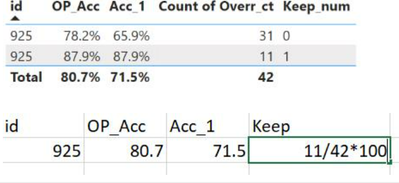
I want the result as bottom screenshot.
Ah, ok.
You want to do this in DAX, not in Power Query. Create a DAX measure like this:
_Overr_ct_pct =
VAR __idCount =
COUNT(yourTable[Overr_ct])
VAR __total =
CALCULATE(
COUNT(yourTable[Overr_ct]),
REMOVEFILTERS(yourTable),
VALUES(yourTable[id])
)
RETURN
IF(
MAX(yourTable[Keep_num]) = 1, // If [Keep_num] is a measure you can remove the MAX() and 'yourTable' bits
DIVIDE(__idCount, __total, 0)
)
Select this new measure from the Fields list, go to the Measure Tools tab, change the format to Percent:
Pete
Proud to be a Datanaut!
Hi @shikhavidyarthi ,
Assuming I'm understanding what you're trying to do, I think it would look like this:
if [Criteria] = 1 and [override_reason] = "KEEP"
then List.Count(previousStepName[facility_id]) / List.Count(previousStepName[facility_id])
else 0
Pete
Proud to be a Datanaut!
If criteria = 1 then ( if override_reason = 'KEEP' then count(facility_id))/Count(facility_id) else 0
Hi @shikhavidyarthi ,
That's what my code does.
If it's not doing what you're expecting it to do, can you give me some more detail around what you need please?
Pete
Proud to be a Datanaut!
Check out the May 2026 Power BI update to learn about new features.
Sign up to receive a private message when registration opens and key events begin.
If you have recently started exploring Fabric, we'd love to hear how it's going. Your feedback can help with product improvements.