
Learn from the best! Meet the four finalists headed to the FINALS of the Power BI Dataviz World Championships! Register now
I am creating a new custom column for a table with more than 30 columns.
I am trying to create a new column with IF and ELSE Statement but getting the below error. Please let me know the correct syntax for this.
if [Criteria] = 1 then
(if [override_reason] = "KEEP" then Count[facility_id] else 0)/(count[facility_id]) else 0
Solved! Go to Solution.
Ah, ok.
You want to do this in DAX, not in Power Query. Create a DAX measure like this:
_Overr_ct_pct =
VAR __idCount =
COUNT(yourTable[Overr_ct])
VAR __total =
CALCULATE(
COUNT(yourTable[Overr_ct]),
REMOVEFILTERS(yourTable),
VALUES(yourTable[id])
)
RETURN
IF(
MAX(yourTable[Keep_num]) = 1, // If [Keep_num] is a measure you can remove the MAX() and 'yourTable' bits
DIVIDE(__idCount, __total, 0)
)
Select this new measure from the Fields list, go to the Measure Tools tab, change the format to Percent:
Pete
Proud to be a Datanaut!
Hi,
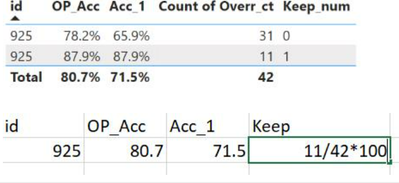
I want the result as bottom screenshot.
Ah, ok.
You want to do this in DAX, not in Power Query. Create a DAX measure like this:
_Overr_ct_pct =
VAR __idCount =
COUNT(yourTable[Overr_ct])
VAR __total =
CALCULATE(
COUNT(yourTable[Overr_ct]),
REMOVEFILTERS(yourTable),
VALUES(yourTable[id])
)
RETURN
IF(
MAX(yourTable[Keep_num]) = 1, // If [Keep_num] is a measure you can remove the MAX() and 'yourTable' bits
DIVIDE(__idCount, __total, 0)
)
Select this new measure from the Fields list, go to the Measure Tools tab, change the format to Percent:
Pete
Proud to be a Datanaut!
Hi @shikhavidyarthi ,
Assuming I'm understanding what you're trying to do, I think it would look like this:
if [Criteria] = 1 and [override_reason] = "KEEP"
then List.Count(previousStepName[facility_id]) / List.Count(previousStepName[facility_id])
else 0
Pete
Proud to be a Datanaut!
If criteria = 1 then ( if override_reason = 'KEEP' then count(facility_id))/Count(facility_id) else 0
Hi @shikhavidyarthi ,
That's what my code does.
If it's not doing what you're expecting it to do, can you give me some more detail around what you need please?
Pete
Proud to be a Datanaut!
A new Power BI DataViz World Championship is coming this June! Don't miss out on submitting your entry.
Share feedback directly with Fabric product managers, participate in targeted research studies and influence the Fabric roadmap.
| User | Count |
|---|---|
| 5 | |
| 4 | |
| 4 | |
| 3 | |
| 3 |
| User | Count |
|---|---|
| 11 | |
| 10 | |
| 8 | |
| 7 | |
| 5 |