Get certified for free when you join Fabric Data Days 2026 and dive into Fabric, Power BI, SQL, AI, and other essential data skills.
Join nowJuly 7 - July 17 | Round 2 of the Power BI Dataviz World Championships. Don't miss your chance! Learn more
Hi all,
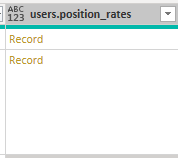
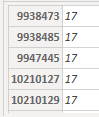
Trying to figure out how to expand a column which presents data in a key-value pair format, but where the keys are not defined ahead of time. Here's how the data looks:
Ultimately, what I need to do is a lookup against that column, where I'm matching a value from the table against the first "column" in that expanded record.
Any insights would be appreciated. Thanks!
Solved! Go to Solution.
Hey Greg and Pat,
Thanks for the insights. I ended up solving it as follows:
GetPositionRatesTable = Table.AddColumn(MyTable, "rates", each Record.ToTable([positionRates])),
GetPositionRatesTableFiltered = Table.AddColumn(GetPositionRatesTable, "rateKVP", each Table.SelectRows([rates], (r) => Number.From(r[Name]) = Number.From([position_id]))),
GetPositionRate = Table.AddColumn(GetPositionRatesTableFiltered, "rate", each if Table.RowCount([rateKVP]) >= 1 then [rateKVP]{0} else [Name = "", Value = [hourlyRate]])
Hey Greg and Pat,
Thanks for the insights. I ended up solving it as follows:
GetPositionRatesTable = Table.AddColumn(MyTable, "rates", each Record.ToTable([positionRates])),
GetPositionRatesTableFiltered = Table.AddColumn(GetPositionRatesTable, "rateKVP", each Table.SelectRows([rates], (r) => Number.From(r[Name]) = Number.From([position_id]))),
GetPositionRate = Table.AddColumn(GetPositionRatesTableFiltered, "rate", each if Table.RowCount([rateKVP]) >= 1 then [rateKVP]{0} else [Name = "", Value = [hourlyRate]])
You should be able to use Record.FieldNames() to get the changing names and feed them into Record.Field.
Pat
To learn more about Power BI, follow me on Twitter or subscribe on YouTube.
@mahoneypat Yep, was going to say the same thing. Could also use Record.ToList and then use List.First.
@kramaswamy Seems like you need Record.Field
Record functions - PowerQuery M | Microsoft Docs
Thanks for the insights, Greg - however, Record.Field (and most other methods) all require me to know the names of the columns ahead of time. In the example on MSDN for Record.Field, for example, it says:
Record.Field([CustomerID = 1, Name = "Bob", Phone = "123-4567"], "CustomerID")
How do I use it if I don't know the names of the columns?
Join us in Barcelona for FabCon and SQLCon, the Fabric, Power BI, SQL, and AI community event. Save €200 with code FABCMTY200.
Join Data Days 2026: 60 days of free live/on-demand sessions, challenges, study groups, and certification opportunities.