cancel
Showing results for 
Search instead for 
Did you mean: 

The Power BI Data Visualization World Championships is back! It's time to submit your entry. Live now!

Reply
kramaswamy
Frequent Visitor

Expand key-value pair column

Hi all,


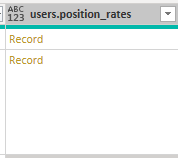
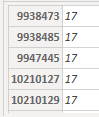
Trying to figure out how to expand a column which presents data in a key-value pair format, but where the keys are not defined ahead of time. Here's how the data looks:

kramaswamy_1-1627940470687.png

kramaswamy_0-1627940452218.png

Ultimately, what I need to do is a lookup against that column, where I'm matching a value from the table against the first "column" in that expanded record.

Any insights would be appreciated. Thanks!

1 ACCEPTED SOLUTION
kramaswamy
Frequent Visitor

Hey Greg and Pat,


Thanks for the insights. I ended up solving it as follows:


GetPositionRatesTable = Table.AddColumn(MyTable, "rates", each Record.ToTable([positionRates])),
GetPositionRatesTableFiltered = Table.AddColumn(GetPositionRatesTable, "rateKVP", each Table.SelectRows([rates], (r) => Number.From(r[Name]) = Number.From([position_id]))),
GetPositionRate = Table.AddColumn(GetPositionRatesTableFiltered, "rate", each if Table.RowCount([rateKVP]) >= 1 then [rateKVP]{0} else [Name = "", Value = [hourlyRate]])

View solution in original post

5 REPLIES 5
kramaswamy
Frequent Visitor

Hey Greg and Pat,


Thanks for the insights. I ended up solving it as follows:


GetPositionRatesTable = Table.AddColumn(MyTable, "rates", each Record.ToTable([positionRates])),
GetPositionRatesTableFiltered = Table.AddColumn(GetPositionRatesTable, "rateKVP", each Table.SelectRows([rates], (r) => Number.From(r[Name]) = Number.From([position_id]))),
GetPositionRate = Table.AddColumn(GetPositionRatesTableFiltered, "rate", each if Table.RowCount([rateKVP]) >= 1 then [rateKVP]{0} else [Name = "", Value = [hourlyRate]])

mahoneypat
Microsoft Employee
Microsoft Employee

You should be able to use Record.FieldNames() to get the changing names and feed them into Record.Field.


Pat


Did I answer your question? Mark my post as a solution! Kudos are also appreciated!

To learn more about Power BI, follow me on Twitter or subscribe on YouTube.


@mahoneypa HoosierBI on YouTube


@mahoneypat Yep, was going to say the same thing. Could also use Record.ToList and then use List.First.


Follow on LinkedIn
@ me in replies or I'll lose your thread!!!
Instead of a Kudo, please vote for this idea
Become an expert!: Enterprise DNA
External Tools: MSHGQM
YouTube Channel!: Microsoft Hates Greg
Latest book!:
DAX For Humans

DAX is easy, CALCULATE makes DAX hard...
Greg_Deckler
Community Champion
Community Champion

@kramaswamy Seems like you need Record.Field

Record functions - PowerQuery M | Microsoft Docs


Follow on LinkedIn
@ me in replies or I'll lose your thread!!!
Instead of a Kudo, please vote for this idea
Become an expert!: Enterprise DNA
External Tools: MSHGQM
YouTube Channel!: Microsoft Hates Greg
Latest book!:
DAX For Humans

DAX is easy, CALCULATE makes DAX hard...

Thanks for the insights, Greg - however, Record.Field (and most other methods) all require me to know the names of the columns ahead of time. In the example on MSDN for Record.Field, for example, it says:

Record.Field([CustomerID = 1, Name = "Bob", Phone = "123-4567"], "CustomerID")

 How do I use it if I don't know the names of the columns?

Helpful resources

Announcements
FabCon Atlanta 2026 carousel

FabCon Atlanta 2026

Join us at FabCon Atlanta, March 16-20, for the ultimate Fabric, Power BI, AI and SQL community-led event. Save $200 with code FABCOMM.