Join us at FabCon Atlanta from March 16 - 20, 2026, for the ultimate Fabric, Power BI, AI and SQL community-led event. Save $200 with code FABCOMM.
Register now!The Power BI Data Visualization World Championships is back! Get ahead of the game and start preparing now! Learn more
Hi,
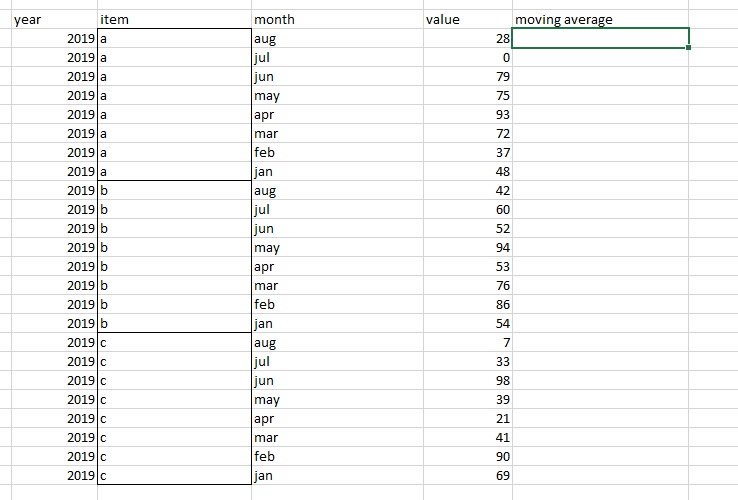
Hi, Can someone assist on moving average when data is grouped? below is an example:
looking for moving average on data grouped by "item" column.
Thanks!
Solved! Go to Solution.
Hi @Anonymous ,
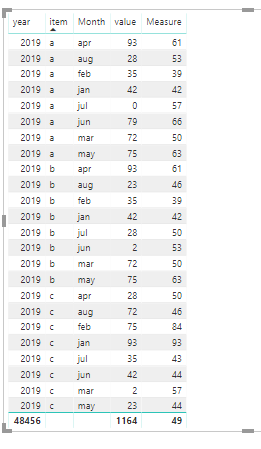
We can create a measure as below by DAX.
Measure =
VAR a =
CALCULATE (
SUM ( 'Table'[value] ),
FILTER ( ALL ( 'Table' ), 'Table'[Monthno] <= MAX ( 'Table'[Monthno] ) ),
VALUES ( 'Table'[item] )
)
VAR b =
CALCULATE (
COUNTROWS ( 'Table' ),
FILTER ( ALL ( 'Table' ), 'Table'[Monthno] <= MAX ( 'Table'[Monthno] ) ),
VALUES ( 'Table'[item] )
)
RETURN
DIVIDE ( a, b )
Hi @Anonymous ,
We can create a measure as below by DAX.
Measure =
VAR a =
CALCULATE (
SUM ( 'Table'[value] ),
FILTER ( ALL ( 'Table' ), 'Table'[Monthno] <= MAX ( 'Table'[Monthno] ) ),
VALUES ( 'Table'[item] )
)
VAR b =
CALCULATE (
COUNTROWS ( 'Table' ),
FILTER ( ALL ( 'Table' ), 'Table'[Monthno] <= MAX ( 'Table'[Monthno] ) ),
VALUES ( 'Table'[item] )
)
RETURN
DIVIDE ( a, b )
This article describes how to create a rolling sum, just use List.Average instead: https://www.thebiccountant.com/2017/05/29/performance-tip-partition-tables-crossjoins-possible-power...
Imke Feldmann (The BIccountant)
If you liked my solution, please give it a thumbs up. And if I did answer your question, please mark this post as a solution. Thanks!
How to integrate M-code into your solution -- How to get your questions answered quickly -- How to provide sample data -- Check out more PBI- learning resources here -- Performance Tipps for M-queries
The Power BI Data Visualization World Championships is back! Get ahead of the game and start preparing now!