Get certified for free when you join Fabric Data Days 2026 and dive into Fabric, Power BI, SQL, AI, and other essential data skills.
Join nowJuly 7 - July 17 | Round 2 of the Power BI Dataviz World Championships. Don't miss your chance! Learn more
Hi,
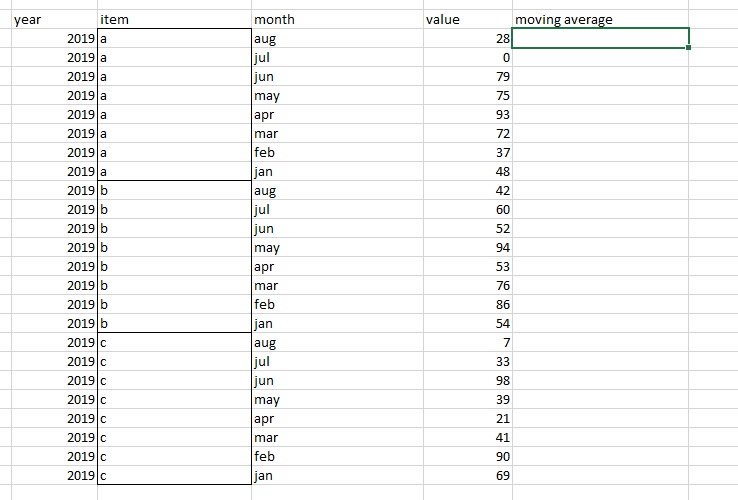
Hi, Can someone assist on moving average when data is grouped? below is an example:
looking for moving average on data grouped by "item" column.
Thanks!
Solved! Go to Solution.
Hi @Anonymous ,
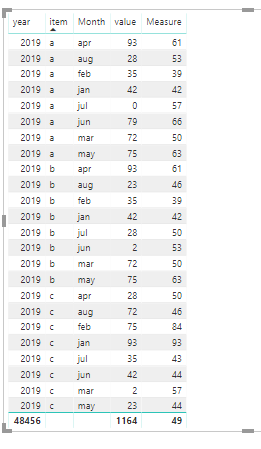
We can create a measure as below by DAX.
Measure =
VAR a =
CALCULATE (
SUM ( 'Table'[value] ),
FILTER ( ALL ( 'Table' ), 'Table'[Monthno] <= MAX ( 'Table'[Monthno] ) ),
VALUES ( 'Table'[item] )
)
VAR b =
CALCULATE (
COUNTROWS ( 'Table' ),
FILTER ( ALL ( 'Table' ), 'Table'[Monthno] <= MAX ( 'Table'[Monthno] ) ),
VALUES ( 'Table'[item] )
)
RETURN
DIVIDE ( a, b )
Hi @Anonymous ,
We can create a measure as below by DAX.
Measure =
VAR a =
CALCULATE (
SUM ( 'Table'[value] ),
FILTER ( ALL ( 'Table' ), 'Table'[Monthno] <= MAX ( 'Table'[Monthno] ) ),
VALUES ( 'Table'[item] )
)
VAR b =
CALCULATE (
COUNTROWS ( 'Table' ),
FILTER ( ALL ( 'Table' ), 'Table'[Monthno] <= MAX ( 'Table'[Monthno] ) ),
VALUES ( 'Table'[item] )
)
RETURN
DIVIDE ( a, b )
This article describes how to create a rolling sum, just use List.Average instead: https://www.thebiccountant.com/2017/05/29/performance-tip-partition-tables-crossjoins-possible-power...
Imke Feldmann (The BIccountant)
If you liked my solution, please give it a thumbs up. And if I did answer your question, please mark this post as a solution. Thanks!
How to integrate M-code into your solution -- How to get your questions answered quickly -- How to provide sample data -- Check out more PBI- learning resources here -- Performance Tipps for M-queries