Learn from the best! Meet the four finalists headed to the FINALS of the Power BI Dataviz World Championships! Register now
Hi,
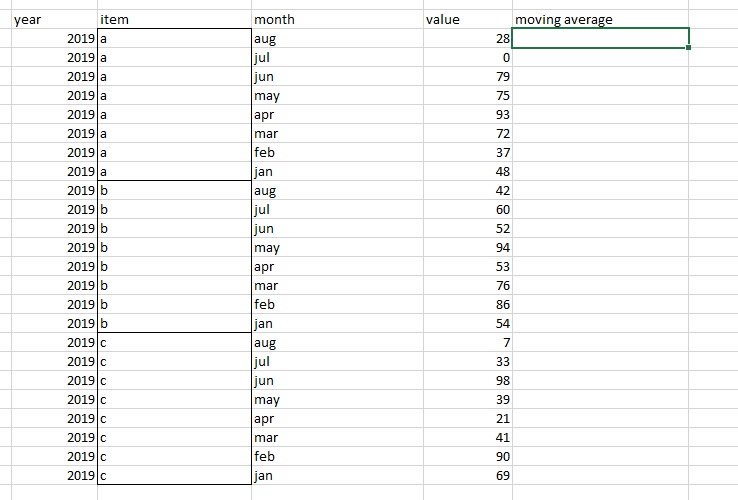
Hi, Can someone assist on moving average when data is grouped? below is an example:
looking for moving average on data grouped by "item" column.
Thanks!
Solved! Go to Solution.
Hi @Anonymous ,
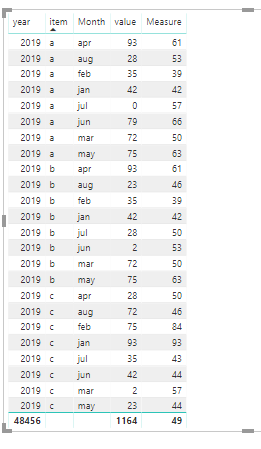
We can create a measure as below by DAX.
Measure =
VAR a =
CALCULATE (
SUM ( 'Table'[value] ),
FILTER ( ALL ( 'Table' ), 'Table'[Monthno] <= MAX ( 'Table'[Monthno] ) ),
VALUES ( 'Table'[item] )
)
VAR b =
CALCULATE (
COUNTROWS ( 'Table' ),
FILTER ( ALL ( 'Table' ), 'Table'[Monthno] <= MAX ( 'Table'[Monthno] ) ),
VALUES ( 'Table'[item] )
)
RETURN
DIVIDE ( a, b )
Hi @Anonymous ,
We can create a measure as below by DAX.
Measure =
VAR a =
CALCULATE (
SUM ( 'Table'[value] ),
FILTER ( ALL ( 'Table' ), 'Table'[Monthno] <= MAX ( 'Table'[Monthno] ) ),
VALUES ( 'Table'[item] )
)
VAR b =
CALCULATE (
COUNTROWS ( 'Table' ),
FILTER ( ALL ( 'Table' ), 'Table'[Monthno] <= MAX ( 'Table'[Monthno] ) ),
VALUES ( 'Table'[item] )
)
RETURN
DIVIDE ( a, b )
This article describes how to create a rolling sum, just use List.Average instead: https://www.thebiccountant.com/2017/05/29/performance-tip-partition-tables-crossjoins-possible-power...
Imke Feldmann (The BIccountant)
If you liked my solution, please give it a thumbs up. And if I did answer your question, please mark this post as a solution. Thanks!
How to integrate M-code into your solution -- How to get your questions answered quickly -- How to provide sample data -- Check out more PBI- learning resources here -- Performance Tipps for M-queries
A new Power BI DataViz World Championship is coming this June! Don't miss out on submitting your entry.
Share feedback directly with Fabric product managers, participate in targeted research studies and influence the Fabric roadmap.
| User | Count |
|---|---|
| 5 | |
| 4 | |
| 4 | |
| 3 | |
| 3 |
| User | Count |
|---|---|
| 11 | |
| 10 | |
| 7 | |
| 7 | |
| 7 |