Get Fabric or SQL Certified for Free.
Get certified for free when you join Fabric Data Days 2026 and dive into Fabric, Power BI, SQL, AI, and other essential data skills.
Join now- Power BI forums
- Get Help with Power BI
- Desktop
- Service
- Report Server
- Power Query
- Mobile Apps
- Developer
- DAX Commands and Tips
- Custom Visuals Development Discussion
- Health and Life Sciences
- Power BI Spanish forums
- Translated Spanish Desktop
- Training and Consulting
- Instructor Led Training
- Dashboard in a Day for Women, by Women
- Galleries
- Data Stories Gallery
- Themes Gallery
- Contests Gallery
- QuickViz Gallery
- Quick Measures Gallery
- Visual Calculations Gallery
- Notebook Gallery
- Translytical Task Flow Gallery
- TMDL Gallery
- R Script Showcase
- Webinars and Video Gallery
- Ideas
- Custom Visuals Ideas (read-only)
- Issues
- Issues
- Events
- Upcoming Events
July 7 - July 17 | Round 2 of the Power BI Dataviz World Championships. Don't miss your chance! Learn more
- Power BI forums
- Forums
- Get Help with Power BI
- Power Query
- Re: Dynamicly delete x line
- Subscribe to RSS Feed
- Mark Topic as New
- Mark Topic as Read
- Float this Topic for Current User
- Bookmark
- Subscribe
- Printer Friendly Page


- Mark as New
- Bookmark
- Subscribe
- Mute
- Subscribe to RSS Feed
- Permalink
- Report Inappropriate Content
Dynamicly delete x line
Hi
I have multiple Excel file to concatenate, but i should only start after that i found this information Section 7 on a specific sheet.
This information is not at the same line for each file
I made a function TrouveIndexSection to found the line of the information for each file, it works
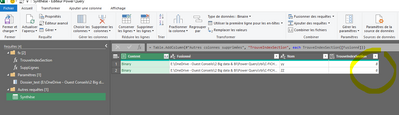
I made another function SuppLignes to delete the line for each file, but i don't arrive to use the result of the previous function TrouveIndexSection as an argument for my function .... in order to delete the good number of line for each file
Here My file :
https://1drv.ms/x/s!AoqtZHsX4BzvhLMY4mWpyWCh89cNaA?e=E4uOGC
Solved! Go to Solution.


- Mark as New
- Bookmark
- Subscribe
- Mute
- Subscribe to RSS Feed
- Permalink
- Report Inappropriate Content
let
    Source = Folder.Files("C:\Users\xxx\Downloads"),
    #"Filtered Rows" = Table.SelectRows(Source, each [Name] = "ww.xlsx" or [Name] = "yy.xlsx" or [Name] = "ZZ.xlsx"),
    LoadFile = (Ex) => let
        #"Imported Excel Workbook" = Excel.Workbook(Ex),
        #"Fiche contrôle_Sheet" = #"Imported Excel Workbook"{[Item="Fiche contrôle",Kind="Sheet"]}[Data],
        #"Added Index" = Table.AddIndexColumn(#"Fiche contrôle_Sheet", "Index", 0, 1, Int64.Type),
        #"Removed Top Rows" = Table.Skip(#"Added Index",Table.SelectRows(#"Added Index", each ([Column2] = "Section 7 : RECOMMANDATIONS#(lf)"))[Index]{0}+1),
        #"Replaced Value" = Table.ReplaceValue(#"Removed Top Rows",null,"Category",Replacer.ReplaceValue,{"Column2"}),
        #"Removed Other Columns" = Table.SelectColumns(#"Replaced Value",{"Column2", "Column4"}),
        #"Promoted Headers" = Table.PromoteHeaders(#"Removed Other Columns", [PromoteAllScalars=true])
    in
        #"Promoted Headers",
    #"Added Custom" = Table.AddColumn(#"Filtered Rows", "DataCustom", each LoadFile([Content])),
    #"Removed Other Columns" = Table.SelectColumns(#"Added Custom",{"Name", "DataCustom"}),
    #"Expanded DataCustom" = Table.ExpandTableColumn(#"Removed Other Columns", "DataCustom", {"Category", "Thème"}, {"Category", "Thème"}),
    #"Filtered Rows1" = Table.SelectRows(#"Expanded DataCustom", each ([Thème] <> null))
in
#"Filtered Rows1"- Mark as New
- Bookmark
- Subscribe
- Mute
- Subscribe to RSS Feed
- Permalink
- Report Inappropriate Content
Not sure exactly what you are trying to achieve but have a look at this:
let
    Source = Excel.Workbook(File.Contents("C:\Users\xxx\Downloads\SUPPORT.xlsx"), null, true),
    Synthèse_test_Sheet = Source{[Item="Synthèse_test",Kind="Sheet"]}[Data],
    #"Promoted Headers" = Table.PromoteHeaders(Synthèse_test_Sheet, [PromoteAllScalars=true]),
    #"Filtered Rows" = Table.SelectRows(#"Promoted Headers", each [Column2] <> null  and Text.Lower([Column2])<>Text.Lower([Nom]))
in
#"Filtered Rows"- Mark as New
- Bookmark
- Subscribe
- Mute
- Subscribe to RSS Feed
- Permalink
- Report Inappropriate Content
Hi
thanks for your reply but it is not that i want
I try to explain in other way
I concatenate 2 files Y and Z
In the Y file i want to delete the 8 fist lines ant for Z the 6 and after concanetate the rest of lines of the 2 files
I found 8 and 6 because with the fist function i search Section 7 and for the Y file it is at the 8 position
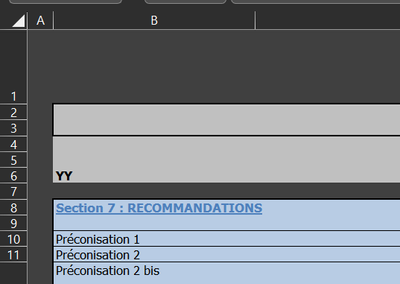
and for the Z files it is at the 6
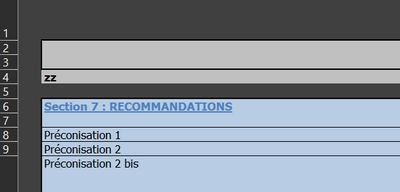
Y and Z files
- Mark as New
- Bookmark
- Subscribe
- Mute
- Subscribe to RSS Feed
- Permalink
- Report Inappropriate Content
let
    Source = Folder.Files("C:\Users\xxx\Downloads"),
    #"Filtered Rows" = Table.SelectRows(Source, each [Name] = "yy.xlsx" or [Name] = "ZZ.xlsx"),
    LoadFile = (Ex) => let
        #"Imported Excel Workbook" = Excel.Workbook(Ex),
        #"Fiche contrôle_Sheet" = #"Imported Excel Workbook"{[Item="Fiche contrôle",Kind="Sheet"]}[Data],
        #"Filtered Rows1" = Table.SelectRows(#"Fiche contrôle_Sheet", each ([Column4] <> null)),
        #"Replaced Value" = Table.ReplaceValue(#"Filtered Rows1",null,"Category",Replacer.ReplaceValue,{"Column2"}),
        #"Removed Other Columns" = Table.SelectColumns(#"Replaced Value",{"Column2", "Column4"}),
        #"Promoted Headers" = Table.PromoteHeaders(#"Removed Other Columns", [PromoteAllScalars=true])
    in
        #"Promoted Headers",
    #"Added Custom" = Table.AddColumn(#"Filtered Rows", "DataCustom", each LoadFile([Content])),
    #"Removed Other Columns" = Table.SelectColumns(#"Added Custom",{"Name", "DataCustom"}),
    #"Expanded DataCustom" = Table.ExpandTableColumn(#"Removed Other Columns", "DataCustom", {"Category", "Thème"}, {"Category", "Thème"})
in
#"Expanded DataCustom"- Mark as New
- Bookmark
- Subscribe
- Mute
- Subscribe to RSS Feed
- Permalink
- Report Inappropriate Content
Hi
Thanks for your answer
Your solution does the job on my example files, but for the real files i really need to filter base on the position as explain
here a real file without client information
https://1drv.ms/f/s!AoqtZHsX4BzvhLMk2vl7mHRT8F-OIQ?e=eNY7t5
- Mark as New
- Bookmark
- Subscribe
- Mute
- Subscribe to RSS Feed
- Permalink
- Report Inappropriate Content
let
    Source = Folder.Files("C:\Users\xxx\Downloads"),
    #"Filtered Rows" = Table.SelectRows(Source, each [Name] = "ww.xlsx" or [Name] = "yy.xlsx" or [Name] = "ZZ.xlsx"),
    LoadFile = (Ex) => let
        #"Imported Excel Workbook" = Excel.Workbook(Ex),
        #"Fiche contrôle_Sheet" = #"Imported Excel Workbook"{[Item="Fiche contrôle",Kind="Sheet"]}[Data],
        #"Added Index" = Table.AddIndexColumn(#"Fiche contrôle_Sheet", "Index", 0, 1, Int64.Type),
        #"Removed Top Rows" = Table.Skip(#"Added Index",Table.SelectRows(#"Added Index", each ([Column2] = "Section 7 : RECOMMANDATIONS#(lf)"))[Index]{0}+1),
        #"Replaced Value" = Table.ReplaceValue(#"Removed Top Rows",null,"Category",Replacer.ReplaceValue,{"Column2"}),
        #"Removed Other Columns" = Table.SelectColumns(#"Replaced Value",{"Column2", "Column4"}),
        #"Promoted Headers" = Table.PromoteHeaders(#"Removed Other Columns", [PromoteAllScalars=true])
    in
        #"Promoted Headers",
    #"Added Custom" = Table.AddColumn(#"Filtered Rows", "DataCustom", each LoadFile([Content])),
    #"Removed Other Columns" = Table.SelectColumns(#"Added Custom",{"Name", "DataCustom"}),
    #"Expanded DataCustom" = Table.ExpandTableColumn(#"Removed Other Columns", "DataCustom", {"Category", "Thème"}, {"Category", "Thème"}),
    #"Filtered Rows1" = Table.SelectRows(#"Expanded DataCustom", each ([Thème] <> null))
in
#"Filtered Rows1"- Mark as New
- Bookmark
- Subscribe
- Mute
- Subscribe to RSS Feed
- Permalink
- Report Inappropriate Content
Thanks a lot !!!!
I will read and read again your code
Have a nice day🤘

Helpful resources

FabCon & SQLCon – Barcelona 2026
Join us in Barcelona for FabCon and SQLCon, the Fabric, Power BI, SQL, and AI community event. Save €200 with code FABCMTY200.

Data Days 2026
Join Fabric Data Days 2026: 60 days of free live/on-demand sessions, challenges, study groups, and certification opportunities.

Power BI DataViz World Championships - June 2026
A new Power BI DataViz World Championship is coming this June! Don't miss out on submitting your entry.


| User | Count |
|---|---|
| 8 | |
| 5 | |
| 5 | |
| 4 | |
| 4 |


