Join us at FabCon Atlanta from March 16 - 20, 2026, for the ultimate Fabric, Power BI, AI and SQL community-led event. Save $200 with code FABCOMM.
Register now!The Power BI Data Visualization World Championships is back! Get ahead of the game and start preparing now! Learn more
Hello,
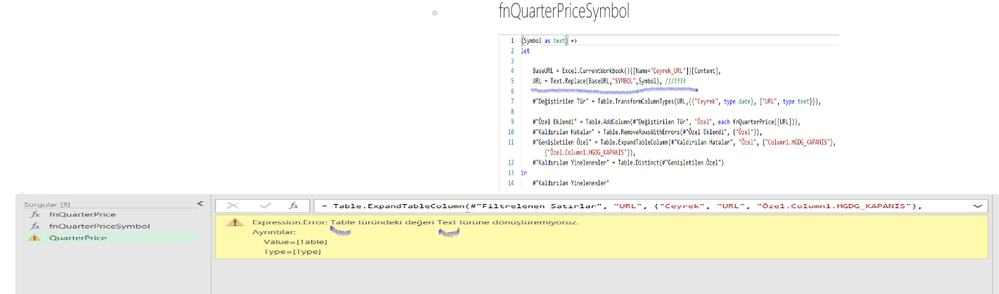
This is in need of help. I am not proficient in M language. I am trying.
I think there is a problem in this part.
-----------------------------------------------------------------------
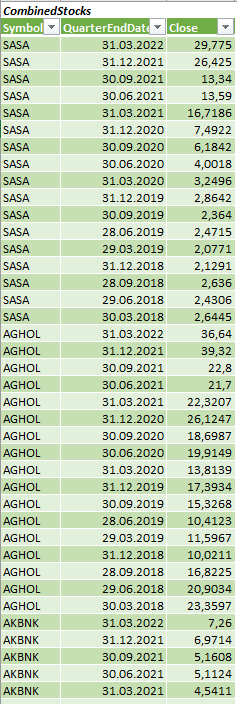
I want to get a result like in the picture.
-----------------------------------------------------------------------------
One Stock working:
Multiple Stock Not working:
Solved! Go to Solution.
Hi @deniztopcu ,
looks like changing your query to:
(Symbol as text) =>
let
//Symbol = "FENER",
BaseURL = Excel.CurrentWorkbook(){[Name="Çeyrek_URL"]}[Content],
#"Added Custom" = Table.AddColumn(BaseURL, "ModifiedURL", each Text.Replace([URL],"SYMBOL",Symbol)),
///????
#"Değiştirilen Tür" = Table.TransformColumnTypes(#"Added Custom",{{"Ceyrek", type date}, {"URL", type text}}),
#"Özel Eklendi" = Table.AddColumn(#"Değiştirilen Tür", "Özel", each fnQuarterPrice([ModifiedURL])),
#"Removed Errors" = Table.RemoveRowsWithErrors(#"Özel Eklendi", {"Özel"}),
#"Kaldırılan Hatalar" = Table.RemoveRowsWithErrors(#"Removed Errors", {"Özel"}),
#"Genişletilen Özel" = Table.ExpandTableColumn(#"Kaldırılan Hatalar", "Özel", {"Column1.HGDG_KAPANIS"}, {"Özel.Column1.HGDG_KAPANIS"}),
#"Kaldırılan Yinelenenler" = Table.Distinct(#"Genişletilen Özel")
in
#"Kaldırılan Yinelenenler"
does the job.
(Attached file as well)
Imke Feldmann (The BIccountant)
If you liked my solution, please give it a thumbs up. And if I did answer your question, please mark this post as a solution. Thanks!
How to integrate M-code into your solution -- How to get your questions answered quickly -- How to provide sample data -- Check out more PBI- learning resources here -- Performance Tipps for M-queries
Hi @deniztopcu ,
looks like changing your query to:
(Symbol as text) =>
let
//Symbol = "FENER",
BaseURL = Excel.CurrentWorkbook(){[Name="Çeyrek_URL"]}[Content],
#"Added Custom" = Table.AddColumn(BaseURL, "ModifiedURL", each Text.Replace([URL],"SYMBOL",Symbol)),
///????
#"Değiştirilen Tür" = Table.TransformColumnTypes(#"Added Custom",{{"Ceyrek", type date}, {"URL", type text}}),
#"Özel Eklendi" = Table.AddColumn(#"Değiştirilen Tür", "Özel", each fnQuarterPrice([ModifiedURL])),
#"Removed Errors" = Table.RemoveRowsWithErrors(#"Özel Eklendi", {"Özel"}),
#"Kaldırılan Hatalar" = Table.RemoveRowsWithErrors(#"Removed Errors", {"Özel"}),
#"Genişletilen Özel" = Table.ExpandTableColumn(#"Kaldırılan Hatalar", "Özel", {"Column1.HGDG_KAPANIS"}, {"Özel.Column1.HGDG_KAPANIS"}),
#"Kaldırılan Yinelenenler" = Table.Distinct(#"Genişletilen Özel")
in
#"Kaldırılan Yinelenenler"
does the job.
(Attached file as well)
Imke Feldmann (The BIccountant)
If you liked my solution, please give it a thumbs up. And if I did answer your question, please mark this post as a solution. Thanks!
How to integrate M-code into your solution -- How to get your questions answered quickly -- How to provide sample data -- Check out more PBI- learning resources here -- Performance Tipps for M-queries
Thank you so much. For your efforts in this thread. A very positive result for me.🌻🌻🌻
Add to the end of the BaseURL step: [Column]{Row - 1}
Replace Column with the column that contains the url and Row with the row number.
I tried what you said but it still gives an error.
represents a single row.
in the table (Çeyrek_URL),
in the "URL column"
should get all URLs. and should be for each symbol.
The Power BI Data Visualization World Championships is back! Get ahead of the game and start preparing now!
Check out the November 2025 Power BI update to learn about new features.
| User | Count |
|---|---|
| 10 | |
| 6 | |
| 5 | |
| 4 | |
| 2 |