cancel
Showing results for 
Search instead for 
Did you mean: 

July 7 - July 17 | Round 2 of the Power BI Dataviz World Championships. Don't miss your chance! Learn more

Reply
Anonymous
Not applicable

Dealing with huge database

Hi,


I'm dealing with a 2tb database and have tried few times to load it but end up unsuccess. What can i do with it?

1 ACCEPTED SOLUTION
Anonymous
Not applicable

@Anonymous,

Do you need all the columns of your database? I would recommend you specify required columns using SQL statement like "select col1,col2 from mydata.link_bi_betslips limit 5", and enter timeout value.

1.PNG


Regards,
Lydia

View solution in original post

7 REPLIES 7
Greg_Deckler
Community Champion
Community Champion

I would recommend a Direct Query (Live) connection to that large of a database.


Follow on LinkedIn
@ me in replies or I'll lose your thread!!!
Instead of a Kudo, please vote for this idea
Become an expert!: Enterprise DNA
External Tools: MSHGQM
YouTube Channel!: Microsoft Hates Greg
Latest book!:
DAX For Humans

DAX is easy, CALCULATE makes DAX hard...
Anonymous
Not applicable

@Greg_Deckler, my database is in MySQL. I can't find the option for me to perform Direct Query. Below is my view:


MySQL.JPG

Anonymous
Not applicable

@Anonymous,

There is no DirectQuery option for MySQL, in your scenario, I would recommend you write specific SQL statement to import required columns and rows.

Regards,
Lydia

Anonymous
Not applicable

@Anonymous, can you show me where and how to write the SQL statement in Power BI to import required columns and rows?

Anonymous
Not applicable

@Anonymous,

You can input SQL statement in the highlighted textbox. You can firstly test the SQL statement in MySQL workbench,

1.PNG

Regards,
Lydia

Anonymous
Not applicable

@Anonymous,


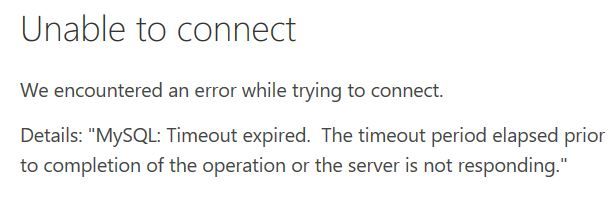
I was still unable to extract any data with my sql statement belowsql statement.JPGUnable to connect.JPG

Anonymous
Not applicable

@Anonymous,

Do you need all the columns of your database? I would recommend you specify required columns using SQL statement like "select col1,col2 from mydata.link_bi_betslips limit 5", and enter timeout value.

1.PNG


Regards,
Lydia

Helpful resources

Announcements
FabCon and SQLCon Barcelona 2026

FabCon & SQLCon – Barcelona 2026

Join us in Barcelona for FabCon and SQLCon, the Fabric, Power BI, SQL, and AI community event. Save €200 with code FABCMTY200.

60 days of Data Days Carousel

Data Days 2026

Join Fabric Data Days 2026: 60 days of free live/on-demand sessions, challenges, study groups, and certification opportunities.

Power BI DataViz World Championships carousel

Power BI DataViz World Championships - June 2026

A new Power BI DataViz World Championship is coming this June! Don't miss out on submitting your entry.