Join us at FabCon Atlanta from March 16 - 20, 2026, for the ultimate Fabric, Power BI, AI and SQL community-led event. Save $200 with code FABCOMM.
Register now!The Power BI Data Visualization World Championships is back! Get ahead of the game and start preparing now! Learn more
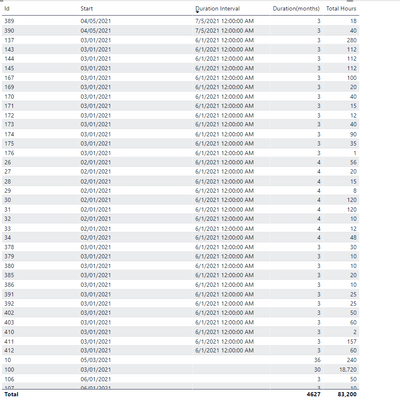
Hi, I'm trying to spread total hours of a task over a certain number of months. I don't have an end date , but I do have a start date. I thought simple way was to use DateADD , yet my outcome is not configuring for all rows.
Duration Interval = DATEADD('STEP Resource Planning'[Start],[Duration(months)],MONTH)
I want to use this as my End Date column. Wanting to know if this makes sense to do it this way, and if so, how do I have it calculate for all rows.
Thanks.
Solved! Go to Solution.
Assuming you are using a calcuated column:
Duration Interval = DATE(YEAR('STEP Resource Planning'[Start]), MONTH('STEP Resource Planning'[Start]) + 'STEP Resource Planning'[Duration(month)]), DAY('STEP Resource Planning'[Start]))
Assuming you are using a calcuated column:
Duration Interval = DATE(YEAR('STEP Resource Planning'[Start]), MONTH('STEP Resource Planning'[Start]) + 'STEP Resource Planning'[Duration(month)]), DAY('STEP Resource Planning'[Start]))
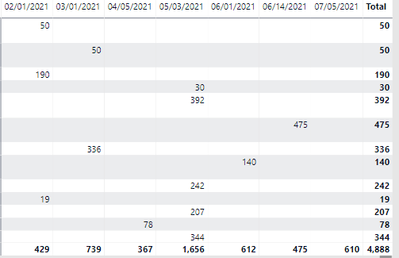
@JW_van_Holst , oh my goodness, your Dax worked and look all the hours are in the months columns.. so thankful do you know how many hours I've been trying to get this to work? 👼
Check out the November 2025 Power BI update to learn about new features.
Advance your Data & AI career with 50 days of live learning, contests, hands-on challenges, study groups & certifications and more!
| User | Count |
|---|---|
| 10 | |
| 6 | |
| 5 | |
| 4 | |
| 3 |