cancel
Showing results for 
Search instead for 
Did you mean: 

Learn from the best! Meet the four finalists headed to the FINALS of the Power BI Dataviz World Championships! Register now

Reply
Anonymous
Not applicable

Datasource credentials configuration problem

Hi there,


I'm trying to set up auto refresh for a dataset but I keep failing to do what I want.

I installed the on-premises gateaway (tried both personal and entreprise) and all seems good, I went to configure my dataset credentials for the datasource (Excel file) and I have 3 privacy options to choose from : <blank>, <Private>, <Organizational>. This is confidential data so i choosed private (as well as in the Power BI Desktop options for the datasource) but when I try to save changes it keeps loading indefinitely and this is the same if I try with Organizational option. But when I select the blank value, this works and the data is well refreshed.


Am I doing something wrong?

What append if I choose the blank option? Will my data be public? (I tried with fake data to avoid this)


Thanks for your help.

1 ACCEPTED SOLUTION
v-piga-msft
Resident Rockstar
Resident Rockstar

Hi @Anonymous ,

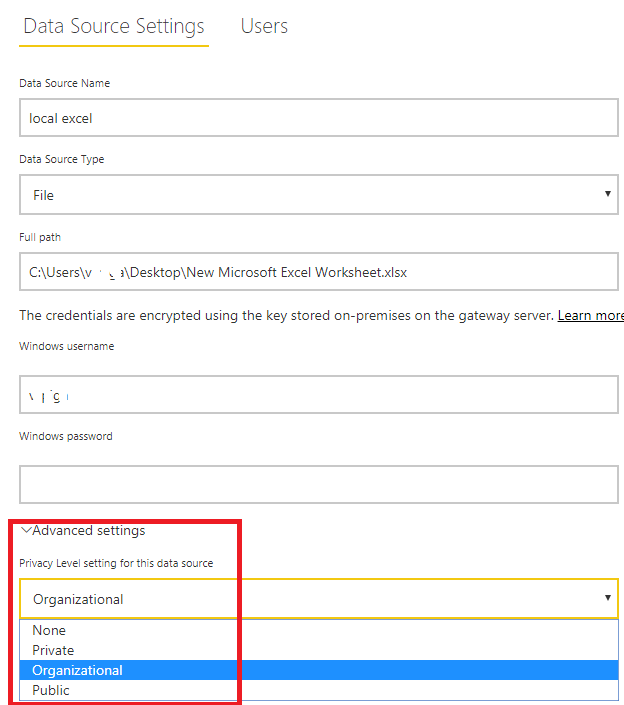
If I understand your sceanrio correctly that you don't know how to choose the option under Advanced setting.

add data source to gateway.png

For the options, here is an official document which describe it in details, you could have a good at it.

In addition, by my test, I could select Organizational option and apply it successfully.

Besides, please check if you have install the latest version of gateway (3000.2.52).

Best Regards,

Cherry


Community Support Team _ Cherry Gao
If this post helps, then please consider Accept it as the solution to help the other members find it more quickly.

View solution in original post

1 REPLY 1
v-piga-msft
Resident Rockstar
Resident Rockstar

Hi @Anonymous ,

If I understand your sceanrio correctly that you don't know how to choose the option under Advanced setting.

add data source to gateway.png

For the options, here is an official document which describe it in details, you could have a good at it.

In addition, by my test, I could select Organizational option and apply it successfully.

Besides, please check if you have install the latest version of gateway (3000.2.52).

Best Regards,

Cherry


Community Support Team _ Cherry Gao
If this post helps, then please consider Accept it as the solution to help the other members find it more quickly.

Helpful resources

Announcements
Power BI DataViz World Championships carousel

Power BI DataViz World Championships - June 2026

A new Power BI DataViz World Championship is coming this June! Don't miss out on submitting your entry.

Join our Fabric User Panel

Join our Fabric User Panel

Share feedback directly with Fabric product managers, participate in targeted research studies and influence the Fabric roadmap.

March Power BI Update Carousel

Power BI Community Update - March 2026

Check out the March 2026 Power BI update to learn about new features.