cancel
Showing results for 
Search instead for 
Did you mean: 

The Fabric community is upgrading! Read all of the details including the timeline and what you can expect. Learn more

Reply
Anonymous
Not applicable

Datasource credentials configuration problem

Hi there,


I'm trying to set up auto refresh for a dataset but I keep failing to do what I want.

I installed the on-premises gateaway (tried both personal and entreprise) and all seems good, I went to configure my dataset credentials for the datasource (Excel file) and I have 3 privacy options to choose from : <blank>, <Private>, <Organizational>. This is confidential data so i choosed private (as well as in the Power BI Desktop options for the datasource) but when I try to save changes it keeps loading indefinitely and this is the same if I try with Organizational option. But when I select the blank value, this works and the data is well refreshed.


Am I doing something wrong?

What append if I choose the blank option? Will my data be public? (I tried with fake data to avoid this)


Thanks for your help.

1 ACCEPTED SOLUTION
v-piga-msft
Resident Rockstar
Resident Rockstar

Hi @Anonymous ,

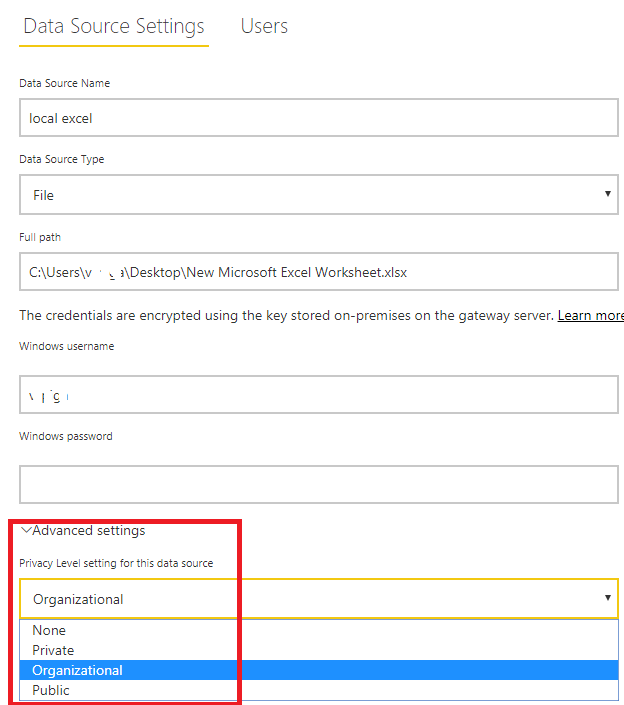
If I understand your sceanrio correctly that you don't know how to choose the option under Advanced setting.

add data source to gateway.png

For the options, here is an official document which describe it in details, you could have a good at it.

In addition, by my test, I could select Organizational option and apply it successfully.

Besides, please check if you have install the latest version of gateway (3000.2.52).

Best Regards,

Cherry


Community Support Team _ Cherry Gao
If this post helps, then please consider Accept it as the solution to help the other members find it more quickly.

View solution in original post

1 REPLY 1
v-piga-msft
Resident Rockstar
Resident Rockstar

Hi @Anonymous ,

If I understand your sceanrio correctly that you don't know how to choose the option under Advanced setting.

add data source to gateway.png

For the options, here is an official document which describe it in details, you could have a good at it.

In addition, by my test, I could select Organizational option and apply it successfully.

Besides, please check if you have install the latest version of gateway (3000.2.52).

Best Regards,

Cherry


Community Support Team _ Cherry Gao
If this post helps, then please consider Accept it as the solution to help the other members find it more quickly.

Helpful resources

Announcements
FabCon and SQLCon Barcelona 2026

FabCon & SQLCon – Barcelona 2026

Join us in Barcelona for FabCon and SQLCon, the Fabric, Power BI, SQL, and AI community event. Save €200 with code FABCMTY200.

Power BI DataViz World Championships carousel

Power BI DataViz World Championships - June 2026

A new Power BI DataViz World Championship is coming this June! Don't miss out on submitting your entry.