We've captured the moments from FabCon & SQLCon that everyone is talking about, and we are bringing them to the community, live and on-demand. Starts on April 14th. Register now
Hi All,
pls, help me to find the error and fix it. data I am getting from an excel file..excel file has value and blank row but no error in file.
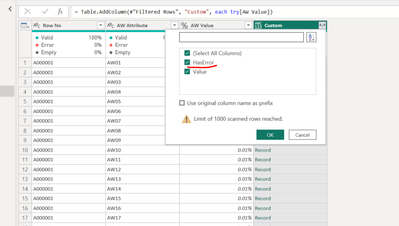
first, I added an error in the custom column..
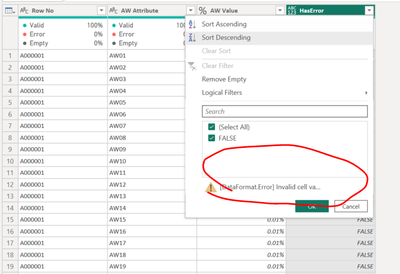
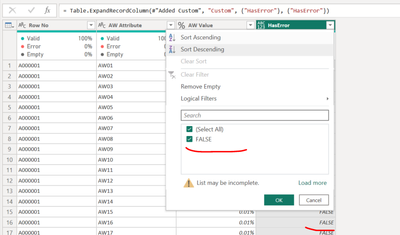
here it show me only false value..no error
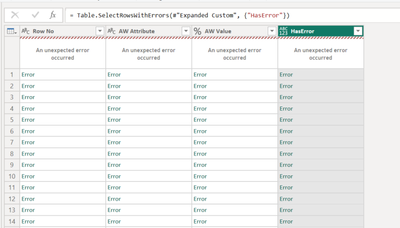
but when I clicked on kept error then getting error in all column.
it says something in data format. error invalid cell value "#ref. i am unable to fix it..pls tell me how to find what is the error and how to fix it..
this is the advance editor code.
let
Source = #"PBWBSEARLY03-AW",
#"Removed Columns" = Table.RemoveColumns(Source,{"DEL SEQ", "Company Document Number ", "Contractor Document Number ", "Document Title ", "Planned Progress", "Actual Progress", "Weighted Planned Progress", "Weighted Actual Progress", "Variance from Baseline"}),
#"Filtered Rows" = Table.SelectRows(#"Removed Columns", each true),
#"Added Custom" = Table.AddColumn(#"Filtered Rows", "Custom", each try[AW Value]),
#"Expanded Custom" = Table.ExpandRecordColumn(#"Added Custom", "Custom", {"HasError"}, {"HasError"})
in
#"Expanded Custom"
Solved! Go to Solution.
Hi @RAKESH1986
Based on below step, you can try filtering rows to remain rows that HasError <> false
= Table.SelectRows(#"Expanded Custom", each ([HasError] <> false))
See if this can filter the rows that have errors.
Best Regards,
Community Support Team _ Jing
If this post helps, please Accept it as Solution to help other members find it. Highly appreciate your Kudos!
Hi @RAKESH1986
Based on below step, you can try filtering rows to remain rows that HasError <> false
= Table.SelectRows(#"Expanded Custom", each ([HasError] <> false))
See if this can filter the rows that have errors.
Best Regards,
Community Support Team _ Jing
If this post helps, please Accept it as Solution to help other members find it. Highly appreciate your Kudos!
If you have recently started exploring Fabric, we'd love to hear how it's going. Your feedback can help with product improvements.
A new Power BI DataViz World Championship is coming this June! Don't miss out on submitting your entry.
Share feedback directly with Fabric product managers, participate in targeted research studies and influence the Fabric roadmap.
| User | Count |
|---|---|
| 5 | |
| 3 | |
| 3 | |
| 2 | |
| 2 |
| User | Count |
|---|---|
| 11 | |
| 10 | |
| 7 | |
| 6 | |
| 5 |