Get certified for free when you join Fabric Data Days 2026 and dive into Fabric, Power BI, SQL, AI, and other essential data skills.
Join nowData Days is here! Join us now for 60+ days of learning, challenges, and connection. Learn more
Hi All,
pls, help me to find the error and fix it. data I am getting from an excel file..excel file has value and blank row but no error in file.
first, I added an error in the custom column..
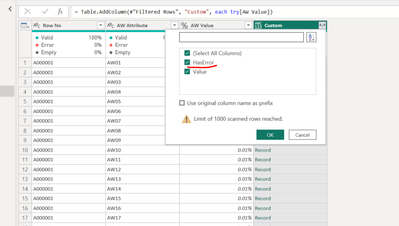
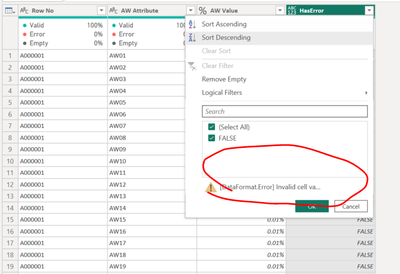
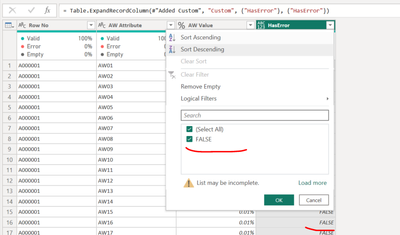
here it show me only false value..no error
but when I clicked on kept error then getting error in all column.
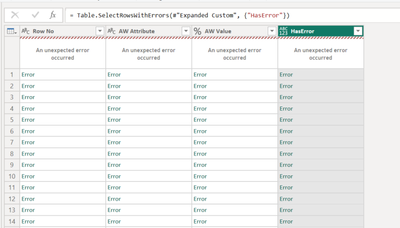
it says something in data format. error invalid cell value "#ref. i am unable to fix it..pls tell me how to find what is the error and how to fix it..
this is the advance editor code.
let
Source = #"PBWBSEARLY03-AW",
#"Removed Columns" = Table.RemoveColumns(Source,{"DEL SEQ", "Company Document Number ", "Contractor Document Number ", "Document Title ", "Planned Progress", "Actual Progress", "Weighted Planned Progress", "Weighted Actual Progress", "Variance from Baseline"}),
#"Filtered Rows" = Table.SelectRows(#"Removed Columns", each true),
#"Added Custom" = Table.AddColumn(#"Filtered Rows", "Custom", each try[AW Value]),
#"Expanded Custom" = Table.ExpandRecordColumn(#"Added Custom", "Custom", {"HasError"}, {"HasError"})
in
#"Expanded Custom"
Solved! Go to Solution.
Hi @RAKESH1986
Based on below step, you can try filtering rows to remain rows that HasError <> false
= Table.SelectRows(#"Expanded Custom", each ([HasError] <> false))
See if this can filter the rows that have errors.
Best Regards,
Community Support Team _ Jing
If this post helps, please Accept it as Solution to help other members find it. Highly appreciate your Kudos!
Hi @RAKESH1986
Based on below step, you can try filtering rows to remain rows that HasError <> false
= Table.SelectRows(#"Expanded Custom", each ([HasError] <> false))
See if this can filter the rows that have errors.
Best Regards,
Community Support Team _ Jing
If this post helps, please Accept it as Solution to help other members find it. Highly appreciate your Kudos!
Don't miss out on Data Days, June 15 through August 7. Learn Fabric, Power BI, SQL, AI and more.
Check out the May 2026 Power BI update to learn about new features.
| User | Count |
|---|---|
| 4 | |
| 4 | |
| 3 | |
| 2 | |
| 1 |
| User | Count |
|---|---|
| 11 | |
| 11 | |
| 5 | |
| 4 | |
| 3 |