
Don't miss your chance to take the Fabric Data Engineer (DP-600) exam for FREE! Find out how by watching the DP-600 session on-demand now through April 28th.
Learn moreJoin the FabCon + SQLCon recap series. Up next: Power BI, Real-Time Intelligence, IQ and AI, and Data Factory take center stage. All sessions are available on-demand after the live show. Register now
Hi guys
I have a custom column as shown below in power query
But when I close and apply
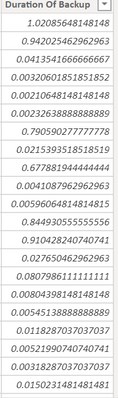
It changes to the below on the Data tab of my report
How do I correct this behavior..
Thanks
Solved! Go to Solution.
Hi, @Anonymous
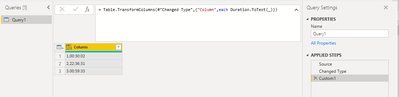
You may add a new step as below in Power Query to convert 'Duration' data type to 'Text' before applying changes to Power BI Desktop. The pbix file is attached in the end.
= Table.TransformColumns(#"Changed Type",{"Column",each Duration.ToText(_)})
Result:
Best Regards
Allan
If this post helps,then consider Accepting it as the solution to help other members find it faster.
Hi, @Anonymous
You may add a new step as below in Power Query to convert 'Duration' data type to 'Text' before applying changes to Power BI Desktop. The pbix file is attached in the end.
= Table.TransformColumns(#"Changed Type",{"Column",each Duration.ToText(_)})
Result:
Best Regards
Allan
If this post helps,then consider Accepting it as the solution to help other members find it faster.
@Anonymous
You're welcome.
If I answered your question please mark my post as the solution.
If my answer helped solve your problem, give it a kudos by clicking on the Thumbs Up.
Proud to be a Super User!
Hi @Anonymous
Power Pivot doesn't have a Duration data type,so it converts your durations in PQ to decimal numbers where 1.0 represents 1 day.
Phil
Proud to be a Super User!
Check out the April 2026 Power BI update to learn about new features.
If you have recently started exploring Fabric, we'd love to hear how it's going. Your feedback can help with product improvements.
A new Power BI DataViz World Championship is coming this June! Don't miss out on submitting your entry.
| User | Count |
|---|---|
| 8 | |
| 6 | |
| 5 | |
| 5 | |
| 4 |