
Don't miss your chance to take the Fabric Data Engineer (DP-600) exam for FREE! Find out how by attending the DP-600 session on April 23rd (pacific time), live or on-demand.
Learn moreNext up in the FabCon + SQLCon recap series: The roadmap for Microsoft SQL and Maximizing Developer experiences in Fabric. All sessions are available on-demand after the live show. Register now
Hi guys
I have a custom column as shown below in power query
But when I close and apply
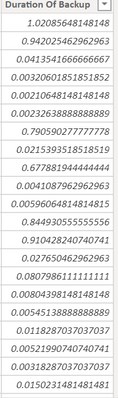
It changes to the below on the Data tab of my report
How do I correct this behavior..
Thanks
Solved! Go to Solution.
Hi, @Anonymous
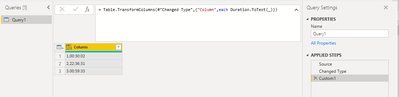
You may add a new step as below in Power Query to convert 'Duration' data type to 'Text' before applying changes to Power BI Desktop. The pbix file is attached in the end.
= Table.TransformColumns(#"Changed Type",{"Column",each Duration.ToText(_)})
Result:
Best Regards
Allan
If this post helps,then consider Accepting it as the solution to help other members find it faster.
Hi, @Anonymous
You may add a new step as below in Power Query to convert 'Duration' data type to 'Text' before applying changes to Power BI Desktop. The pbix file is attached in the end.
= Table.TransformColumns(#"Changed Type",{"Column",each Duration.ToText(_)})
Result:
Best Regards
Allan
If this post helps,then consider Accepting it as the solution to help other members find it faster.
@Anonymous
You're welcome.
If I answered your question please mark my post as the solution.
If my answer helped solve your problem, give it a kudos by clicking on the Thumbs Up.
Proud to be a Super User!
Hi @Anonymous
Power Pivot doesn't have a Duration data type,so it converts your durations in PQ to decimal numbers where 1.0 represents 1 day.
Phil
Proud to be a Super User!
If you have recently started exploring Fabric, we'd love to hear how it's going. Your feedback can help with product improvements.
A new Power BI DataViz World Championship is coming this June! Don't miss out on submitting your entry.
Experience the highlights from FabCon & SQLCon, available live and on-demand starting April 14th.
| User | Count |
|---|---|
| 5 | |
| 3 | |
| 3 | |
| 3 | |
| 2 |
| User | Count |
|---|---|
| 7 | |
| 5 | |
| 5 | |
| 5 | |
| 4 |