
Join us at FabCon Atlanta from March 16 - 20, 2026, for the ultimate Fabric, Power BI, AI and SQL community-led event. Save $200 with code FABCOMM.
Register now!Vote for your favorite vizzies from the Power BI Dataviz World Championship submissions. Vote now!
Hi guys
I have a custom column as shown below in power query
But when I close and apply
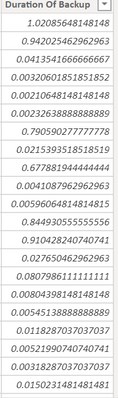
It changes to the below on the Data tab of my report
How do I correct this behavior..
Thanks
Solved! Go to Solution.
Hi, @Anonymous
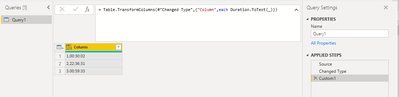
You may add a new step as below in Power Query to convert 'Duration' data type to 'Text' before applying changes to Power BI Desktop. The pbix file is attached in the end.
= Table.TransformColumns(#"Changed Type",{"Column",each Duration.ToText(_)})
Result:
Best Regards
Allan
If this post helps,then consider Accepting it as the solution to help other members find it faster.
Hi, @Anonymous
You may add a new step as below in Power Query to convert 'Duration' data type to 'Text' before applying changes to Power BI Desktop. The pbix file is attached in the end.
= Table.TransformColumns(#"Changed Type",{"Column",each Duration.ToText(_)})
Result:
Best Regards
Allan
If this post helps,then consider Accepting it as the solution to help other members find it faster.
@Anonymous
You're welcome.
If I answered your question please mark my post as the solution.
If my answer helped solve your problem, give it a kudos by clicking on the Thumbs Up.
Proud to be a Super User!
Hi @Anonymous
Power Pivot doesn't have a Duration data type,so it converts your durations in PQ to decimal numbers where 1.0 represents 1 day.
Phil
Proud to be a Super User!
Vote for your favorite vizzies from the Power BI World Championship submissions!
If you love stickers, then you will definitely want to check out our Community Sticker Challenge!
Check out the January 2026 Power BI update to learn about new features.
| User | Count |
|---|---|
| 12 | |
| 11 | |
| 7 | |
| 7 | |
| 6 |