Join us at FabCon Atlanta from March 16 - 20, 2026, for the ultimate Fabric, Power BI, AI and SQL community-led event. Save $200 with code FABCOMM.
Register now!The Power BI Data Visualization World Championships is back! Get ahead of the game and start preparing now! Learn more
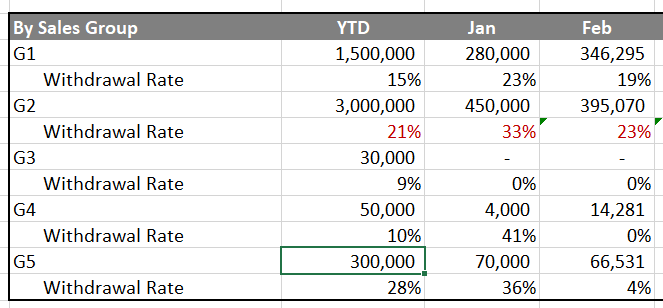
Hi, I am trying to convert this excel table calculation into PowerBI but I cant seem to be able to modify the tables extensively and create the desired output of my table. Somehow powerBI can only have 1 column and 1 row variable. Is it possible for me to have multiple variables?
For example here is a mock table :
Withdrawal rate = withdrawal numbers(notshown) / total number(Right above it)
Solved! Go to Solution.
Hi @jit
Assume you have data as below
| group | name | value | date | withdrawal numbers |
| G1 | withdrawal rate | 100 | 1/1/2019 | 40 |
| G2 | withdrawal rate | 200 | 1/1/2019 | 50 |
| G3 | withdrawal rate | 1/1/2019 | 10 | |
| G4 | withdrawal rate | 300 | 1/1/2019 | 50 |
| G5 | withdrawal rate | 400 | 1/1/2019 | 80 |
| G1 | withdrawal rate | 200 | 2/1/2019 | 60 |
| G2 | withdrawal rate | 300 | 2/1/2019 | 50 |
| G3 | withdrawal rate | 400 | 2/1/2019 | 40 |
| G4 | withdrawal rate | 500 | 2/1/2019 | 60 |
| G5 | withdrawal rate | 100 | 2/1/2019 | 30 |
Please create measures
YTD =
VAR ytd_value =
CALCULATE (
SUM ( Sheet3[value] ),
FILTER ( ALLSELECTED ( Sheet3 ), Sheet3[group] = MAX ( Sheet3[group] ) )
)
VAR next_level =
FORMAT ( MAX ( Sheet3[withdrawal numbers] ) / ytd_value, "0.00%" )
RETURN
IF (
ISINSCOPE ( Sheet3[name] ),
IF ( ytd_value = BLANK (), "0%", next_level ),
ytd_value
)
Jan =
VAR jan_value =
CALCULATE (
SUM ( Sheet3[value] ),
FILTER (
ALLSELECTED ( Sheet3 ),
Sheet3[group] = MAX ( Sheet3[group] )
&& MONTH ( Sheet3[date] ) = 1
)
)
VAR next_level_jan =
FORMAT ( MAX ( Sheet3[withdrawal numbers] ) / jan_value, "0.00%" )
RETURN
IF (
ISINSCOPE ( Sheet3[name] ),
IF ( jan_value = BLANK (), "0%", next_level_jan ),
jan_value
)
Feb =
VAR feb_value =
CALCULATE (
SUM ( Sheet3[value] ),
FILTER (
ALLSELECTED ( Sheet3 ),
Sheet3[group] = MAX ( Sheet3[group] )
&& MONTH ( Sheet3[date] ) = 2
)
)
VAR next_level_feb =
FORMAT ( MAX ( Sheet3[withdrawal numbers] ) / feb_value, "0.00%" )
RETURN
IF (
ISINSCOPE ( Sheet3[name] ),
IF ( feb_value = BLANK (), "0%", next_level_feb ),
feb_value
)
Add them in a matrix visual
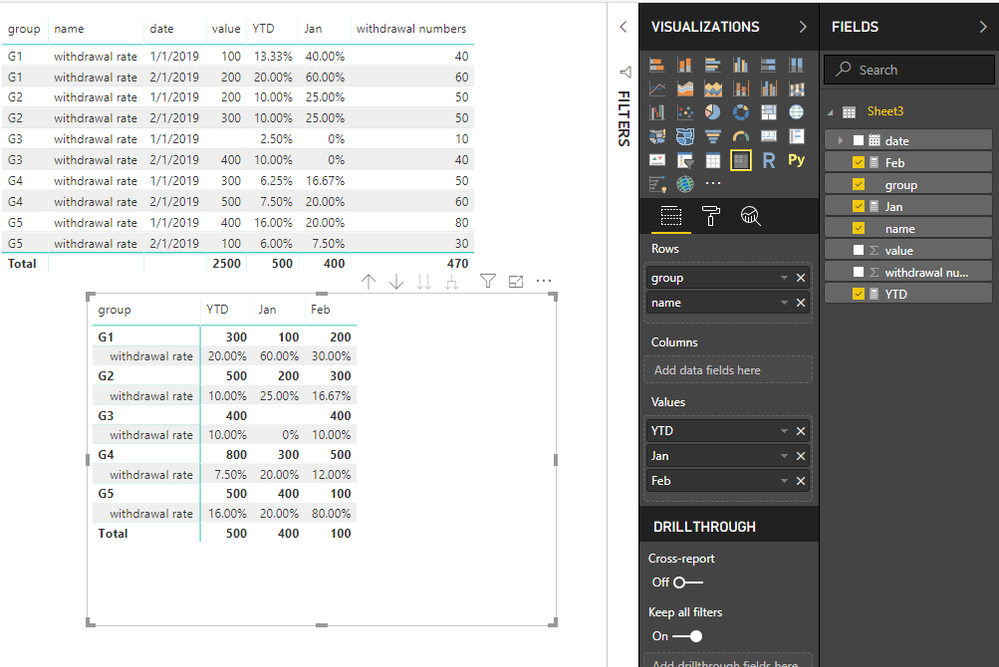
Best Regards
Maggie
Community Support Team _ Maggie Li
If this post helps, then please consider Accept it as the solution to help the other members find it more quickly.
Hi @jit
Assume you have data as below
| group | name | value | date | withdrawal numbers |
| G1 | withdrawal rate | 100 | 1/1/2019 | 40 |
| G2 | withdrawal rate | 200 | 1/1/2019 | 50 |
| G3 | withdrawal rate | 1/1/2019 | 10 | |
| G4 | withdrawal rate | 300 | 1/1/2019 | 50 |
| G5 | withdrawal rate | 400 | 1/1/2019 | 80 |
| G1 | withdrawal rate | 200 | 2/1/2019 | 60 |
| G2 | withdrawal rate | 300 | 2/1/2019 | 50 |
| G3 | withdrawal rate | 400 | 2/1/2019 | 40 |
| G4 | withdrawal rate | 500 | 2/1/2019 | 60 |
| G5 | withdrawal rate | 100 | 2/1/2019 | 30 |
Please create measures
YTD =
VAR ytd_value =
CALCULATE (
SUM ( Sheet3[value] ),
FILTER ( ALLSELECTED ( Sheet3 ), Sheet3[group] = MAX ( Sheet3[group] ) )
)
VAR next_level =
FORMAT ( MAX ( Sheet3[withdrawal numbers] ) / ytd_value, "0.00%" )
RETURN
IF (
ISINSCOPE ( Sheet3[name] ),
IF ( ytd_value = BLANK (), "0%", next_level ),
ytd_value
)
Jan =
VAR jan_value =
CALCULATE (
SUM ( Sheet3[value] ),
FILTER (
ALLSELECTED ( Sheet3 ),
Sheet3[group] = MAX ( Sheet3[group] )
&& MONTH ( Sheet3[date] ) = 1
)
)
VAR next_level_jan =
FORMAT ( MAX ( Sheet3[withdrawal numbers] ) / jan_value, "0.00%" )
RETURN
IF (
ISINSCOPE ( Sheet3[name] ),
IF ( jan_value = BLANK (), "0%", next_level_jan ),
jan_value
)
Feb =
VAR feb_value =
CALCULATE (
SUM ( Sheet3[value] ),
FILTER (
ALLSELECTED ( Sheet3 ),
Sheet3[group] = MAX ( Sheet3[group] )
&& MONTH ( Sheet3[date] ) = 2
)
)
VAR next_level_feb =
FORMAT ( MAX ( Sheet3[withdrawal numbers] ) / feb_value, "0.00%" )
RETURN
IF (
ISINSCOPE ( Sheet3[name] ),
IF ( feb_value = BLANK (), "0%", next_level_feb ),
feb_value
)
Add them in a matrix visual
Best Regards
Maggie
Community Support Team _ Maggie Li
If this post helps, then please consider Accept it as the solution to help the other members find it more quickly.
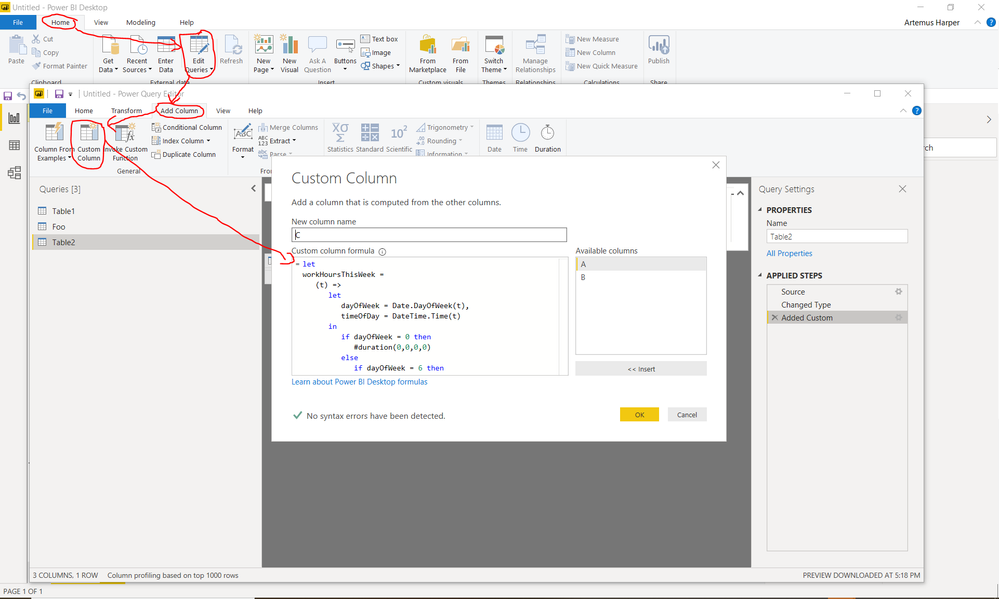
You can reference a query (Right click and choose reference, or under Manage button). After creating a couple of references, you can use remove alternating rows in one, and replace "Withdrawl Rate" with null -> fill down -> remove the other alternating rows in the other query, and finally merge them together
Hey @artemus thanks for the quick response. I can't quite follow what you are saying... Is it possible for you to show some screenshots/examples? Thanks so much!
Check out the November 2025 Power BI update to learn about new features.
Advance your Data & AI career with 50 days of live learning, contests, hands-on challenges, study groups & certifications and more!
| User | Count |
|---|---|
| 10 | |
| 6 | |
| 5 | |
| 5 | |
| 3 |