This time we’re going bigger than ever. Fabric, Power BI, SQL, AI and more. We're covering it all. You won't want to miss it.
Learn moreGet Fabric Certified for FREE during AI Skills Fest. This week only. Secure your voucher now.
Hi. I created several Calcultaed measure on different Table query. Now, I need to create a summary table which will provide me different numbers per cell as below. Each cell in Yield and Cost column have different Calculated Measure from different query. How should I set it up?
I am still new in PowerBI, I only know the drag and drop form of tables.
Appreciate help on this. Thanks!
| Stage | Yield | Cost |
| Fab | FYield | Fcost |
| Probe | Pyield | Pcost |
| Assy | Ayield | Acost |
| Test | Tyield | Tcost |
Hi @kaye123
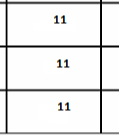
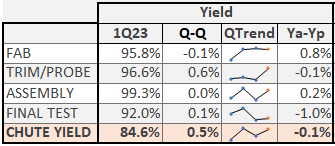
you can use cards for it and set them in a tabular form.
every card has shown different measure values and fixed them as a table.
Like.
Thanks for this. I have tried this. I am planning to setup multiple columns (around 30columns), replicating what i did in excel macro. Cards will might be crowded with this setup. Are there any options?
Hi @kaye123
I had the same requirement and I handled that by using the card, but if you don't want to use the card try matrix visual.
Note: Power BI might be different from excel, what did you do in excel sometimes it can't be implemented in Power bi.
That's why I prefer cards for this requirement and clients accept that.
Check out the May 2026 Power BI update to learn about new features.
Sign up to receive a private message when registration opens and key events begin.
If you have recently started exploring Fabric, we'd love to hear how it's going. Your feedback can help with product improvements.
| User | Count |
|---|---|
| 3 | |
| 3 | |
| 2 | |
| 1 | |
| 1 |