Don't miss your chance to take the Fabric Data Engineer (DP-600) exam for FREE! Find out how by attending the DP-600 session on April 23rd (pacific time), live or on-demand.
Learn moreNext up in the FabCon + SQLCon recap series: The roadmap for Microsoft SQL and Maximizing Developer experiences in Fabric. All sessions are available on-demand after the live show. Register now
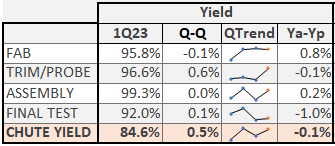
Hi. I created several Calcultaed measure on different Table query. Now, I need to create a summary table which will provide me different numbers per cell as below. Each cell in Yield and Cost column have different Calculated Measure from different query. How should I set it up?
I am still new in PowerBI, I only know the drag and drop form of tables.
Appreciate help on this. Thanks!
| Stage | Yield | Cost |
| Fab | FYield | Fcost |
| Probe | Pyield | Pcost |
| Assy | Ayield | Acost |
| Test | Tyield | Tcost |
Hi @kaye123
you can use cards for it and set them in a tabular form.
every card has shown different measure values and fixed them as a table.
Like.
Thanks for this. I have tried this. I am planning to setup multiple columns (around 30columns), replicating what i did in excel macro. Cards will might be crowded with this setup. Are there any options?
Hi @kaye123
I had the same requirement and I handled that by using the card, but if you don't want to use the card try matrix visual.
Note: Power BI might be different from excel, what did you do in excel sometimes it can't be implemented in Power bi.
That's why I prefer cards for this requirement and clients accept that.
If you have recently started exploring Fabric, we'd love to hear how it's going. Your feedback can help with product improvements.
A new Power BI DataViz World Championship is coming this June! Don't miss out on submitting your entry.
Experience the highlights from FabCon & SQLCon, available live and on-demand starting April 14th.
| User | Count |
|---|---|
| 5 | |
| 3 | |
| 3 | |
| 3 | |
| 2 |
| User | Count |
|---|---|
| 7 | |
| 5 | |
| 5 | |
| 5 | |
| 4 |