cancel
Showing results for 
Search instead for 
Did you mean: 

The Fabric community is now in read-only for platform upgrade. Learn more

Reply
DanielaFerreira
Regular Visitor

Create sequence based on another power query column

Hi guys, 

Could you help me with difficulty bellow?

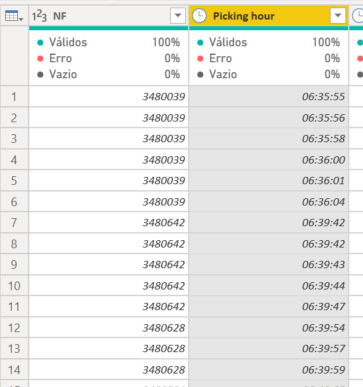
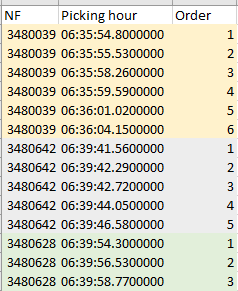
I need creat a sequencebeging from 1 acording with the colum "Picking hour", but when the colum NF change I need to restart the sequence from 1 again. 


DanielaFerreira_0-1652726769038.png

Bellow one exemple that I need


DanielaFerreira_1-1652726906975.png


Thanks a lot

1 ACCEPTED SOLUTION
AlexisOlson
Super User
Super User

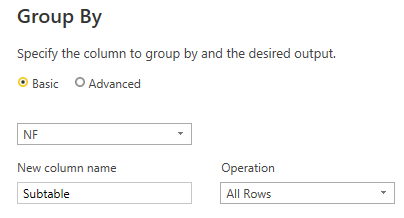
You can do this by grouping on [NF] keeping All Rows
AlexisOlson_0-1652728498930.png

And then edit the code generated to add an index column to each group.


Full M query example you can paste into the Advanced Editor after creating a new Blank Query:

let
    Source = Table.FromRows(Json.Document(Binary.Decompress(Binary.FromText("i45WclTSUTI1VYrVgTLNEEwLMNMJyDQwRDBNwExnINPECME0RjCRFJgrxcYCAA==", BinaryEncoding.Base64), Compression.Deflate)), let _t = ((type nullable text) meta [Serialized.Text = true]) in type table [NF = _t, #"Picking hour" = _t]),
    #"Grouped Rows" = Table.Group(Source, {"NF"}, {{"Subtable", each Table.AddIndexColumn(_, "Order", 1, 1), type table}}),
    #"Expanded Count" = Table.ExpandTableColumn(#"Grouped Rows", "Subtable", {"Picking hour", "Order"}, {"Picking hour", "Order"})
in
    #"Expanded Count"

View solution in original post

2 REPLIES 2
AlexisOlson
Super User
Super User

You can do this by grouping on [NF] keeping All Rows

AlexisOlson_0-1652728498930.png

And then edit the code generated to add an index column to each group.


Full M query example you can paste into the Advanced Editor after creating a new Blank Query:

let
    Source = Table.FromRows(Json.Document(Binary.Decompress(Binary.FromText("i45WclTSUTI1VYrVgTLNEEwLMNMJyDQwRDBNwExnINPECME0RjCRFJgrxcYCAA==", BinaryEncoding.Base64), Compression.Deflate)), let _t = ((type nullable text) meta [Serialized.Text = true]) in type table [NF = _t, #"Picking hour" = _t]),
    #"Grouped Rows" = Table.Group(Source, {"NF"}, {{"Subtable", each Table.AddIndexColumn(_, "Order", 1, 1), type table}}),
    #"Expanded Count" = Table.ExpandTableColumn(#"Grouped Rows", "Subtable", {"Picking hour", "Order"}, {"Picking hour", "Order"})
in
    #"Expanded Count"
It worked Alexis!!

Thanks so much!!

Helpful resources

Announcements
FabCon and SQLCon Barcelona 2026

FabCon & SQLCon – Barcelona 2026

Join us in Barcelona for FabCon and SQLCon, the Fabric, Power BI, SQL, and AI community event. Save €200 with code FABCMTY200.

Power BI DataViz World Championships carousel

Power BI DataViz World Championships - June 2026

A new Power BI DataViz World Championship is coming this June! Don't miss out on submitting your entry.

Top Kudoed Authors