This is best Fabric, Power BI, SQL and AI community event. How do we know? The last event sold out! Save €200 with code FABCMTY200.
Register nowJuly 28 - August 9 | Final Round of the Power BI Dataviz World Championships. This is your chance. Learn more
Hi guys,
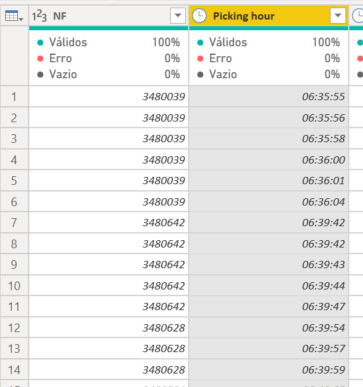
Could you help me with difficulty bellow?
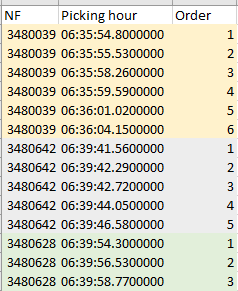
I need creat a sequencebeging from 1 acording with the colum "Picking hour", but when the colum NF change I need to restart the sequence from 1 again.
Bellow one exemple that I need
Thanks a lot
Solved! Go to Solution.
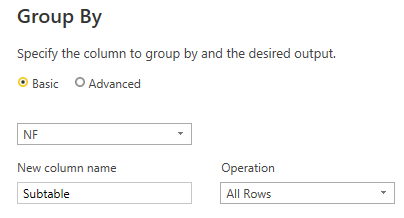
You can do this by grouping on [NF] keeping All Rows
And then edit the code generated to add an index column to each group.
Full M query example you can paste into the Advanced Editor after creating a new Blank Query:
let
Source = Table.FromRows(Json.Document(Binary.Decompress(Binary.FromText("i45WclTSUTI1VYrVgTLNEEwLMNMJyDQwRDBNwExnINPECME0RjCRFJgrxcYCAA==", BinaryEncoding.Base64), Compression.Deflate)), let _t = ((type nullable text) meta [Serialized.Text = true]) in type table [NF = _t, #"Picking hour" = _t]),
#"Grouped Rows" = Table.Group(Source, {"NF"}, {{"Subtable", each Table.AddIndexColumn(_, "Order", 1, 1), type table}}),
#"Expanded Count" = Table.ExpandTableColumn(#"Grouped Rows", "Subtable", {"Picking hour", "Order"}, {"Picking hour", "Order"})
in
#"Expanded Count"
You can do this by grouping on [NF] keeping All Rows
And then edit the code generated to add an index column to each group.
Full M query example you can paste into the Advanced Editor after creating a new Blank Query:
let
Source = Table.FromRows(Json.Document(Binary.Decompress(Binary.FromText("i45WclTSUTI1VYrVgTLNEEwLMNMJyDQwRDBNwExnINPECME0RjCRFJgrxcYCAA==", BinaryEncoding.Base64), Compression.Deflate)), let _t = ((type nullable text) meta [Serialized.Text = true]) in type table [NF = _t, #"Picking hour" = _t]),
#"Grouped Rows" = Table.Group(Source, {"NF"}, {{"Subtable", each Table.AddIndexColumn(_, "Order", 1, 1), type table}}),
#"Expanded Count" = Table.ExpandTableColumn(#"Grouped Rows", "Subtable", {"Picking hour", "Order"}, {"Picking hour", "Order"})
in
#"Expanded Count"
It worked Alexis!!
Thanks so much!!
Join us in Barcelona for FabCon and SQLCon, the Fabric, Power BI, SQL, and AI community event. Save €200 with code FABCMTY200.
If you love stickers, then you will definitely want to check out our community sticker challenge, Barcelona edition!
Check out the July 2026 Power BI update to learn about new features.